TYPE-C 6PIN Selection Guide for Engineers
TYPE-C 6PIN selection and application notes for engineers and buyers. Key specs, design considerations, and how to source via RFQ on IC-Online.
TYPE-C 6PIN Selection Guide for Engineers: Power, Cost, and Pinout Trade-offs
Why the 6-Pin USB-C Connector is Gaining Traction in Power-Only Designs
Consumer electronics, industrial IoT endpoints, and charging accessories have pushed the USB Type‑C connector into domains where high‑speed SuperSpeed data lanes are unnecessary. A wall charger, a simple sensor hub, or a battery‑operated gadget often needs only 5 V power and perhaps USB 2.0 enumeration—nothing more. Populating a full 24‑pin USB‑C receptacle in these contexts adds bill‑of‑materials (BOM) cost, consumes PCB real estate, and forces a more complex routing topology that can easily double the layer count of a simple board. The LCSC engineering blog captures the trend succinctly: the 6‑pin variant is a strategic choice for cost‑sensitive IoT devices and charging‑focused products. By eliminating the SuperSpeed TX/RX pairs, the Sideband Use (SBU) lines, and the second row of power/ground contacts, a TYPE-C 6PIN connector keeps only the essential signals—VBUS, GND, CC1/CC2, and optionally D+/D−—while preserving the familiar reversible mechanical interface that users expect.
The Vista Electronics pinout reference (Vista Electronics) illustrates exactly which signals are retained in a 6‑pin configuration. For a pure charging dock or a 5 V power sink, all that is required is a pair of power rails and a configuration channel to negotiate the default power role. The result is a connector that costs a fraction of a full‑featured USB‑C port, routs comfortably on two‑layer boards, and still meets the mechanical specification of the USB Type‑C standard. As the design community continues to shed unnecessary complexity, the TYPE-C 6PIN connector is becoming the default answer for power‑only and basic USB 2.0 applications. However, engineers and procurement professionals must understand the trade‑offs—pinout, current rating, and second‑source availability—before committing to a specific part number.
What’s Inside a 6-Pin USB-C: Signal Mapping and Functional Groups
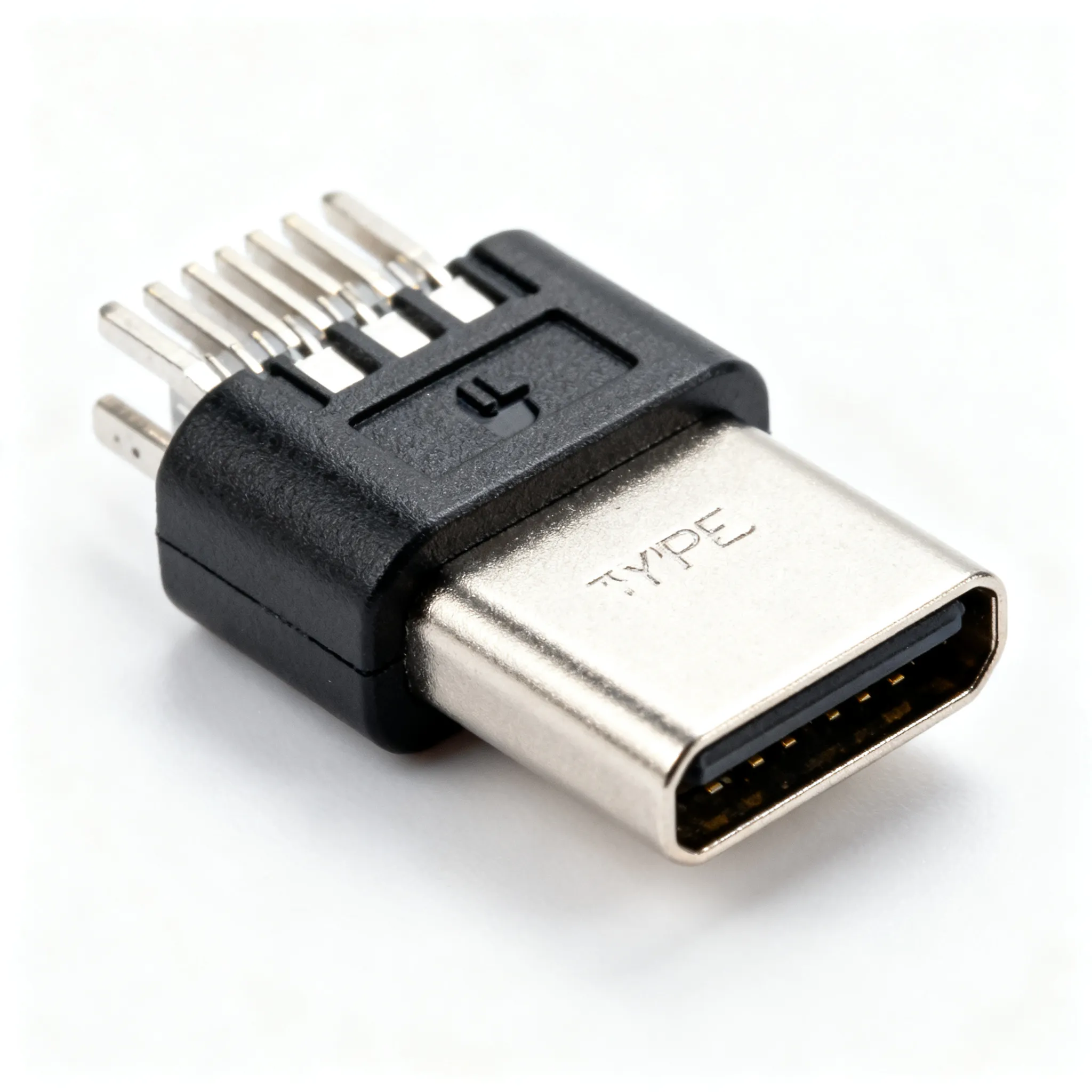
A full 24‑pin USB‑C connector can be broken into five functional groups—power, USB 2.0 data, SuperSpeed data, configuration channel, and sideband—as described in the “Group‑First” approach from Metabee. A TYPE-C 6PIN implementation collapses this to just two or three groups: power delivery, configuration, and optionally USB 2.0 data. The SHOU HAN TYPE‑C 6P connector, available as LCSC C7507406, is a typical example. Its datasheet confirms that it carries VBUS, GND, CC1, CC2, D+, and D−, mapping the six positions to the essential functions of a USB 2.0‑capable USB‑C port.
Table 1 — Typical 6‑Pin USB‑C Signal Mapping (based on SHOU HAN TYPE‑C 6P)
| Pin Name | Function | Notes |
|---|---|---|
| VBUS | Power rail (typically 5 V) | Carries the main supply current; must be routed with wide traces to handle the connector’s rated current. |
| GND | Power return path | Paired with VBUS; low‑impedance return is critical for thermal performance and voltage drop. |
| CC1 | Configuration Channel 1 | Used for plug orientation detection, power role advertisement, and USB PD negotiation (if supported by the system). |
| CC2 | Configuration Channel 2 | Mirrors CC1; together they allow full flippability. A pulldown resistor (5.1 kΩ standard) on both CC pins signals a sink device. |
| D+ | USB 2.0 differential data + | Optional in some 6‑pin variants; if present, enables USB 2.0 enumeration up to 480 Mbps. Route as a differential pair with controlled impedance. |
| D− | USB 2.0 differential data − | Complements D+; absent in pure power‑only connectors. |
What is conspicuously absent from a TYPE-C 6PIN footprint are the SuperSpeed transmit and receive pairs (TX1±, RX1±, TX2±, RX2±) and the SBU1/SBU2 lines. Removing these high‑speed signals eliminates the need for tight differential routing, impedance control for 5 Gbps or 10 Gbps traces, and the associated via stitching that a full USB‑C layout demands. The second row of VBUS and GND pins—present in the 24‑pin connector for higher current capability—is also omitted. This means the entire current delivery must be handled by a single VBUS and GND pair, making the connector’s current rating and the PCB’s copper weight primary design constraints. The orientation of the plug is still detected through CC1/CC2, so the physical reversibility of the receptacle is fully preserved.
Engineers should verify the exact pinout of any TYPE-C 6PIN candidate against its datasheet. Some manufacturers offer power‑only variants that omit D+/D− entirely, trading USB 2.0 data for an even smaller footprint or a lower per‑unit cost. The functional grouping concept from Metabee encourages a “populate only what you need” mindset, and the 6‑pin connector is its most extreme mainstream realization.
6-Pin vs 16-Pin vs 24-Pin USB-C: When Less Is More
The choice between a 6‑pin, 16‑pin, and 24‑pin USB‑C connector is not a simple matter of “fewer pins, lower cost.” It is a system‑level decision that weighs data throughput requirements, maximum power delivery current, PCB complexity, and the need for alternate modes such as DisplayPort. The full pinout diagrams provided by Vista Electronics make the trade‑offs visible: a 24‑pin connector activates all SuperSpeed lanes, dual‑row power, and sideband signals; a 16‑pin variant typically retains one set of SuperSpeed pairs and a single row of power; a 6‑pin connector strips everything back to the bare essentials.
For a power‑only charger or a simple USB 2.0 peripheral, the TYPE-C 6PIN option is often the optimal balance of capability and cost. The SHOU HAN TYPE‑C 6P (LCSC C7507406) illustrates the extreme price advantage: at $0.0283 per unit, it is an order of magnitude less expensive than many full‑featured 24‑pin connectors, while still meeting the mechanical USB‑C specification. The following comparison table distills the key parameters that inform the pin‑count decision.
Table 2 — Pin‑Count Variant Comparison: 6‑Pin, 16‑Pin, and 24‑Pin USB‑C Connectors
| Comparison Metric | 6‑Pin (TYPE-C 6PIN Example) | 16‑Pin (Typical Mid‑Range) | 24‑Pin (Full‑Feature) | Selection Criteria & Failure Boundary |
|---|---|---|---|---|
| Supported Data Rate | USB 2.0 (480 Mbps) or power‑only | USB 3.2 Gen 1 (5 Gbps) or Gen 2 (10 Gbps) with one lane | USB 3.2 Gen 2x2 (20 Gbps) and USB4 possible | Use 6‑pin if the product never needs USB 3.x data; else step up to 16‑pin or 24‑pin. |
| Maximum Practical Power Delivery | 3 A–5 A (depends on connector rating and PCB design) | Typically 5 A (dual‑row power pins) | 5 A (dual‑row, low‑resistance power path) | Derate 6‑pin connectors for continuous high‑current operation; verify datasheet rating. |
| PCB Routing Complexity | Low: 2‑layer board, relaxed impedance control | Medium: requires controlled impedance for SuperSpeed pairs | High: multiple differential pairs, 4‑layer board typically needed | 6‑pin is ideal for cost‑sensitive, low‑layer‑count designs. |
| Relative Unit Cost | Very low (e.g., $0.0283 for SHOU HAN TYPE‑C 6P) | Low to moderate | Moderate to high | BOM cost reduction is significant in volume; evaluate total cost of ownership. |
| Alternate Mode Support (DisplayPort, Thunderbolt) | No | Possible with properly wired SBU/sideband | Yes, full sideband support | 6‑pin cannot support alternate modes; choose 24‑pin if video output is required. |
| Flippability | Full (CC1 and CC2 present) | Full | Full | 6‑pin retains mechanical reversibility as long as both CC pins are populated. |
The ultra‑low price of the SHOU HAN TYPE-C 6PIN part is not an anomaly; it reflects the minimal contact count and simplified manufacturing. However, a connector’s cost is not the only economic factor. Because a 6‑pin layout can often be routed on a standard two‑layer FR‑4 board with no buried vias or exotic dielectric materials, the total PCB fabrication cost drops as well. For a product that ships in the millions—a smart plug, a disposable medical sensor, a USB‑powered LED light—the cumulative savings quickly justify the selection of a 6‑pin connector, provided the feature set is sufficient.
Design and Procurement Pitfalls When Choosing a 6-Pin USB-C Connector
Selecting a TYPE-C 6PIN connector is straightforward, but both engineering and procurement teams can stumble over a handful of predictable issues. The following checklist addresses the most common failure modes and offers actionable guidance for avoiding them.
Table 3 — Common Pitfalls and Mitigation Strategies for 6‑Pin USB‑C Connectors
| Pitfall | Design Impact | Procurement Impact | Recommended Action |
|---|---|---|---|
| Assuming all 6‑pin connectors include D+/D− | USB enumeration fails if the data pair is missing. | May need to re‑source a different variant mid‑production. | Verify the exact pinout in the manufacturer’s drawing; do not rely on the marketing “6‑pin” label alone. |
| Inadequate VBUS/GND copper width | Excessive voltage drop or thermal runaway under continuous load. | Returns and field failures increase warranty costs. | Calculate trace width for the connector’s rated current with a 20 % derating factor; use a PCB trace width calculator. |
| Missing or incorrect CC pulldown resistors | Host (source) cannot detect the sink, and no power is delivered. | Production line stoppage until rework is completed. | Place 5.1 kΩ ±20 % pulldown resistors on both CC1 and CC2 as close to the connector as possible. |
| Single CC pin implementation without orientation circuitry | Plug works only in one orientation, frustrating end users. | Increased customer support tickets and returns. | If the connector has only one CC pin, add external logic to handle orientation or accept the limitation; preferably choose a dual‑CC part. |
| Ignoring connector insertion cycle rating | Connector wears out prematurely in frequently mated products. | Field reliability issues and brand damage. | Check the datasheet for rated insertion cycles; for consumer devices, aim for ≥10 000 cycles. |
| Single‑source procurement without a drop‑in alternative | Any supply disruption halts production. | Risk of line down and expensive spot buys. | Identify a second‑source TYPE-C 6PIN connector with a compatible footprint and pinout; verify mechanical and electrical equivalence through sample testing. |
On the engineering side, the most critical step is to treat the TYPE-C 6PIN connector as a power component, not just a signal connector. The single VBUS/GND pair must carry the full load current. If the system is designed for 3 A continuous, the trace width, copper weight, and via count should be sized to keep the temperature rise within acceptable limits. A common mistake is to route VBUS through a thin trace that would be adequate for a 0.5 A signal but melts under 3 A. The SHOU HAN TYPE‑C 6P datasheet (LCSC) provides the rated current; always refer to that specification and derate by at least 20 % for real‑world thermal conditions. If D+/D− are present, they must be routed as a differential pair with a nominal 90 Ω characteristic impedance, but the tolerance is far more forgiving than for USB 3.x lanes, and a two‑layer stackup is usually sufficient.
Procurement professionals should treat the TYPE-C 6PIN connector as an allocation‑sensitive commodity. While the part is widely available from distributors like LCSC, relying on a single manufacturer without a verified second source creates a single‑point‑of‑failure in the supply chain. The SHOU HAN TYPE‑C 6P is an excellent primary choice, but buyers should evaluate alternative parts from the same connector family or from a competitor that offers a footprint‑compatible alternative. Always request a sample and test for mechanical mating, electrical continuity, and soldering process compatibility before qualifying a second source. Confirm current availability and allocation‑backed lead time via RFQ; do not assume that high stock levels at one distributor will persist indefinitely.
The functional grouping mindset from Metabee is a powerful design discipline: if a signal group is not needed, its pins should not be populated. The TYPE-C 6PIN connector is the physical embodiment of that principle. Engineers who rigorously verify which groups are essential for their product will rarely find themselves over‑specifying a connector.
6-Pin USB-C Connector FAQs: What Engineers and Buyers Need to Know
Q: Can a 6‑pin USB‑C connector support USB Power Delivery (PD) negotiation?
Yes, as long as the CC pins are present. The configuration channel is used to negotiate power roles and voltage levels according to the USB PD specification. A TYPE-C 6PIN connector with both CC1 and CC2 can fully participate in the PD protocol, allowing a sink to request higher voltages and currents up to the host’s capability. However, the actual current‑carrying capacity is limited by the connector’s VBUS/GND contacts and the PCB trace design, not by the PD negotiation itself. A connector rated for 3 A cannot safely deliver 5 A even if the PD contract permits it. Always verify the connector’s rated current in its datasheet and ensure the power path is designed accordingly.
Q: How do I handle connector orientation detection with only one CC pin?
Many TYPE-C 6PIN implementations include both CC1 and CC2 to support full plug flippability—the SHOU HAN TYPE‑C 6P does exactly that. If your selected part has only a single CC pin, you will need to add external circuitry, typically a pull‑down resistor, and accept that the cable orientation is fixed in one direction. This is acceptable for some embedded devices where the plug is rarely disconnected, but it goes against the user‑friendly tenet of USB‑C. Check the pinout diagram carefully before finalizing the design, and whenever possible, choose a connector that brings out both CC pins.
Q: What is the typical current rating of a 6‑pin USB‑C connector, and where can I find it?
Ratings vary by manufacturer. Many TYPE-C 6PIN connectors are designed for 3 A continuous operation, but some robust variants can handle 5 A. The SHOU HAN TYPE‑C 6P (available on LCSC) specifies its electrical ratings in its datasheet, which you can download directly from the product page. As a general rule, always consult the manufacturer’s datasheet for the exact current rating under the intended ambient temperature, and derate appropriately—a 20 % margin is a prudent starting point for high‑volume commercial products.
Q: Can I use a 6‑pin USB‑C connector for USB 2.0 data transfer?
Yes, provided the D+ and D− pins are populated. Not all TYPE-C 6PIN connectors include the data pair; some are purely power‑only (VBUS, GND, CC). The SHOU HAN TYPE‑C 6P connector carries D+ and D−, enabling USB 2.0 communication at 480 Mbps. Confirm the presence of D+/D− in the connector’s mechanical drawing before assuming USB 2.0 functionality. If the data pair is absent, the connector can only be used for power delivery and basic charging.
Q: What are the main cost advantages of a 6‑pin USB‑C connector over higher pin‑count alternatives?
The BOM cost is significantly lower—a TYPE-C 6PIN connector can be a fraction of the price of a full 24‑pin part, as illustrated by the SHOU HAN TYPE‑C 6P at $0.0283. The cost advantage extends beyond the connector itself: routing is simpler and often requires fewer PCB layers, which reduces bare‑board fabrication cost. For power‑only or basic USB 2.0 applications, the total cost of ownership—including PCB, assembly, and test—is much lower. In high‑volume products, the aggregate savings can be substantial.
Q: How do I source reliable 6‑pin USB‑C connectors and avoid lead‑time surprises?
Use large distributors such as LCSC to check real‑time stock and pricing for the TYPE-C 6PIN connector. Look for connectors with clear datasheets, rated insertion cycles, and environmental compliance (RoHS, REACH). Always identify a second‑source part with a compatible footprint and pinout to mitigate supply chain risks. Evaluate alternative parts from the same manufacturer family or a drop‑in‑compatible competitor, and verify electrical and mechanical equivalence through sample testing. Confirm current allocation and lead times via RFQ; do not rely on historical availability figures. For complex BOMs, consider uploading the entire component list to IC-Online for a consolidated quote that covers mixed BOMs and flexible MOQ.
References & Further Reading
- SHOU HAN TYPE-C 6P Connector — LCSC C7507406
- USB-C Connector Types Explained — LCSC Blog
- USB-C Pinout from 24‑Pin to 6‑Pin Explained — Vista Electronics
- USB-C Pinout: The Ultimate Guide — Metabee
- USB Type-C Cable and Connector Specification — USB-IF
- IC-Online — Request a Quote or Upload a BOM
The 6‑pin USB‑C connector is a textbook example of “less is more” when the application demands only power delivery or basic USB 2.0 communication. By stripping away the high‑speed data lanes and sideband signals, a TYPE-C 6PIN receptacle dramatically reduces BOM cost, simplifies PCB layout, and still gives users the reversible plug experience they expect from USB‑C. The SHOU HAN TYPE‑C 6P, available through LCSC, proves that the price point can be astonishingly low while still providing a well‑documented, reliable connector. Engineers must remain vigilant about current ratings, CC pin handling, and the presence of the data pair, while procurement teams should verify second‑source options and treat supply as allocation‑sensitive. When these fundamentals are addressed, the TYPE-C 6PIN connector becomes a powerful tool for cost‑optimized designs.
Next step: Request a quote or upload your full BOM through IC-Online to evaluate current pricing, allocation, and alternative sources for the TYPE-C 6PIN connector and associated components. Whether you need a single reel or a full production batch, the platform’s mixed‑BOM and flexible MOQ support help you secure the parts you need without the guesswork.