The Ultimate Guide to Wire Connectors 2026
You might see a wire connector as a simple part, but it is a critical circuit component. A poor connection creates
You might see a wire connector as a simple part, but it is a critical circuit component. A poor connection creates serious risk; industry data shows incorrect electrical connectors cause up to 30% of failures. The market for all connectors, including usb, usb, usb, usb, usb, usb, usb, usb, usb, and usb connectors, is growing over 6% annually. Understanding the different types of wire connectors and types of electrical connectors is vital. This knowledge ensures you select the right connector to build a reliable circuit and achieve reliable electrical connections with every connector and connection you make.
Key Takeaways
- Wire connectors are important circuit parts. Poor connections cause many failures. Choose the right connector for safety and good performance.
- Understand connector basics. These include gender, polarity, keying, contact resistance, and mating cycles. These features affect how well a connector works.
- Different connectors serve different needs. Power connectors handle strong currents. Data connectors protect signal quality. USB-C offers both data and power in one.
- Proper installation is key. Use correct crimping and soldering methods. Always use the right tools. Check the manufacturer's datasheet for important details.
Connector Fundamentals: The Circuit Impact
Understanding connector basics is the first step to mastering circuit design. A connector is not a passive component. Its mechanical and electrical properties actively shape your circuit's performance. You must consider these fundamentals to ensure a reliable and safe connection.
Gender, Polarity, and Keying
You will often see connectors described with a gender (male pins or female sockets). Polarity ensures you orient the connector correctly, preventing reverse voltage. Keying uses unique physical shapes on the connector housing. This feature stops you from mating the wrong connectors together. Many connectors also include locking mechanisms. These latches or snaps secure the connection, which is vital in environments with vibration or movement.
Contact Resistance and Mating Cycles
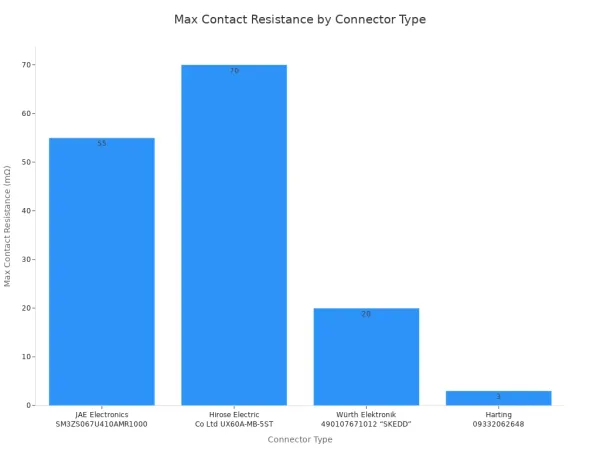
Every connector adds a small amount of resistance to a circuit. This is called contact resistance. Low resistance is crucial for efficient power flow. High resistance can cause voltage drops and overheating. A connector is also rated for a certain number of mating cycles—how many times you can plug and unplug it. Repeated use wears down the contact surfaces. This wear can increase resistance over time. For example, a standard consumer usb connector might be rated for 1,500 cycles, while some industrial connectors can exceed 10,000 cycles. The right connector maintains a stable connection throughout its intended life.
Pitch, Form Factor, and Mounting Style
Pitch is the distance from the center of one pin to the center of the next. Common pitches like 2.54 mm (.100") are used in many electronics. Smaller pitches allow for more compact designs. The form factor is the connector's overall size and shape. Your mounting style—through-hole or surface-mount—determines how the connector attaches to a printed circuit board. These physical traits define how the connector fits into your project.
Advanced Safety and Reliability Features
High-reliability connectors often include advanced safety features. For example, automotive connectors use Terminal Position Assurance (TPA) and Connector Position Assurance (CPA). TPA ensures each pin is fully seated, while CPA locks the mated connectors together.
The housing material also plays a key safety role. Many quality connectors, including usb connectors, use plastics with a UL94 V-0 flammability rating. This means the material will self-extinguish quickly if it catches fire, preventing the fire from spreading and ensuring a safe direct electrical connection. These features are essential for building robust and secure systems.
A Guide to the Main Types of Wire Connectors
Choosing the right connector is not just about making things fit. It's about ensuring safety, efficiency, and reliability for your entire circuit. Different applications demand different types of wire connectors, each engineered with specific electrical properties. Let's explore the main categories to help you select the perfect component for your project.
Power Connectors for Safe Current Delivery
Power connectors are the workhorses of electrical systems, designed to handle significant current without overheating. Selecting the wrong one can lead to dangerous voltage drops or even fire hazards. Your primary consideration here is the current rating, which must match or exceed your circuit's requirements.
A key factor in this is the wire gauge. Thicker wires have lower resistance and can carry more current safely.
- Overheating Risk: Using a wire gauge that is too small for the current load causes high resistance, generating excessive heat that can melt insulation and create a fire hazard.
- Performance Loss: An undersized wire also leads to voltage drop, reducing the power that reaches your device and causing inefficient operation or even failure.
You must choose a connector rated for both the current and the wire gauge you are using. Common types of electrical connectors for power include:
- Barrel Connectors: You see these often on consumer electronics like laptops and routers. They are simple, reliable for DC power, and easy to use. When selecting one, check its voltage and current rating, and ensure the pin diameter matches your device's jack.
- Molex Connectors: These are robust, multi-pin connectors common in computers and automotive systems. They use a pin-and-socket design with a locking mechanism, providing a secure connection for both power and signal lines. Key criteria are the pin count, wire gauge compatibility, and current rating per pin.
- Push-In vs. Screw Terminals: For wiring into a terminal block, you have options. Traditional screw terminals are common, but push-in connectors offer significant advantages. They can reduce wiring time by up to 50% and provide a more reliable, vibration-resistant connection without needing special tools. This makes them excellent for industrial and automation applications.
Data and Signal Connectors
When your goal is the clear transmission of signals, you need data and signal connectors. These components are engineered to protect signal integrity by minimizing noise, interference, and data loss. They are crucial in everything from networking to high-speed digital electronics. For complex designs, especially those involving high-performance SoCs, partnering with an expert like Nova Technology Company (HK) Limited, a HiSilicon-designated (authorized) solutions partner, can ensure you select the right components for optimal signal integrity.
These connectors come in several forms, including wire-to-board connectors and board-to-board connectors, which link different parts of an electronic system.
Impedance Matching: The Key to Clean Signals In high-speed data applications, the connector's impedance must match the impedance of the cable and the circuit board (typically 50 or 100 ohms). An impedance mismatch causes signal reflections, where part of the signal bounces back, corrupting the data. This is why using the right connector is critical for reliable, high-frequency transmission of signals.
Here are two classic examples of data connectors:
| Feature | D-Sub Connectors | RJ45 Connectors |
|---|---|---|
| Pin Count | Variable (e.g., 9, 15, 25) | 8 |
| Primary Use | Legacy serial/parallel ports, industrial controls | Ethernet networking, telecommunications |
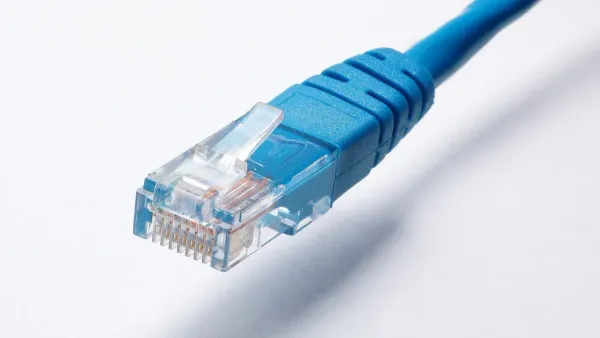
| Key Feature | D-shaped metal shield for robust, secure connection | Locking tab for secure, easy-to-use connection |
| Circuit Impact | Reliable for low to moderate speed data | Optimized for high-speed, balanced signal pairs |
USB Connectors: Data and Power Delivery
USB (Universal Serial Bus) connectors are perhaps the most recognizable type of connector today. They have evolved significantly, offering both data transfer and power delivery in a single, convenient package. While many people just think of "a USB," there are several distinct types of USB connectors.
- USB-A Connectors: The classic rectangular connector found on computers and chargers. These are durable but are being phased out in favor of USB-C. You will find USB-A connectors on many host devices.
- USB-B Connectors: This square-shaped connector is often used for printers and other large peripheral devices.
- USB-Mini Connectors: A smaller version once popular for cameras and MP3 players, now largely replaced.
- USB-Micro Connectors: This was the standard for most smartphones and small devices before USB-C.
The modern standard is USB-C. This reversible connector is a game-changer. It's not just a new shape; it's a powerful platform. With the USB Power Delivery (PD) 3.1 standard, a single USB-C connector can deliver up to 240 watts of power using its Extended Power Range (EPR) mode. This is enough to charge high-performance laptops and other demanding devices, eliminating the need for bulky power bricks.
Furthermore, USB-C supports Alternate Modes, allowing it to carry different types of signals:
- DisplayPort Alt Mode: Transmit high-resolution video (up to 8K) and audio directly over the USB-C cable. You can run 4K video and high-speed USB 3.2 data at the same time.
- Thunderbolt™ (3, 4, and 5): This technology, developed by Intel, uses the USB-C port to provide blazing-fast data transfer (up to 40 Gbps or more), connect multiple high-resolution displays, and even link to external graphics cards.
The versatility of USB connectors makes them a cornerstone of modern electronics. From simple charging to high-speed data and video, the USB ecosystem, especially with the powerful USB-C connector, has a solution.
High-Frequency (RF) Connectors
When you work with radio frequencies (RF), standard electrical connectors won't do. RF signals are extremely sensitive to impedance mismatches, which cause signal reflections and power loss. RF connectors are precision-engineered to maintain a constant impedance, typically 50 or 75 ohms, ensuring a clean signal path.
Key performance metrics for these connectors are:
- Insertion Loss: The amount of signal strength lost as it passes through the connector. Lower is better.
- Return Loss (VSWR): A measure of the signal reflections caused by impedance mismatches. High return loss (a low VSWR number) is ideal.
While they are also used for the transmission of signals, you should not confuse RF connectors with audio connectors. Audio signals operate at much lower frequencies, so audio connectors like TRS or XLR plugs are designed for fidelity and noise rejection, not high-frequency impedance matching. Using the wrong connector for an RF or audio application will degrade performance. The world of audio requires its own specialized connectors to preserve sound quality, just as RF requires its own to preserve signal integrity. You need the right connector for the right job, whether it's for high-fidelity audio or high-frequency data. The principles of clean signal transfer apply to both audio and RF, but the engineering solutions are very different. For your audio projects, always use dedicated audio connectors.
Here are some common RF connectors:
| Connector | Common Impedance | Typical Frequency Range | Primary Use Case |
|---|---|---|---|
| BNC | 50 or 75 Ohm | Up to 4 GHz | Lab equipment, video, older radio systems |
| SMA | 50 Ohm | Up to 18 GHz | Wi-Fi antennas, cellular, microwave systems |
| N-Type | 50 Ohm | Up to 11 GHz | High-power applications, base stations, robust equipment |
Termination and Splice Connectors
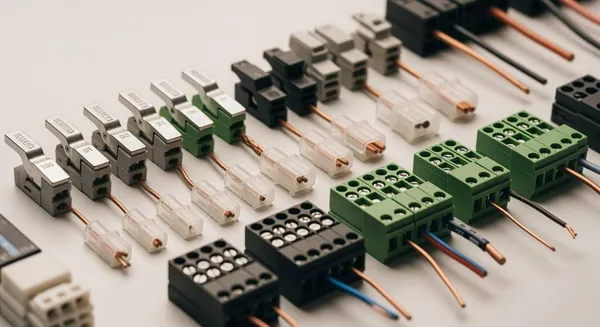
Sometimes, you don't need to connect to a device but simply need to join two wires together or terminate the end of a wire. This is where termination and splice connectors come in. These are fundamental types of wire connectors used in everything from home wiring to automotive repair.
The most common are butt splice connectors. These allow you to crimp two wire ends together to create a single, continuous connection. They come in two main varieties:
- Non-Insulated: These are simple metal tubes. After crimping, you must add your own insulation, like heat-shrink tubing. They are great for tight spaces or when you need a specific type of insulation.
- Insulated: These connectors have a plastic or nylon sleeve over the metal barrel. This provides immediate insulation and strain relief in one step, making the installation process faster and safer. Heat-shrink insulated connectors offer the best protection, creating a waterproof seal that is ideal for marine and automotive use.
Choosing between them depends on your environment and needs. For a quick, protected connection, an insulated connector is best. For custom applications or where space is minimal, a non-insulated connector followed by heat shrink is a reliable choice. These essential types of electrical connectors ensure your wiring is both secure and properly managed. Other common termination electrical connectors include wire nuts for household wiring and ring or spade terminals for connecting to screw posts. These wire-to-wire connectors are essential for creating reliable electrical connections.
Installation and Maintenance Best Practices
A perfect connector can fail with poor installation. Your technique directly impacts circuit reliability. Following best practices for installing all types of crimp connectors ensures a safe, durable, and efficient system. This applies to all connectors, including usb connectors.
Crimping and Soldering Techniques
You create a strong bond through proper crimping and soldering. A correct crimp forms a "cold weld," creating a seamless, gas-tight direct electrical connection between the wire and the terminal. This method provides low resistance and high mechanical strength for many types of crimp connectors.
Physicist Richard Feynman explained that when atoms of the same kind touch, they cannot "know" they are in different pieces of material. A proper crimp removes oxide layers and uses high pressure to force atoms to bond as one. This is why good crimp connectors are so reliable.
For soldering, you should always heat the component, not the solder itself.
- Tin the tips of stranded wires before soldering.
- Use a "third hand" tool to hold wires steady.
- Avoid leaving the iron on the pin too long to prevent damage.
- Ensure the solder flows evenly to avoid a brittle cold solder joint. This applies to many connectors, including usb connectors.
Using the Correct Tools for the Job
You must use the right tool for the job. Pliers are not crimpers. Using the wrong tool for crimp connectors leads to loose connections, high resistance, and electrical shorts. Different types of crimp connectors require specific tools. For example, open-barrel and closed-barrel crimp connectors are not interchangeable and need their own dedicated crimping tools. Always use the manufacturer-specified tool for your chosen electrical connectors to guarantee a secure connection. This is true for all connectors, including usb connectors. Many types of crimp connectors exist, so check your tool. These crimp connectors need care.
Environmental Protection and Sealing
Many connectors, including usb connectors, need protection from dust and water. The IP (Ingress Protection) rating tells you how well a connector is sealed. The first digit rates solid protection (dust), and the second rates liquid protection.
- IP67: These connectors are dust-tight and can be submerged in 1 meter of water for 30 minutes.
- IP68: These connectors offer more protection, allowing for continuous submersion at depths specified by the manufacturer. Manufacturers achieve this sealing with materials like silicone gaskets, O-rings, and potting compounds that protect the internal connection of the connector. This is vital for all types of crimp connectors used outdoors. These crimp connectors are robust.
How to Read a Connector Datasheet
The manufacturer's datasheet is your most important resource. You will find critical specifications for all electrical connectors here. Look for the "Downloads" or "Design Resources" section on a product page. Key specs to check for any connector include:
- Current/Voltage Rating: Ensures the connector can handle your circuit's power.
- Operating Temperature: Defines the safe temperature range. High heat can cause parts to fail.
- Mating Cycles: Tells you how many times you can plug and unplug the connector before it wears out. Always check the datasheet for your specific connectors, including all usb connectors and types of crimp connectors, to make safe design decisions. These crimp connectors have detailed datasheets. All types of crimp connectors, including usb connectors, have these sheets. All connectors, including usb connectors, need this review. These electrical connectors, including usb connectors, are complex. All connectors, including usb connectors, have datasheets. These crimp connectors, including usb connectors, are no exception.
You now see that a wire connector is a critical, active component for your circuit's long-term performance. Choosing the right one from the many types of wire connectors prevents serious issues. This applies to all electrical connectors, including the many usb, usb, usb, usb, usb, usb, usb, usb, usb, and usb connectors you encounter. An incorrect connector choice leads to failures:
- Electrical Overload: Using signal-grade connectors for power delivery causes overheating.
- Intermittent Connections: Mechanical wear from vibration or repeated use creates unstable signals.
Use this guide as your foundation, but always consult the manufacturer's datasheet for your final selection of electrical connectors.
FAQ
What is the main difference between a usb connector and an audio connector?
You use a usb connector for both data and power. An audio connector, however, is designed only for sound signals. The internal engineering for a usb connector is very different from an audio connector. Always use the correct audio connector for your audio projects.
Can I use pliers for all crimp connectors?
No, you should never use pliers for crimp connectors. Each type of connector, including many crimp connectors, requires a specific crimping tool. Using the wrong tool creates a weak connection. This is true for simple crimp connectors and complex ones alike.
Why are there so many types of usb connectors?
The usb standard has evolved over time. Early usb types served basic needs. Newer usb connectors, like USB-C, offer faster data speeds and higher power delivery. This evolution supports modern devices. The usb ecosystem includes many legacy and current usb options.
Are audio connectors interchangeable?
Not always. Different audio connectors serve different purposes. For example, a guitar uses a different audio plug than a microphone. Using the right audio connector ensures the best sound quality. Check your device's requirements for the correct audio connector. Many audio systems need specific audio connectors.
Do all crimp connectors need insulation?
Many crimp connectors come pre-insulated. However, some crimp connectors are non-insulated metal barrels. You must add your own insulation, like heat-shrink tubing, to these crimp connectors. This protects the connection from short circuits. Choose the right crimp connectors for your environment.