What You Need to Know About DVI Port Types in 2026
DVI port types—DVI-D, DVI-A, and DVI-I—remain vital in 2026 for connecting legacy and pro devices. See which DVI port type fits your display needs.
You may wonder if DVI ports still matter in 2026. Many modern devices now use newer connectors, but DVI ports remain useful in certain situations. Understanding dvi port types helps you avoid compatibility issues when connecting displays or upgrading hardware. If you want to keep your systems running smoothly, knowing these differences saves you time and trouble.
Key Takeaways
- DVI ports come in three main types: DVI-D for digital signals, DVI-A for analog, and DVI-I for both. Knowing the difference helps you pick the right cable.
- Dual-link DVI supports higher resolutions and refresh rates, making it suitable for high-res monitors and gaming. Always check your device compatibility.
- DVI remains useful in 2026 for legacy systems, industrial equipment, and professional setups that need stable video connections. It’s still relevant in many industries.
- Compared to HDMI and DisplayPort, DVI offers less support for 4K, HDR, and audio. For future-proofing, consider newer interfaces for new devices.
- Use adapters to connect DVI to HDMI or VGA, but remember DVI does not carry audio. Check your device specs to avoid connection issues.
DVI Port Types Overview

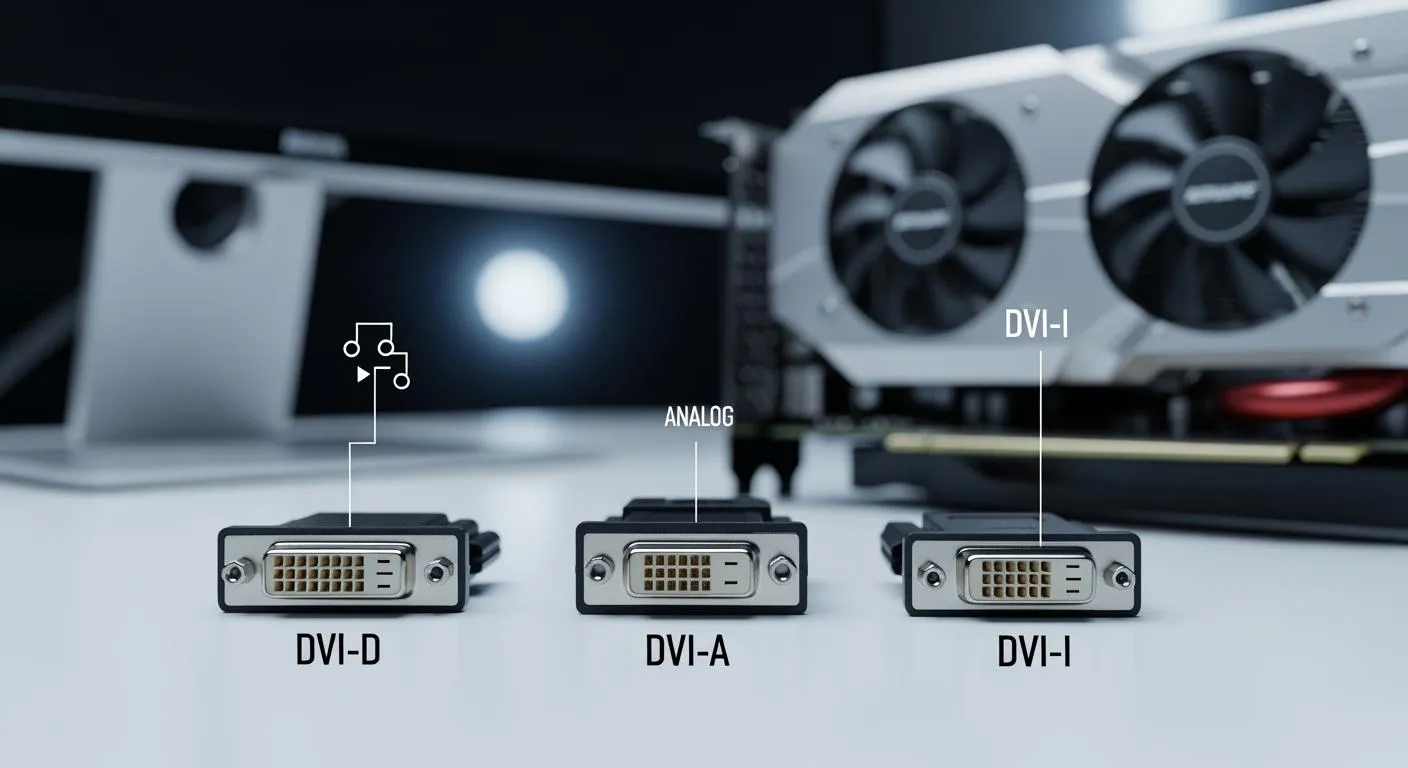
When you look at dvi port types, you see three main options: DVI-D, DVI-A, and DVI-I. Each type handles signals differently, and knowing these differences helps you choose the right cable or adapter for your devices.
DVI-D (Digital Only)
DVI-D stands for Digital Visual Interface – Digital. This port type transmits only digital signals. You use DVI-D when you want to connect a digital source, like a modern graphics card, directly to a digital display. This direct digital connection gives you sharp images and avoids the quality loss that can happen with analog conversion. DVI-D works best for high-quality monitors and projectors that support digital input. You cannot use DVI-D to connect to older analog devices.
Tip: If you want the clearest picture for gaming or design work, DVI-D is the best choice among dvi port types for digital displays.
DVI-A (Analog Only)
DVI-A stands for Digital Visual Interface – Analog. This port type transmits only analog signals. You use DVI-A when you need to connect a digital device to an older monitor that only accepts analog input, like VGA. DVI-A does not support digital signals, so you cannot use it with digital-only displays. This type is less common today, but you might still find it on legacy equipment.
DVI-I (Digital & Analog)
DVI-I stands for Digital Visual Interface – Integrated. This port type supports both digital and analog signals in one connector. You can use DVI-I to connect to either digital or analog displays, but not both at the same time. The versatility of DVI-I makes it useful if you work with a mix of old and new monitors. However, you must use the correct cable for your display type. DVI-I does not convert signals; it only passes through what the source provides.
Note: DVI-I gives you flexibility, but digital and analog signals are not interchangeable. Always check your device’s requirements before connecting.
Quick Comparison Table
| DVI Port Type | Signal Type | Typical Use Case | Compatibility |
|---|---|---|---|
| DVI-D | Digital only | Modern monitors, projectors | Digital devices only |
| DVI-A | Analog only | Legacy VGA monitors | Analog devices only |
| DVI-I | Digital & Analog | Mixed environments, flexible setups | Both, with correct cable |
Single-Link vs Dual-Link
When you compare dvi port types, you also need to understand single-link and dual-link configurations. These terms describe how many data channels the port uses, which affects the maximum resolution and refresh rate you can achieve.
- Single-link DVI uses fewer pins and supports resolutions up to 1920 x 1200 at 60 Hz. This is enough for most standard monitors.
- Dual-link DVI adds more pins, doubling the data channels. This allows for higher resolutions, up to 2560 x 1600 at 60 Hz or 1920 x 1080 at 240 Hz. Dual-link is important if you use large monitors or need high refresh rates for gaming or professional graphics work.
Resolution and Bandwidth Table
| DVI Type | Maximum Resolution | Maximum Bandwidth | Typical Use |
|---|---|---|---|
| Single-link DVI | 1920 x 1200 at 60 Hz | About 3.96 Gbps | Standard monitors, office work |
| Dual-link DVI | 2560 x 1600 at 60 Hz | About 7.92 Gbps | High-res monitors, gaming, design |
Tip: Always check if your monitor and graphics card support dual-link before buying a cable. Using the wrong type can limit your display’s performance.
How DVI Port Types Compare to HDMI and DisplayPort in 2026
You might wonder how dvi port types stack up against HDMI and DisplayPort in 2026. DVI still works well with many older and professional monitors, especially in offices and labs. However, HDMI and DisplayPort have become more common in new devices. You can use adapters to connect DVI to HDMI or VGA, but DVI does not carry audio signals, unlike HDMI.

Note: DVI port types remain useful for certain setups, but HDMI and DisplayPort offer better compatibility and future-proofing for most users.
If you set up multi-monitor workstations, especially in professional environments, DVI-D can support up to 1080p at 144Hz. This makes it suitable for many business and design applications, though it lacks 4K support and audio transmission.
Understanding dvi port types helps you make smart choices when connecting or upgrading your devices in 2026. You avoid compatibility problems and get the best performance from your hardware.
DVI Usage in 2026
Devices Still Using DVI
You still find DVI ports in many specialized devices in 2026. Industries such as electronics manufacturing, automotive, pharmaceutical, packaging, and food and beverage rely on DVI connections. These sectors use DVI for high-quality inspection systems and safety monitoring. DVI provides stable and reliable video transmission, which is critical for these operations.
Many professional workstations, industrial control panels, and medical imaging systems continue to use DVI. You may also see DVI ports on legacy monitors and projectors in labs or factories. Some companies keep these devices because they deliver consistent results and have long service lives.
Nova Technology Company (HK) Limited stands out as a HiSilicon-designated solutions partner. The company offers advanced chip-level solutions and system integration services for the IC industry. You see their technology in applications that demand robust video interfaces, including industrial automation and high-precision inspection equipment. Their expertise helps you achieve seamless integration of DVI port types with modern semiconductor systems.
If you need to connect DVI-equipped devices to newer displays, you can use adapters or converters. These tools let you link DVI to HDMI without losing video quality. However, you must handle audio separately, since DVI does not carry sound.
Tip: Always check your device’s specifications before choosing adapters. This ensures you get the best performance from your setup.
Typical Scenarios and Users
You may wonder where DVI ports still make sense. In professional environments, DVI remains popular for its stability and high-quality video. You find DVI in medical imaging, industrial control systems, and multi-monitor workstations. Control rooms and mission-critical displays also depend on DVI for reliable performance.
In consumer settings, most users prefer newer interfaces like HDMI. However, DVI still appears in legacy systems and specific cases where you need a dependable connection. You might use DVI if you have an older monitor or graphics card that supports only DVI.
Here is a comparison of DVI usage in different environments:
| Environment Type | Usage Focus | Applications |
|---|---|---|
| Professional | Stability, reliability, high-quality video | Medical imaging, industrial control systems, multi-monitor workstations, control room displays |
| Consumer | Preference for newer interfaces, DVI for legacy | Legacy systems, specific use cases where DVI is still applicable |
You should understand dvi port types to make smart choices when upgrading or maintaining your equipment. This knowledge helps you avoid compatibility issues and ensures your devices work as expected.
DVI Pros and Cons
Video Quality and Performance
DVI port types offer reliable video quality for many applications. With single-link DVI, you can support resolutions up to 1920x1200 at 60Hz, while dual-link DVI extends this to 2560x1600. This makes DVI suitable for high-resolution monitors used in professional work and gaming. DVI can achieve refresh rates of up to 144Hz at 1080p, which benefits gamers seeking smooth visuals. However, DVI does not support 4K resolution at 60Hz or HDR, limiting its use for the latest high-end displays. When comparing DVI to HDMI and DisplayPort, all three are digital interfaces, ensuring similar quality at common resolutions like 1080p. Still, HDMI and DisplayPort support higher bandwidths, enabling 4K and beyond. For example, HDMI 2.1 supports up to 10K resolution at 144Hz, far surpassing DVI's capabilities.
Compatibility and Versatility
One of DVI's main advantages is its compatibility with a wide range of devices. The DVI-I connector supports both digital and analog signals, making it easier to connect legacy equipment like VGA monitors without additional adapters. Many modern graphics cards include DVI ports or support DVI via adapters, ensuring compatibility with older displays. This flexibility is especially valuable in mixed-technology environments, where integrating new and legacy devices remains necessary. Nova Technology Company (HK) Limited, a HiSilicon-designated solutions partner, specializes in chip-level solutions that enhance system integration for DVI port types. Their expertise helps manufacturers develop robust interfaces that bridge old and new technologies efficiently.
Limitations and Declining Support
Despite its strengths, DVI faces significant limitations. Its bandwidth restricts support for modern features like 4K at 60Hz and HDR. As a result, DVI ports cannot handle the demands of current high-end displays. Additionally, support from manufacturers has declined; few new GPUs include DVI ports after 2020. Users often rely on adapters to connect DVI to HDMI or DisplayPort, but these can introduce issues such as driver conflicts or signal degradation. Faulty cables or adapters also cause connection problems, leading to black screens or flickering. Moreover, DVI ports do not carry audio signals, requiring separate connections for sound. These factors make DVI less future-proof compared to HDMI and DisplayPort, which support higher resolutions, audio, and advanced features.
You now understand the strengths and limits of DVI port types in 2026. DVI works well for legacy devices and stable video needs, but HDMI supports higher resolutions and refresh rates. See the table below for a quick comparison:
| Interface Type | Max Resolution | Refresh Rate | Key Features |
|---|---|---|---|
| DVI Single Link | 1920x1200 | 60Hz | For older monitors |
| DVI Dual Link | 2560x1600 | 60Hz | For 2K displays |
| HDMI 2.1 | 8K | 60Hz+ | Best for new tech |

Checklist for choosing DVI or alternatives:
- Does your device require high refresh rates or 4K+ resolution?
- Do you need audio over the same cable?
- Will you upgrade your display soon?
- Is long-distance signal integrity important?
- Do you need legacy compatibility?
Choose DVI if you need reliability with older equipment. For future-proofing, HDMI or DisplayPort is the better choice.
FAQ
What is the main difference between DVI-D and DVI-I?
DVI-D sends only digital signals. DVI-I supports both digital and analog signals. You should use DVI-D for digital displays and DVI-I if you need flexibility with older analog monitors.
Can you connect a DVI port to HDMI or VGA?
Yes, you can use adapters to connect DVI to HDMI or VGA. Remember, DVI does not carry audio. You need a separate cable for sound when using HDMI adapters.
Do DVI ports support 4K resolution?
No, DVI ports do not support 4K at 60Hz. The maximum for dual-link DVI is 2560x1600 at 60Hz. For 4K displays, you should use HDMI or DisplayPort.
Is DVI still good for gaming in 2026?
DVI can support 1080p at high refresh rates, up to 144Hz. If you use a monitor with these specs, DVI works well. For higher resolutions or advanced features, choose HDMI or DisplayPort.
Why do some professional devices still use DVI?
Many industries trust DVI for stable, high-quality video. You find DVI in medical imaging, industrial control, and inspection systems. These fields value reliability and proven performance.