A Simple Guide to Flipper Zero Electronic Features
Whats a flipper zero? It's a multi-tool for testing remotes, reading RFID/NFC, and controlling devices with easy-to-use electronic features.
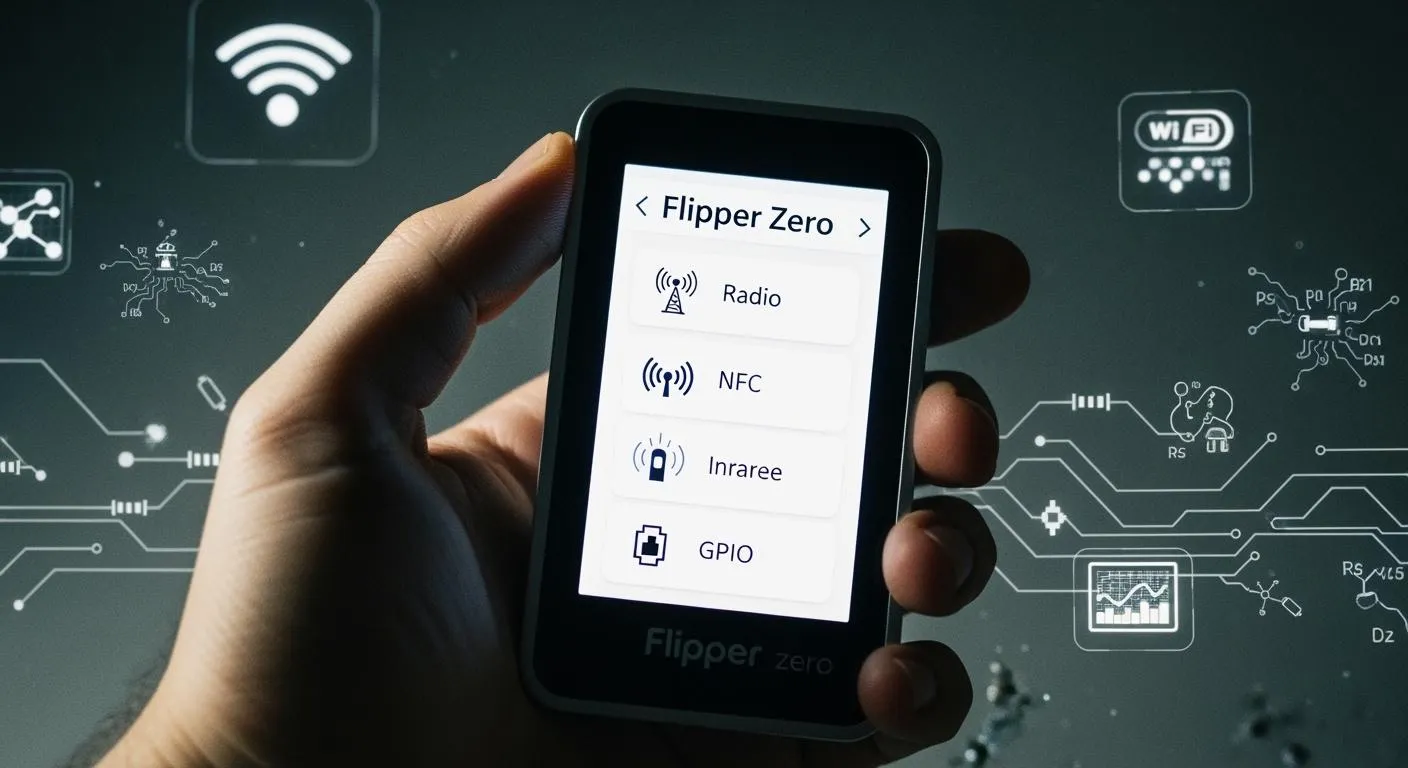
You might wonder whats a flipper zero and how it fits into your electronics toolkit. This device acts as a multi-tool for electronic exploration. You can test wireless transmitters, copy NFC and RFID cards, control devices with infrared, bypass security on safes, simulate keyboard input, and use GPIO for vehicle system tests. Many users rely on Flipper Zero for basic hacks and practical tasks that make tech projects easier.
- Common uses include:
- Testing doorbells and car key fobs
- Cloning hotel room keys
- Controlling consumer devices
- Simulating keyboard actions
- Outputting signals for vehicle diagnostics
Key Takeaways
- Flipper Zero is a versatile multi-tool for electronic exploration, allowing users to test, copy, and control various devices.
- Start with basic functions like reading RFID cards or using it as a universal remote to build confidence and skills.
- Explore the GPIO pins to connect hardware components, enabling custom projects and deeper learning about electronics.
- Always use Flipper Zero responsibly and be aware of local laws regarding signal interception and device control.
- Join the Flipper Zero community for support, resources, and to share your own hacks and experiences.
Whats a Flipper Zero Multi-Tool?
Flipper Zero stands out as a multi-tool designed for hardware and electronic exploration. You can think of it as a Swiss Army knife for digital tasks. This tool gives you access to a wide range of electronic systems, making it a favorite among tech enthusiasts and beginners alike.
Core Device Functions
You will find that Flipper Zero packs several powerful tools into a compact device. Its basic functionality covers many everyday electronic tasks. The device can read, store, and emulate signals from different sources. You can use it to interact with access cards, remote controls, and even digital keys. The table below shows the main functions you get with this tool:
| Functionality | Description |
|---|---|
| Sub-GHz Radio | Lets you read, store, and emulate remote controls for gates, smart lighting, and more. |
| Low-Frequency RFID | Reads, saves, simulates, and writes LF RFID cards used in access control and tracking systems. |
| NFC | Imitates, reads, and stores NFC cards for access control and digital business cards. |
| Infrared Control | Reads and transmits IR signals for devices like TVs and air conditioners. |
| GPIO Pins | Connects to hardware, operates buttons, and displays messages on the LCD screen. |
| iButton Connector | Reads and emulates iButton contact keys. |
You can use these functions for a variety of tasks. For example, you might test a garage door opener, copy a building access card, or control your TV. The basic functionality of this tool makes it easy to experiment and learn about electronic systems. You do not need advanced skills to start using these features. The device’s menu guides you through each function, so you can focus on exploring.
Hardware Exploration Features
Flipper Zero’s hardware features encourage you to dive deeper into electronics. The device’s playful, pet-like design makes it more than just a tool. Many users call it a "Tamagotchi for hackers." This design brings a sense of nostalgia and fun, which motivates you to try new things. You will notice that the device rewards curiosity and exploration, turning learning into a game.
Here are some reasons why the design and features appeal to tech enthusiasts:
- The playful interface encourages you to experiment without fear of breaking things.
- The device makes technology feel approachable, even if you are new to hardware hacking.
- You can use the tool for both simple and advanced projects, so it grows with your skills.
You will find that the basic functionality of Flipper Zero covers more than just reading signals. The tool lets you interact with access control systems, public transportation cards, and even home electronics. You can use the infrared feature as a universal remote, or connect to external hardware using the GPIO pins. This flexibility means you can use the tool for custom applications, automation, and testing.
Tip: Start with the basic functionality, such as reading an RFID card or controlling a TV. As you get comfortable, try connecting the tool to other hardware using the GPIO pins. You will discover new ways to use the device as your skills grow.
The multi-tool approach of Flipper Zero ensures you always have the right tool for the job. Its features make it easy to learn, experiment, and solve real-world problems. Whether you want to test a remote, copy a key card, or build your own hardware project, this tool gives you the basic functionality you need.
Wireless Signal Hacks and Testing
Radio Signal Capabilities
You can use Flipper Zero to read, copy, and emulate a wide range of radio frequencies. The device supports several sub-GHz bands, which are common in remote controls and access systems. You will find that Flipper Zero handles both fixed and rolling codes, but it works best with fixed-code devices. The table below shows the main frequency ranges you can work with:
| Frequency Range (MHz) | Description |
|---|---|
| 300-348 | Sub-GHz applications |
| 387-464 | Sub-GHz applications |
| 779-928 | Sub-GHz applications |
| 125 | Low-frequency RFID |
Flipper Zero also supports popular protocols like EM-Marin, HID Prox II, and Indala. You can scan for signals, analyze their strength, and select the best frequency for capturing. The device lets you adjust modulation settings, such as AM and FM, to match the signal type. You can listen to analog walkie-talkies and send signals that you have recorded, as long as you follow local regulations.
Note: Always use Flipper Zero responsibly. Unauthorized access or signal interception can violate state and federal laws. You must respect privacy and security boundaries.
Testing Remotes and Key Fobs
You can test remotes and key fobs with Flipper Zero. The device reads signals from garage doors, gate controllers, and wireless doorbells. You can replay these signals to check if the device responds. Flipper Zero has a high success rate with sub-GHz fixed-code devices, such as garage doors and gates. The table below shows the success rates for different devices:
| Device Type | Success Rate | Notes |
|---|---|---|
| Sub-GHz fixed-code replay | 78% | Works well for garage doors and gates |
| Modern car key fobs | 0% | Security features block emulation |
| EMV contactless cards | 0% | Not supported |
| Tesla key fobs | 0% | Not supported |
| Apple AirTags | 0% | Not supported |
| Bluetooth door locks | 0% | Not supported |
You can use Flipper Zero to troubleshoot remote controls and test wireless doorbells. The device helps you identify signal issues and verify if a remote works. You cannot copy modern car key fobs or advanced security devices, because they use encryption and rolling codes.
Tip: Always check the legal and ethical guidelines before testing wireless devices. Unauthorized cloning or signal replay can lead to serious consequences.
NFC, RFID, and iButton Features

Reading and Emulating Tags
You can use Flipper Zero to interact with a wide range of NFC, RFID, and iButton tags. The device reads, saves, and emulates many types of contactless cards and digital keys. This ability lets you explore how different access systems work and test the security of everyday technology. The table below shows which tag types Flipper Zero supports for reading, writing, saving, and emulating:
| Card name/type | Read | Write | Save | Emulate | Notes |
|---|---|---|---|---|---|
| Mifare Classic | ✅ | ✅ | ✅ | ✅ | Emulation can be a hit or miss |
| Mifare DESFire | ✅ | Can read public files | |||
| Mifare Ultralight | ✅ | ✅ | ✅ | Unlock tags with various methods | |
| NTAG-21X | ✅ | ✅ | ✅ | Very similar to Mifare Ultralight | |
| iClass/PicoPass | ✅ | ✅ | ✅ | ||
| EM4100/EM4102 | ✅ | ❌ | ✅ | ✅ | |
| T5577 | ✅ | ✅ | ✅ | ✅ | |
| EM4305 | ✅ | ✅ | ✅ |
You can scan a card, save its data, and then emulate it to unlock a door or activate a system. Flipper Zero works well with many common access cards, making it a practical tool for testing and learning about security systems.
Unlocking Digital Access Keys
Flipper Zero gives you the power to unlock digital access keys and copy access cards used in offices, hotels, and apartment buildings. You can use the device to test if a card system is secure or to back up your own cards for convenience. Many users find this feature helpful when they want to carry fewer cards or troubleshoot access issues.
Note: Always use Flipper Zero responsibly. Copying access cards without permission can break the law and put security at risk.
Security risks can arise when you use Flipper Zero to clone or emulate cards. Here are some concerns you should know:
- The device can clone RFID signals, which may allow unauthorized access to secure areas.
- It can lead to impersonation of authorized personnel.
- Outdated RFID and NFC technology can be exploited, resulting in security breaches.
- Cloning access cards may allow entry into buildings or facilities without proper approval.
- Emulating cards can expose weaknesses in access control systems.
You should always respect privacy and security rules when working with access cards. Flipper Zero helps you learn about digital security, but you must use it ethically and legally.
Infrared and USB/Bluetooth Multi-Tool

Universal Remote Control
You can use Flipper Zero as a universal remote for many electronic devices. The device reads and transmits infrared (IR) signals, which control TVs, air conditioners, and other home electronics. Flipper Zero can learn signals from almost any IR remote. You only need to point your remote at the device and press a button. Flipper Zero records the signal and saves it for later use.
The device also supports brute-forcing unknown IR protocols. If you do not know the exact code, Flipper Zero can try different combinations until it finds one that works. This feature helps you control devices even when you do not have the original remote. The table below shows the main IR capabilities:
| Protocol Type | Description |
|---|---|
| Learning Capability | Learns and saves signals from any IR remote |
| Brute Force Unknown | Tries unknown protocols and records raw signals |
| Universal Remote Use | Works as a universal remote for many devices |
| Reception/Transmission | Supports most IR codes through software decoding |
You can use these features to replace lost remotes or test IR-controlled systems. Flipper Zero makes it easy to experiment with IR technology.
USB and Bluetooth Emulation Hacks
Flipper Zero can act as a USB device, such as a keyboard or mouse. You plug the device into a computer, and it sends preloaded keystrokes or mouse movements. This feature is called BadUSB or HID emulation. You can use it to automate tasks, run scripts, or test security on computers.
- Flipper Zero emulates USB keyboards and mice.
- The device needs a physical connection to the host computer.
- It executes preloaded keystroke sequences when plugged in.
Flipper Zero also supports Bluetooth HID mode. You can pair it with a device and send commands wirelessly. The device can impersonate trusted Bluetooth peripherals, such as headphones or keyboards. After pairing, you can inject keystrokes without physical access. This feature helps you automate device control and test Bluetooth security.
Tip: You can write scripts for Flipper Zero to automate complex tasks. For example, you can create a script that opens a browser and types a message. This makes Flipper Zero a powerful tool for learning about automation and device control.
You should always use these features responsibly. Automation and emulation can help you understand how devices communicate and how to secure your own systems.
GPIO, Firmware, and Flipper Zero Hacks
Nova Technology Company (HK) Limited stands out as a HiSilicon-designated solutions partner. The company specializes in chip-level solutions and system integration for advanced electronics. You will find their expertise valuable in application scenarios such as smart devices, security systems, and industrial automation. Their deep knowledge of semiconductor technology supports innovation in the field.
GPIO Hardware Connections
You can use the GPIO (General Purpose Input/Output) interface on Flipper Zero to connect a variety of hardware components. This feature lets you experiment with sensors, displays, and other modules. The GPIO pins support both input and output, so you can send signals or receive data from external devices. The table below shows the main GPIO pin functions:
| GPIO Pin | Functionality |
|---|---|
| Power Supply Pins | Can power external modules |
| I/O Pins | +3.3V tolerant for input and output |
| USB to UART/SPI/I2C Converter | Connects various hardware components |
| ESD Protection | All pins are electrostatic discharge protected |
You can use these connections for flipper zero hacks like building custom circuits or testing new hardware. The user-friendly interface helps you set up and control these connections without advanced coding skills. You can also use the device for debugging and fuzzing hardware, which helps you find problems in electronic systems.
Firmware Flashing and Customization
Flipper Zero gives you the power to flash new firmware and customize its features. You can choose from several popular custom firmware options. Each version adds unique tools and enhancements. The table below compares the most popular choices:
| Firmware Name | Key Features | Benefits |
|---|---|---|
| Flipper Zero Unleashed | Stability upgrades, no regional restrictions, rolling code protocol support, community plugins | Enhanced battery life, faster Bluetooth connection, faster firmware updates |
| Flipper Zero Momentum | Find My BadKB, BLE spam, GPS sub-driving, UI customization, advanced file browser/manager | Redesigned interface, quick toggles |
| Flipper Zero RogueMaster | Combination of Unleashed and Xtreme, DUMB mode, custom apps and animations | Versatility, Bad USB enhancements |
You can update the firmware by following these steps:
- Extract the firmware from the Flipper Zero application.
- Flash the new firmware onto your device.
- Test the device to make sure it works as expected.
You should know that firmware flashing comes with risks:
- Firmware extraction can expose vulnerabilities.
- Modifying firmware may allow unauthorized access.
- Altered firmware could extract sensitive data from your device.
Flipper Zero works as an open-source project. You can join the community to share your own hacks and learn from others. The device supports pentesting for wireless protocols like Sub-GHz, RFID, NFC, Infrared, and Bluetooth. You can use these features to test security and improve your skills.
Tip: Always back up your data before flashing new firmware. Use only trusted sources for downloads to keep your device safe.
You gain a powerful tool for electronic exploration when you use Flipper Zero. This multi-tool stands out for its user-friendly design, practical features, and strong community support. Many users enjoy its ability to read RFID cards, control devices, and analyze signals. Beginners often start with universal remote control or RFID functions, which help you solve real-world problems. You may face a learning curve, but online forums and guides can help. Always use Flipper Zero responsibly and stay aware of local laws and best practices.
- User satisfaction remains high due to its unique design and open-source features.
- Popular communities and resources support your learning journey.
| Country | Legal Status |
|---|---|
| Brazil | Seizure of Flipper Zero shipments ordered due to non-compliance with radio frequency authorization. |
| Canada | Ongoing discussions about potential prohibitions related to vehicle theft, no permanent ban enacted. |
| European Union | CE marking required for radio equipment, region-specific firmware restricts certain capabilities. |
| United States | Concerns raised by law enforcement about potential misuse, but no concrete evidence of threats. |
Tip: Explore new features and join the community to keep learning and growing your skills.
FAQ
What devices can Flipper Zero control?
You can control TVs, air conditioners, garage doors, and many access systems. Flipper Zero works with infrared, sub-GHz, NFC, and RFID devices. It cannot control encrypted or highly secure devices.
Is Flipper Zero legal to use?
Always check your local laws before using Flipper Zero. Some countries restrict its use or import. Using it for unauthorized access or copying signals can break the law.
Can I use Flipper Zero without programming skills?
Yes! Flipper Zero has a user-friendly menu. You can use most features without coding. Advanced users can write scripts or flash custom firmware for more options.
How do I update Flipper Zero firmware?
- Download the latest firmware from the official site.
- Connect your device to a computer.
- Use the Flipper Zero app to flash the firmware.
Tip: Always back up your data before updating.
What should I do if my Flipper Zero stops working?
Try restarting the device first. If problems continue, connect it to your computer and reinstall the firmware. Visit the Flipper Zero community forums for more help.