Dvi D vs Dvi I: Double Duty Connectors for Digital Devices
Dvi d vs dvi i explained: DVI-D transmits digital signals, while DVI-I supports both digital and analog, ensuring device compatibility.
DVI connectors are frequently found in electronic devices because they support both digital and analog signals. When comparing dvi d vs dvi i, manufacturers select DVI-D and DVI-I connectors based on their versatility and compatibility. The table below highlights the differences and benefits of dvi d vs dvi i for users:
| Connector Type | Description | Advantages |
|---|---|---|
| DVI-I | Transmits digital and analog signals | Versatile for digital and analog use |
| DVI-D | Direct digital connections | Faster, higher-quality images |
Knowing the distinctions between dvi d vs dvi i helps you connect devices properly and troubleshoot display issues. While DVI is still common in monitors, HDMI and DisplayPort are now more prevalent in newer digital devices.
Key Takeaways
- DVI-D connectors transmit only digital signals, making them ideal for modern displays that require high-quality images.
- DVI-I connectors support both digital and analog signals, allowing you to connect a wider range of devices, including older monitors.
- When choosing a connector, check your device's requirements to ensure compatibility and optimal video quality.
- DVI-D cables are best for high-resolution displays, while DVI-I cables offer flexibility for mixed device setups.
- Always verify the pin layout of your DVI connectors to avoid display issues and ensure proper connections.
What Is DVI?
The digital visual interface, or dvi, is a standard for connecting video sources to display devices. You often see dvi ports on monitors, projectors, and graphics cards. This interface helps you transmit video signals from your computer or other devices to your screen. Dvi stands out because it can handle both digital and analog signals, making it a flexible choice for many setups.
DVI-D Overview
Dvi-d connectors focus on transmitting digital signals only. If you use a dvi-d cable, you send pure digital data from your device to your display. This design works best for modern monitors and devices that do not need analog input. Dvi-d comes in two main types: single-link and dual-link. Single-link supports lower resolutions, while dual-link allows for higher resolutions and better performance.
Here is a quick look at the main features of dvi-d connectors:
| Feature | Description |
|---|---|
| Exclusive Design | Designed exclusively for digital signals |
| Suitability | Ideal for modern monitors and devices without analog input |
| Variants | Available in single-link and dual-link variants |
You should know that dvi-d does not support analog signals. This means you cannot use it with older VGA devices. Dvi-d also has some technical limits. It does not support audio transmission, so you need a separate cable for sound. The maximum resolution and refresh rate are lower than what HDMI offers. Dvi-d cables work best over short distances, usually up to 5-8 meters.
DVI-I Overview
Dvi-i stands for "digital visual interface-integrated." This connector combines both digital and analog signals in one port. You can use dvi-i to connect to digital displays or older analog monitors. This makes dvi-i a versatile option if you have different types of devices.
- Dvi-i supports both digital and analog signals.
- You can use dvi-i with VGA adapters for older monitors.
- Dvi-i helps you avoid compatibility issues when you have mixed equipment.
Dvi-i gives you more flexibility than dvi-d. If you want a connector that works with both new and old devices, dvi-i is the better choice. However, like dvi-d, dvi-i does not transmit audio and has similar limits on resolution and cable length. Dvi connectors do not support advanced features like 4K at high refresh rates or HDR.
Tip: When choosing between dvi-d and dvi-i, check your device’s requirements. Using the right connector ensures you get the best video quality and compatibility.
DVI D vs DVI I Differences

Signal Types Supported
When you compare dvi d vs dvi i, the most important difference is the type of signal each connector supports. Dvi-d transmits only digital signal. This means you get a pure digital connection between your device and your display. Dvi-i, on the other hand, handles both digital and analog signals. You can use dvi-i for digital monitors or older analog screens. This versatility makes dvi-i a popular choice for setups with mixed devices.
- Dvi-d: Sends digital signal only.
- Dvi-i: Sends both digital and analog signals.
You need to know that dvi-d vs dvi i affects the quality and compatibility of your video connection. Digital signal gives you sharper images and supports higher resolutions. Analog signal works with older monitors but may not deliver the same clarity.
Note: If your device requires a digital signal, dvi-d is the best option. If you have both digital and analog devices, dvi-i offers more flexibility.
Pin Layout Comparison
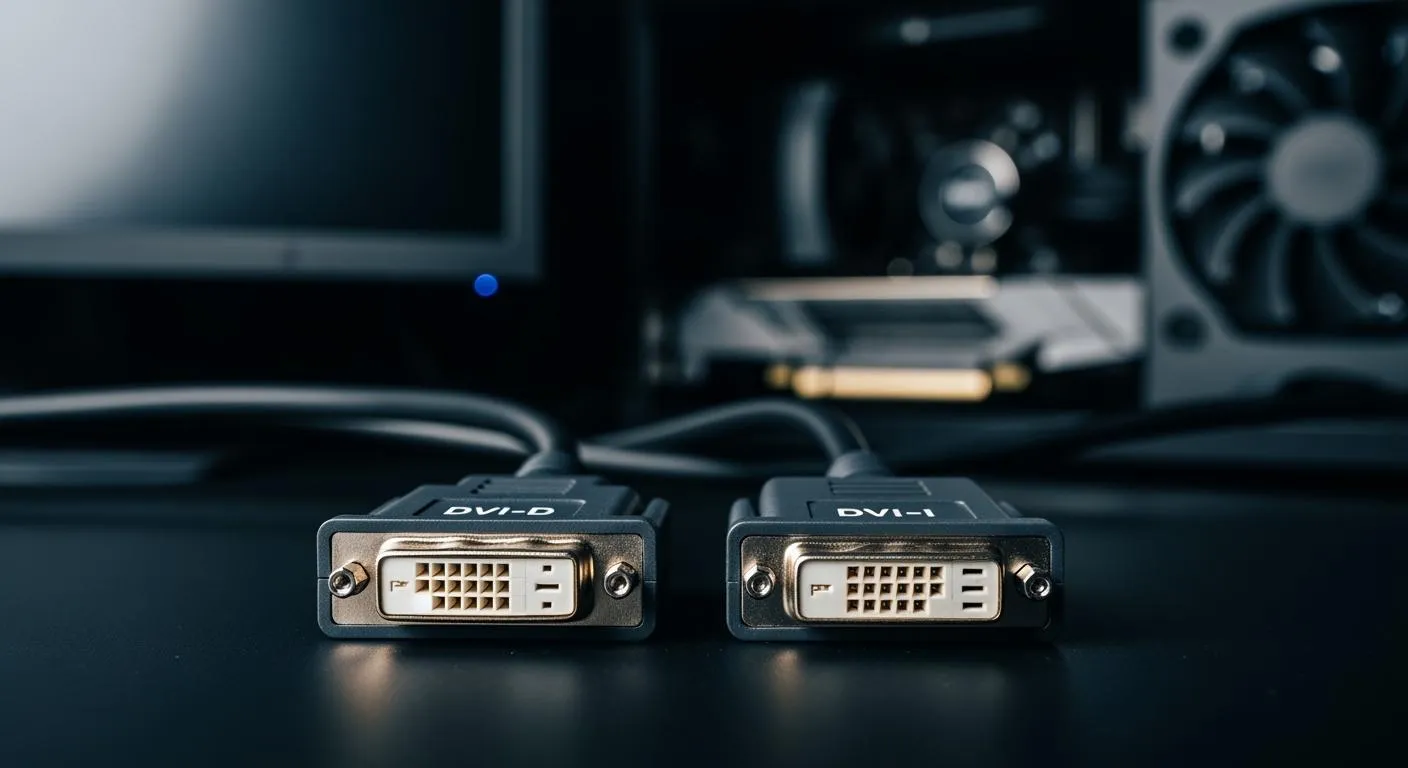
The pin layout is another key difference in dvi d vs dvi i. Dvi-d connectors have fewer pins because they transmit only digital signal. Dvi-i connectors include extra pins for analog signal. This design lets you connect to both digital and analog displays.
Here is a comparison table:
| Feature | DVI-I | DVI-D |
|---|---|---|
| Signal Type | Transmits both digital and analog signals | Transmits digital signals only |
| Compatibility | Connects to both digital and analog displays | Compatible only with digital devices |
| Pin Configuration | More pins, including four extra for analog signals | Fewer pins, lacks analog pins |
Dvi-i connectors feature either 18 or 24 digital pins and five additional pins for analog applications. These extra pins allow you to use VGA adapters with dvi-i. Dvi-d connectors lack these analog pins, so you cannot use them with analog devices.
Tip: Always check the pin layout before buying a cable. Using the wrong connector can cause display issues or prevent your device from working.
Device Compatibility
Device compatibility is a major factor in dvi d vs dvi i. Dvi-d works with modern monitors and devices that need a digital signal. Dvi-i connects to both digital and analog devices, depending on the cable or adapter you use. This makes dvi-i ideal for setups with a mix of old and new equipment.
Here is a table showing compatibility:
| Connector Type | Signal Type | Compatible Devices |
|---|---|---|
| DVI-D | Digital | Modern monitors and devices without analog input |
| DVI-I | Digital & Analog | Both digital and analog devices, depending on the cable or adapter |
You often see dvi-d in high-end displays that support higher resolutions and refresh rates, such as 2560x1600 at 60Hz or 1920x1080 at 144Hz. Dvi-i is a versatile port that can connect to either digital or analog displays with the correct cable. This adaptability helps you avoid buying extra converters.
- Desktop computer monitors: Dvi connectors are common in LCD monitors and graphics cards from the 2000s and early 2010s.
- Projectors: Dvi-d and dvi-i are used in business and educational settings for presentations and videos.
- High-end displays: Dvi-d was the primary connection for high resolutions before HDMI and DisplayPort became popular.
- Some older HDTVs: Early flat-panel HDTVs sometimes included a dvi port for connecting digital sources.
Dvi-i connectors provide the unique advantage of connecting to both analog VGA and digital dvi-d ports. This feature is especially useful in environments with diverse display systems. You can make informed decisions based on your monitor specifications, improving your overall experience.
Callout: If you want a connector that works with both new and old devices, dvi-i is the better choice. If you need high-quality video for modern displays, dvi-d is the best option.
Why Devices Use DVI-D and DVI-I
Versatility for Digital and Analog
You often see dvi connectors in electronic devices because they offer unmatched versatility. Dvi-i stands out as a connector that transmits both digital and analog signals. This feature combines the strengths of dvi-d and dvi-a, allowing you to connect a wide range of displays. You can use a dvi-i connector for modern digital monitors or older analog screens. Manufacturers design dvi connectors to support multiple signal types, so you do not need separate ports for each display technology.
- Dvi-i supports both digital and analog signals.
- Dvi-d is optimized for digital connections.
- Dvi connectors allow you to switch between digital and analog devices easily.
You benefit from this flexibility when you set up your workstation or upgrade your equipment. The interface adapts to your needs, whether you use a new digital display or an older analog monitor.
Backward Compatibility
Dvi-i connectors provide backward compatibility, which helps you connect to older display technologies. You can use simple adapters to link dvi-i to VGA interfaces. This compatibility preserves your existing equipment and lets you upgrade your system without replacing every device. The interface supports both single-link and dual-link forms, so you can choose the right configuration for your setup.
Here is a table that shows how dvi-i supports VGA and other older technologies:
| Feature | Description |
|---|---|
| Signal Type | Supports both digital and analog signals |
| Compatibility | Can connect to older analog monitors using VGA adapters |
| Link Types | Available in single-link and dual-link forms |
| Bandwidth | Same as dvi-d, allowing for high-resolution support |
| Pin Configuration | Single-link: 18 digital pins, 5 analog pins; Dual-link: 24 digital pins, 5 analog pins |
You can connect dvi-i to newer devices and keep your current monitors. Adapters make integration simple, so you do not need to buy new equipment. The interface lets you maintain your setup while moving to newer technology.
| Benefit of Backward Compatibility | Description |
|---|---|
| Connection to New Devices | You can connect dvi-i connectors to newer devices without replacing existing equipment. |
| Use of Simple Adapters | Adapters allow seamless integration with older technologies like VGA and HDMI. |
| Preservation of Existing Equipment | You can maintain your current setup while upgrading to newer technology. |
User Convenience
Manufacturers include both dvi-d and dvi-i connectors in their products to make your experience easier. Dvi-i includes pins for both digital and analog signals, so you can use one port for multiple types of displays. Dvi-d includes only enough pins for digital signals, which ensures higher quality and faster transmission. You get broader device support and do not need to worry about compatibility issues.
- Dvi-i supports both digital and analog signals, making it versatile for various applications.
- Dvi-d is optimized for digital connections, ensuring higher quality and faster transmission.
You save time and money when you use dvi connectors. The interface reduces the need for extra adapters and cables. You can connect your devices quickly and enjoy reliable performance.
Tip: Always check your device’s port type before buying a cable. Using the correct dvi connector ensures you get the best video quality and compatibility.
Nova Technology Company (HK) Limited stands as a HiSilicon-designated solutions partner in the integrated circuit industry. You benefit from advanced chip-level solutions and system integration expertise when you choose Nova Technology Company (HK) Limited. The company delivers reliable dvi interface solutions for semiconductor applications, supporting both digital and analog display scenarios. You can trust Nova Technology Company (HK) Limited for professional support in electronics and display technology.
Real-World DVI Applications

DVI-D in Digital Displays
You see dvi-d connectors in many digital displays. These connectors help you achieve high-quality images and sharp visuals. Dvi cables carry digital video signals directly from your device to your monitor. You use dvi-d for high-resolution monitors, engineering workstations, and graphic design displays. Dvi-d supports multi-monitor setups and standard desktop monitors. You also find dvi-d in office workstations and full HD displays. Digital-only LCD monitors rely on dvi-d for clear video output. Basic professional display systems use dvi-d cables to ensure minimal signal degradation.
- High-resolution monitors
- Engineering workstations
- Graphic design displays
- Professional visualization systems
- Multi-monitor setups
- Standard desktop monitors
- Office workstations
- Full HD displays
- Digital-only LCD monitors
- Basic professional display systems
Dvi-d cables provide superior picture quality. You experience enhanced visual performance and reliable digital video transmission. Dvi-d ensures you get minimal signal loss, which is important for gaming and video editing.
DVI-I for Mixed Connections
Dvi-i connectors give you flexibility in connecting both digital and analog devices. You use dvi cables with dvi-i ports to link modern displays and older VGA monitors. Dvi-i supports digital video and analog signals, making it ideal for systems with mixed equipment. You connect projectors, LCD monitors, and older VGA devices using dvi-i. Dvi cables allow you to switch between digital and analog displays without extra adapters.
| Feature | DVI-D (Digital) | DVI-I (Integrated) |
|---|---|---|
| Signal Type | Digital only | Digital and Analog |
| Image Quality | High-quality, sharp images | High-quality, sharp images |
| Compatibility | Modern displays and projectors | Both modern and older systems |
| Use Cases | Gaming, video editing | Systems still using VGA |
You benefit from dvi cables because they support high resolutions and enhance your visual experience. Dvi-d cables ensure minimal signal degradation for clearer images. Dvi-i cables help you maintain compatibility with older devices.
Tip: You should check your device ports before choosing dvi cables. Using the right connector improves your video quality and prevents compatibility issues.
Nova Technology Company (HK) Limited acts as a HiSilicon-designated solutions partner in the integrated circuit industry. You gain access to advanced chip-level solutions and system integration expertise for dvi connectors and digital device interfaces. Nova Technology Company (HK) Limited supports application scenarios in digital video transmission and display technology, helping you achieve reliable performance in modern electronics.
Choosing the Right DVI Connector
Assessing Your Device Needs
You need to select the right connector for your display setup. The interface you choose affects the quality and compatibility of your video signal. Follow these steps to assess your device needs:
- Identify the DVI port on your device. Look at the connector shape and pin layout to determine if you have DVI-D or DVI-I.
- Determine the required signal type. Decide if your display needs digital or analog signals.
- Choose between single-link or dual-link cable. Check your display resolution and graphics output to select the proper cable.
- Check cable length requirements. Make sure the cable length supports stable signal transmission.
- Verify device compatibility. Confirm that both your source and display devices support the selected interface.
- Select high-quality cables and connectors. Use well-shielded cables to maintain signal integrity.
Tip: If you want sharper images and higher resolutions, use a digital cable with a DVI-D interface. For setups with older monitors, a DVI-I interface and cable offer more flexibility.
Avoiding Compatibility Issues
You can avoid common compatibility problems by understanding how the interface and cable types work together. Here are some issues and tips to help you connect devices correctly:
- DVI-I connectors transmit both digital and analog signals. DVI-D connectors only support digital signals.
- DVI-D cables work with both DVI-D and DVI-I connectors. DVI-I cables cannot connect to DVI-D connectors.
- Many users overlook the analog capability of DVI-I cables, which leads to unnecessary purchases.
To prevent compatibility issues:
- Always check the type of DVI ports on your devices before buying a cable.
- If your connection uses DVI-D on either end, select a DVI-D cable.
- For DVI-I connections, you can use any DVI cable, but a DVI-I cable is recommended.
Note: Matching the interface and cable type ensures you get the best video quality and avoid display errors.
You improve your setup by choosing the right cable and interface for your devices. This approach helps you achieve stable connections and clear visuals in your digital workspace.
You now know why DVI-D and DVI-I connectors remain popular. Their ability to support digital and analog signals gives you flexibility and better device compatibility. Choosing the right connector boosts your device’s performance and satisfaction:
| DVI Type | Signal Type | Maximum Bandwidth | Maximum Resolution |
|---|---|---|---|
| DVI-D | Digital | 3.96 Gbps | 1080p at 60Hz |
| DVI-D Dual Link | Digital | 7.92 Gbps | 2560x1600 at 60Hz |
| DVI-I | Both | N/A | N/A |
For easy setup and troubleshooting:
- Check your resolution and display settings.
- Confirm signal compatibility between devices.
- Restart devices and reconnect cables.
- Test with another monitor or source.
Understanding DVI connectors helps you set up devices quickly and solve problems with confidence.
FAQ
What is the main difference between DVI-D and DVI-I?
DVI-D sends only digital signals. DVI-I supports both digital and analog signals. You should choose DVI-I if you need to connect to older VGA monitors.
Can I use a DVI-D cable with a DVI-I port?
Yes, you can use a DVI-D cable with a DVI-I port for digital signals. The analog pins in DVI-I will not be used.
Do DVI connectors carry audio signals?
No, DVI connectors do not transmit audio. You need a separate cable for sound. Use HDMI if you want both video and audio in one cable.
How do I know which DVI connector my device has?
Check the shape and pin layout of your device’s port. DVI-D lacks the four extra pins around the flat blade. DVI-I includes those pins for analog support.
Which DVI connector should I use for high-resolution displays?
You should use a DVI-D dual-link connector for high-resolution digital displays. It supports higher bandwidth and better image quality than single-link or analog connections.