Comparing Mini USB and Micro USB for Today’s Devices
When you choose a connector for your electronic devices, you will find that the micro USB connector fits most modern needs.
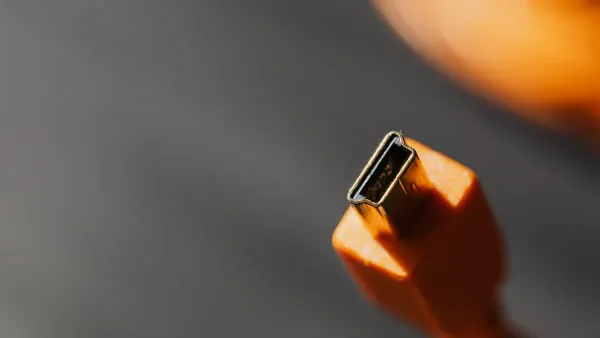
When you choose a connector for your electronic devices, you will find that the micro USB connector fits most modern needs. Device makers moved from the mini USB connector to micro USB because micro USB is slimmer and lasts longer. This change helps designers build thinner gadgets, such as smartphones and tablets, that rely on compact electronic components and integrated circuits.
| Feature | Mini USB | Micro USB |
|---|---|---|
| Size | Thicker | Slimmer |
| Lifespan (insertions) | 5,000 | 10,000 |
| Suitability for Devices | Less suitable for thin devices | Better suited for modern, thinner devices |
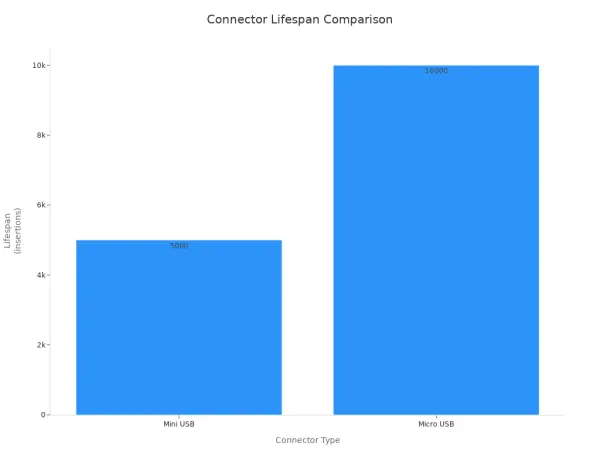
Today, you also see USB-C connectors, but micro USB remains common in many products. You can use this information to understand the shift from mini micro usb to micro USB in consumer electronics.
Key Takeaways
- Micro USB connectors are slimmer and more durable than Mini USB connectors, making them ideal for modern devices.
- Micro USB supports faster data transfer rates of up to 480 Mbps, while Mini USB only supports up to 12 Mbps.
- Most modern gadgets, like smartphones and tablets, use Micro USB connectors, while older devices often rely on Mini USB.
- When choosing a connector, check your device's age and compatibility to ensure you select the right type.
- Micro USB connectors provide better charging performance, supporting higher power output for quicker charging.
Mini Micro USB Overview
Mini USB Connector Basics
You often find the mini usb connector in older devices. This connector first appeared in 2005. It has an anvil shape and a larger size compared to newer usb connectors. You see it in digital cameras, MP3 players, and some early smartphones. The mini usb connector uses five pins, but its ID pin does not support advanced features. You get slower data transfer speeds and less durability. Most mini usb connectors last for about 5,000 connect-disconnect cycles. Device makers used mini usb connectors when electronic components and integrated circuits were bigger and needed more space.
Tip: If you work with older gadgets or legacy equipment, you may still need a mini usb connector for charging or data transfer.
Here is a quick comparison of mini usb connector features:
| Feature | Mini USB |
|---|---|
| Introduction Year | 2005 |
| Shape | Anvil shape |
| Size | Larger than micro USB |
| Pin Configuration | 5 pins, limited ID pin usage |
| Durability | Less durable |
| Transfer Rate | Slower |
| USB On The Go Support | No |
| Current Status | Deprecated |
Micro USB Connector Basics
You see the micro usb connector in most modern devices. This connector launched in 2007. It has a rounded top and flat bottom, making it slimmer and easier to fit into thin gadgets. The micro usb connector measures only 6.85 x 1.8 mm. You find it in smartphones, tablets, and many portable electronics. The five-pin setup includes a functional ID pin, which lets you use USB On The Go. This feature allows your device to act as a host for other usb devices. Micro usb connectors support faster data transfer rates, up to 480 megabits per second. You get better durability, with up to 10,000 connect-disconnect cycles. Designers prefer micro usb connectors because they help build compact electronic components and integrated circuits.
Here is a comparison table for micro usb connector features:
| Feature | Micro USB |
|---|---|
| Introduction Year | 2007 |
| Shape | Rounded top, flat bottom |
| Size | 6.85 x 1.8 mm |
| Pin Configuration | 5 pins, functional ID pin |
| Durability | 10,000 connect-disconnect cycles |
| Transfer Rate | Up to 480 megabits per second |
| USB On The Go Support | Yes |
| Current Status | Widely used |
You notice that the shift from mini micro usb to micro usb connector reflects changes in electronic components and integrated circuits. Smaller connectors allow for thinner devices and more advanced features.
Physical Differences
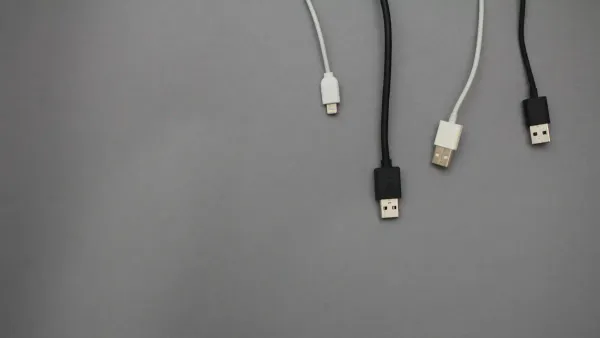
Size and Shape
When you look at mini micro usb connectors, you notice clear differences in size and shape. Mini USB connectors have a larger and thicker body. This design made sense for older electronic components and integrated circuits, which needed more space. You see mini USB connectors with an anvil-like shape, which takes up more room inside a device.
Micro USB connectors changed the game for modern electronics. You find micro USB connectors with a slimmer profile and a rounded top with a flat bottom. This shape fits easily into thin devices, such as smartphones and tablets. The smaller size allows engineers to use compact electronic components and integrated circuits, making devices lighter and easier to carry.
Here is a table showing the physical measurements:
| Connector Type | Dimensions (mm) | Characteristics |
|---|---|---|
| Mini USB | N/A | Deprecated technology, larger size |
| Micro USB | 6.85 x 1.8 | Smaller, more durable, faster transfer rates |
Note: The smaller micro USB connector helps you use thinner gadgets without sacrificing performance. Device makers prefer micro USB connectors because they save space and support advanced features.
Durability
Durability matters when you connect and disconnect usb connectors many times. Mini USB connectors last for about 5,000 insertion cycles. You may notice that older devices with mini USB connectors wear out faster. The larger size and older design do not handle repeated use as well.
Micro USB connectors offer better durability. You can use a micro USB connector up to 10,000 times before it wears out. This improvement comes from stronger materials and a better design. The slim shape and sturdy build help protect the connector and the electronic components inside your device.
- Mini USB connectors: Less durable, more likely to break with frequent use.
- Micro USB connectors: More durable, designed for modern devices that need reliable connections.
You benefit from longer-lasting usb connectors when you choose micro USB. This durability supports the performance of integrated circuits and electronic components, keeping your device working smoothly.
Tip: If you want a connector that lasts longer and fits modern devices, micro USB is the better choice.
Device Compatibility
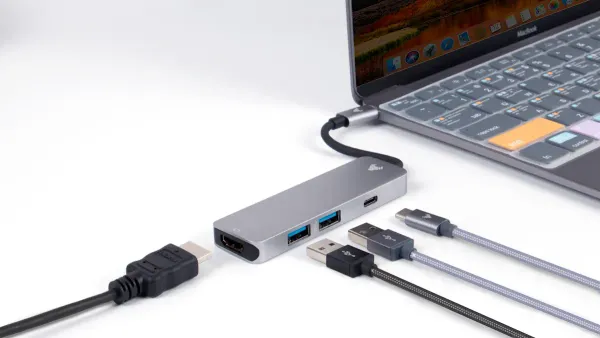
Mini USB Connector Devices
You often find the mini usb connector in older gadgets. Many digital cameras from the early 2000s use this connector. Some MP3 players and GPS units also rely on mini USB. Early smartphones, such as the BlackBerry Curve and some Palm devices, include this port. These devices have larger electronic components and integrated circuits, so they need more space for usb connectors.
Here are some examples of devices that use the mini usb connector:
- Digital cameras (Canon PowerShot, Nikon Coolpix)
- MP3 players (SanDisk Sansa, Creative Zen)
- GPS navigation units (Garmin Nuvi)
- Early smartphones (BlackBerry Curve, Palm Treo)
Note: If you work with legacy equipment, you may still need a mini micro usb cable for charging or data transfer.
Micro USB Connector Devices
You see the micro usb connector in many modern devices. Most Android smartphones and tablets from 2010 to 2018 use this connector. Bluetooth headphones, portable speakers, and power banks also rely on micro USB. These devices use smaller electronic components and integrated circuits, so they benefit from the slim design of micro usb connectors.
Common devices with micro usb connector include:
- Android smartphones (Samsung Galaxy S5, Motorola Moto G)
- Tablets (Amazon Kindle Fire, Samsung Galaxy Tab)
- Bluetooth headphones and speakers
- Power banks and portable chargers
- Game controllers (PlayStation 4, Xbox One)
You notice that the shift from mini usb to micro usb in consumer electronics happened as devices became thinner and more advanced. Smaller usb connectors allow engineers to design compact gadgets with powerful integrated circuits. This change helps you enjoy lighter, faster, and more reliable devices.
Performance
Data Transfer
You rely on usb connectors for fast and reliable data transfer between devices. Mini USB connectors support basic data transfer, but you may notice slower speeds. Most mini USB connectors handle up to 12 megabits per second. This speed works for older electronic components and integrated circuits, but it limits how quickly you can move files.
Micro USB connectors improve your experience. You get data transfer rates up to 480 megabits per second. This speed helps you move photos, music, and documents quickly. Micro USB connectors work well with advanced electronic components and integrated circuits. You see better performance in smartphones, tablets, and other modern gadgets.
Here is a quick comparison:
| Connector Type | Max Data Transfer Rate | Typical Devices |
|---|---|---|
| Mini USB | 12 Mbps | Digital cameras, MP3 players |
| Micro USB | 480 Mbps | Smartphones, tablets, game controllers |
Tip: If you want faster charging and data transfer, choose micro USB connectors for your devices.
Charging
You use usb connectors for charging many devices. Mini USB connectors provide basic charging for older gadgets. You may notice slower charging times because mini USB connectors support lower power levels. This limitation comes from the design of older electronic components and integrated circuits.
Micro USB connectors deliver better charging performance. You get higher power output, which means your devices charge faster. Micro USB connectors support up to 1.8 amps, making them suitable for smartphones, tablets, and power banks. The improved design matches the needs of modern electronic components and integrated circuits.
Consider these points when you compare charging:
- Mini USB connectors: Slower charging, best for legacy devices.
- Micro USB connectors: Faster charging, ideal for modern gadgets.
You benefit from improved power and data transfer when you use micro USB connectors. This advantage supports the performance of your devices and helps you stay connected.
Uses Today
Mini USB Connector Applications
You still find mini USB connectors in some devices today, even though most manufacturers have moved to newer options. You may use mini USB connectors with older digital cameras, MP3 players, and GPS units. These devices often have larger electronic components and integrated circuits. The mini USB connector gives you a way to transfer photos, music, or maps from these gadgets to your computer.
You might see mini USB connectors in some laboratory equipment or industrial tools. These tools rely on simple electronic components and integrated circuits that do not need high-speed data transfer. If you work with legacy equipment, you may need mini USB cables for charging or data transfer.
Note: Mini USB connectors help you keep older devices working. You can connect them to computers or chargers and extend their life.
Common mini USB connector applications:
- Digital cameras for photo transfer
- MP3 players for music syncing
- GPS units for map updates
- Laboratory instruments for basic data exchange
Micro USB Connector Applications
You use micro USB connectors with many modern devices. Most smartphones, tablets, and portable speakers rely on micro USB for charging and data transfer. These devices use compact electronic components and integrated circuits, which fit well with the slim design of micro USB connectors.
You also find micro USB connectors in game controllers, Bluetooth headphones, and power banks. The micro USB connector supports faster data transfer and higher charging speeds. This helps you keep your devices powered and ready to use.
Micro USB connectors play a key role in supporting advanced electronic components and integrated circuits. You benefit from reliable connections and quick charging. Many smart home devices, such as security cameras and sensors, use micro USB connectors for power and communication.
Popular micro USB connector applications:
- Smartphones and tablets for charging and syncing
- Bluetooth headphones and speakers for power and updates
- Game controllers for fast data transfer
- Power banks for quick charging
- Smart home devices for connectivity
Tip: Micro USB connectors give you a simple way to connect and power modern devices. You can enjoy faster performance and longer device life.
Choosing Mini Micro USB
User Tips
When you choose between mini micro usb connectors, you need to think about your device and how you use it. Picking the right usb connector helps you keep your gadgets working well and protects the electronic components and integrated circuits inside.
Here are some practical tips to help you make the best choice:
-
Check Device Age
Older devices usually use mini USB connectors. You will see these in digital cameras, MP3 players, and early smartphones. Newer devices, like most smartphones and tablets, use micro USB connectors. If you have a recent gadget, you will likely need a micro USB cable. -
Look at Compatibility
Mini USB connectors do not fit into modern devices. Micro USB connectors work with many current gadgets, but not all. Some micro USB cables only support USB 2.0, so they may not work with USB 3.0 devices. Always check your device’s manual or port shape before buying a cable. -
Think About Durability
Both mini USB and micro USB connectors can break if you bend them too much. Micro USB connectors last longer, but you still need to handle them with care. If you use your device every day, choose a high-quality cable to protect the electronic components and integrated circuits. -
Avoid Common Mistakes
Many people pick the wrong cable because they do not check the connector type. Some users try to use a micro USB cable with a device that needs USB-C or USB 3.0, which will not work. Micro USB connectors cannot match the fast data transfer or charging power of USB-C. If you need high-speed data or fast charging, look for a device with a USB-C port. -
Consider Your Needs
If you use older equipment in a lab or with special tools, you might still need a mini USB connector. For most modern gadgets, micro USB is the better choice. It supports faster data transfer and better charging, which helps your device’s electronic components and integrated circuits work smoothly.
Tip: Always match your cable to your device’s port. This simple step protects your device and keeps the integrated circuits safe from damage.
Factors to Consider Table
| Factor | Mini USB | Micro USB |
|---|---|---|
| Device Age | Older devices | Newer devices |
| Compatibility | Obsolete, not for new gadgets | Common in modern gadgets |
| Durability | Less durable | More durable |
| Data Transfer | Slower | Faster |
| Charging Power | Lower | Higher |
You can see that the right usb connector keeps your device running well. It also protects the small electronic components and integrated circuits inside. When you choose carefully, you avoid problems and get the best performance from your gadgets.
You should choose micro USB connectors for most modern devices. Micro USB stands out because it is slimmer, more durable, and supports faster charging and data transfer. You find micro USB as the standard for many portable devices, making it easy to connect electronic components and integrated circuits. Mini USB connectors are larger and less durable, often found in older gadgets.
| Disadvantage | Mini USB Description |
|---|---|
| Durability | Fragile, 5,000 cycles |
| Compatibility | Not for On The Go or new devices |
| Availability | Hard to find, mostly phased out |
Tip: Always check your device’s port. If you use newer electronics with advanced integrated circuits, micro USB is the better choice for reliable performance.
FAQ
What is the main difference between Mini USB and Micro USB connectors?
You will notice that Mini USB connectors are larger and less durable. Micro USB connectors are slimmer and last longer. Both connect electronic components and integrated circuits, but Micro USB supports more advanced devices and faster data transfer.
Why did device makers switch from Mini USB to Micro USB?
Device makers wanted to build thinner gadgets with smaller electronic components and integrated circuits. Micro USB connectors helped them do this. The switch also improved durability and charging speed. This change is a key part of USB connector history.
Can I use a Micro USB cable with a Mini USB device?
You cannot use a Micro USB cable with a Mini USB device. The shapes do not match. Each connector fits specific electronic components and integrated circuits. Always check your device’s port before choosing a cable.
How do Mini USB and Micro USB fit into the types of USB connectors?
Mini USB and Micro USB are two important types of USB connectors. Both played a role in the history of connecting electronic components and integrated circuits. Today, Micro USB is more common, but USB-C is becoming the new standard.
Are Mini USB connectors still used in new electronic devices?
You rarely see Mini USB connectors in new devices. Most new gadgets use Micro USB or USB-C. Mini USB connectors remain in some older equipment with larger electronic components and integrated circuits.