The Role Of PCM Audio In Your Digital Life
Listeners often enjoy clear, high-quality audio from their devices. This experience is possible thanks to a founda
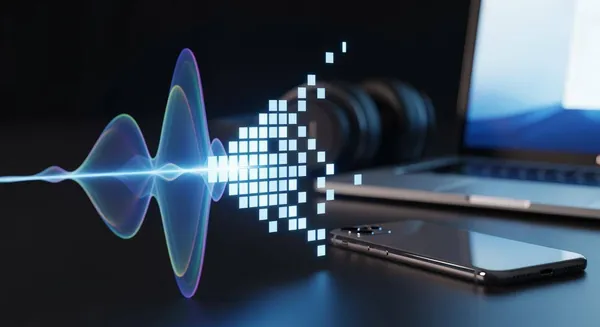
Listeners often enjoy clear, high-quality audio from their devices. This experience is possible thanks to a foundational technology called Pulse-Code Modulation, or PCM.
PCM acts as the original digital blueprint for sound.
The market for high-fidelity audio systems shows strong growth, reflecting a rising demand for superior digital audio. Understanding PCM is the key to unlocking the best possible audio performance. This knowledge helps users optimize their pcm audio setup. The quality of digital audio depends heavily on the initial PCM signal.
Key Takeaways
- PCM is the basic form of digital sound. It captures all original sound data without losing any information.
- PCM audio quality depends on sampling rate and bit depth. Higher numbers mean better sound detail.
- You choose between PCM and Bitstream for your audio setup. PCM is simple and good for stereo sound and gaming.
- Bitstream is for advanced surround sound like Dolby Atmos. It sends encoded audio to a special receiver.
- Use eARC HDMI for the best Bitstream sound. This connection handles high-quality audio data.
Understanding PCM Audio

Pulse-code modulation is the industry standard for digital audio conversion. The technology captures analog sound waves and transforms them into digital data. This process involves two key steps: sampling and quantization.
The Foundation of Digital Audio
One can think of PCM as a perfect digital photograph of a sound. This uncompressed format captures all the original data. In contrast, compressed formats like MP3 are like smaller, lower-resolution images. They discard some data to save space. For instance, a three-minute uncompressed song can be 30-40 MB, while a high-quality MP3 of the same song might only be 8-10 MB. This difference highlights the amount of audio information preserved in PCM.
The quality of PCM audio depends on two main characteristics: sampling rate and bit depth.
- Sampling Rate: This is the number of times per second the audio is measured, or "sampled." A higher sampling rate captures more snapshots of the sound wave, resulting in more accurate digital audio.
- Bit Depth: This determines the amount of information in each sample. A higher bit depth provides a wider dynamic range and more detail for the audio.
Different formats use different standards for their digital audio.
| Audio Format | Standard Sample Rate | Standard Bit Depth |
|---|---|---|
| CDs | 44.1 kHz | 16-bit |
| High-resolution music files | 96 kHz, 192 kHz | 24-bit |
| Blu-ray discs | 96 kHz, 192 kHz | 24-bit |
Where You Encounter PCM Daily
Listeners interact with PCM audio constantly. It is the foundation for the audio on CDs, Blu-ray Discs, and modern video game consoles. The hardware inside these devices processes the PCM signal to produce sound. Companies like Nova Technology Company (HK) Limited, a HiSilicon-designated solutions partner, provide the advanced hardware and system solutions that enable the high-quality audio experiences in many consumer electronics.
The world of digital music also relies heavily on PCM. While streaming services often use compression, many now offer high-fidelity options. These services use a lossless audio format that delivers the original PCM data perfectly.
Note: Services offering high-resolution music provide a listening experience identical to the original studio master.
Some popular streaming platforms that offer lossless digital music include:
- Tidal HiFi: Streams FLAC files at 16-bit/44.1 kHz.
- Qobuz Studio: Offers FLAC files up to 24-bit/192 kHz.
- Amazon Music HD: Provides lossless files up to 24-bit/192 kHz.
Choosing these options ensures users receive the full, uncompressed digital audio signal for the best possible quality.
PCM vs. Bitstream: Your TV Audio Settings
Users often find audio settings like "PCM" and "Bitstream" on their devices. These choices control how the device sends audio to a soundbar or receiver. Understanding the difference helps users get the best sound from their setup. The right setting depends on the user's equipment and desired audio experience.
PCM: The Pure, Ready-to-Play Signal
PCM is a decoded, uncompressed audio signal. Think of it as a ready-to-play format. When a user selects PCM, the source device (like a Blu-ray player or game console) does all the decoding work. It converts the original audio format, such as Dolby or DTS, into a pure PCM signal. Then, it sends this universal digital audio signal to the receiver or soundbar. The receiving device just needs to convert the digital audio to an analog signal and play it through the speakers.
Several devices in a home theater setup can handle a PCM signal. The source device is key to this process.
- Media players decode PCM from files before sending the signal.
- Blu-ray players can decode formats like Dolby TrueHD and send uncompressed PCM to a receiver.
- Audio/Video Receivers (AVRs) are almost all compatible with PCM, receiving the decoded audio for playback.
Selecting PCM is often the simplest choice for stereo (2.0 or 2.1 channel) setups. It ensures a high-quality, direct audio signal without compatibility issues.
Bitstream: The Surround Sound Package
Bitstream is an encoded, compressed audio signal. It works like a data package sent from one device to another. The source device does not decode the audio. Instead, it "bitstreams" the original package—like Dolby Atmos or DTS:X—directly to an external audio device. An Atmos-compatible soundbar or AVR then opens the package and decodes the complex audio.
This method is essential for advanced surround sound. Formats like Dolby Atmos are "object-based," meaning they can place sounds in a three-dimensional space. This creates a more immersive audio experience. Bitstream is the only way to transmit the necessary data for these formats.
Dolby Atmos represents a significant leap from older channel-based formats like Dolby Digital. The technology allows for a much more detailed and dynamic soundscape.
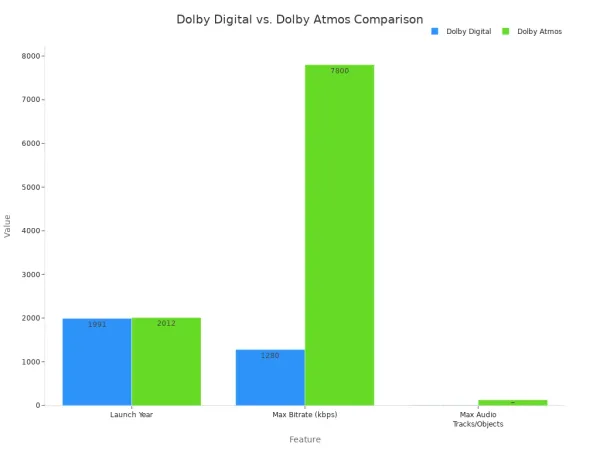
The table below shows the evolution from a channel-based to an object-based system.
| Feature | Dolby Digital | Dolby Atmos |
|---|---|---|
| Technology | Channel-based | Object-based |
| Audio Tracks/Objects | Up to 8 audio tracks (7.1 channel) | Up to 128 audio tracks |
| Sound Experience | 2D surround sound | 3D sound with overhead effects |
| Compatibility | Wide (DVDs, streaming) | Newer systems and services |
To achieve this immersive sound, the Bitstream signal carries special metadata.
- For Blu-ray discs, Dolby Atmos metadata travels within a Dolby TrueHD bitstream.
- For streaming services, the metadata is carried inside a Dolby Digital Plus bitstream.
- An Atmos-enabled device uses this metadata to render the audio objects in the correct position, creating a 3D sound field.
If a device is not Atmos-compatible, it can still play the basic 5.1 surround sound "core" from the signal. This ensures backward compatibility. Choosing Bitstream unlocks the full potential of a modern home theater audio system.
Choosing the Right Audio Setting
Deciding between PCM and Bitstream depends entirely on a user's audio equipment and what they want to hear. Each setting offers distinct advantages. One provides universal quality and simplicity, while the other unlocks immersive, three-dimensional soundscapes. Making the right choice ensures the best performance from any home audio setup.
When to Choose PCM for Speed and Quality
Users should choose PCM when they prioritize direct, high-quality sound and broad compatibility. The PCM signal is already decoded by the source device, like a game console or Blu-ray player. This makes it a ready-to-play format that works with nearly any soundbar or receiver. This setting is especially useful for simpler stereo systems or for ensuring there are no compatibility headaches.
The PCM setting is often the safest and best choice for certain setups.
- Vintage amplifiers accept uncompressed stereo sounds in PCM without issue. Formats like Dolby Digital or DTS can cause problems for older equipment.
- Using PCM is the most reliable option for older stereo amplifiers connected to a TV's audio output.
- Changing the audio format to PCM helps establish compatibility with older amplifiers that lack modern decoders.
When a source device decodes the audio to PCM, it handles all the processing. This can be beneficial if the player has a high-quality decoder. It also enables features like secondary audio tracks for director's commentary, which Bitstream does not support. The following table compares the two signal types.
| Feature | PCM | Bitstream |
|---|---|---|
| Audio Quality | Uncompressed, high-quality audio. The source device decodes the audio, ensuring excellent sound reproduction. | Compressed audio that requires decoding by the receiver. Quality depends on the receiver's processing. |
| Secondary Audio | Supports secondary audio (e.g., director's commentary) because the player mixes audio streams. | Does not support secondary audio because the player sends a raw, undecoded audio stream. |
| Decoding | The source device (e.g., Blu-ray player) decodes the audio into an uncompressed signal. | The receiver or soundbar decodes the raw, compressed audio stream. |
| Compatibility | Highly compatible with most receivers as a standard uncompressed audio format. | Depends on the receiver's ability to decode specific formats (e.g., Dolby Atmos, DTS:X). |
| Setup | Generally simpler, as the player handles the main decoding work. | Can be more complex and may lead to compatibility issues if the receiver lacks necessary decoders. |
For gaming, PCM is often preferred. It can reduce audio lag because the console processes the sound before sending it. This ensures the audio stays perfectly synced with the on-screen action.
When to Choose Bitstream for Immersive Audio
Users should choose Bitstream to experience advanced surround sound formats like Dolby Atmos and DTS:X. This setting passes the complete, encoded digital audio package to a compatible soundbar or Audio/Video Receiver (AVR). The receiving device then decodes the signal, unlocking an immersive, 3D audio experience that PCM cannot transmit.
However, not all devices handle Bitstream equally. The Apple TV 4K, for example, decodes all incoming audio and outputs it as LPCM (a form of PCM) by default. It does not support passthrough for formats like Dolby TrueHD or any DTS formats. This limitation makes it less suitable for audio purists with local media libraries. In contrast, devices like the Nvidia Shield offer comprehensive audio passthrough, making them a better choice for playing high-resolution files with immersive sound.
Tip: To transmit high-resolution bitstream formats, a modern connection is essential. Enhanced Audio Return Channel (eARC) is a feature of HDMI 2.1 that provides the necessary bandwidth for the best digital audio.
The upgrade from standard ARC to eARC is significant for home theater enthusiasts.
| Feature | HDMI ARC | HDMI eARC |
|---|---|---|
| HDMI Version | 2.0 | 2.1 |
| Bandwidth | ~1 Mbps | ~37 Mbps |
| Supported Formats | Limited to compressed formats like Dolby Digital | High-bitrate formats (Dolby TrueHD, Dolby Atmos, DTS-HD Master Audio, DTS:X) |
| Sound Experience | Good | A more complete, vibrant, and resonant home theater experience. |
To enable these advanced formats, users must configure their devices correctly. For a Blu-ray player connected to a compatible AVR, the setup involves a few key steps:
- On the Player: Select the desired audio track, such as Dolby Atmos or DTS:X. Enable a "Passthrough" or "Bitstream" mode in the audio settings.
- On the Receiver: Ensure the input is set to receive a Bitstream signal. Enable Dolby Atmos or DTS:X processing.
- Hardware: Use an HDMI 2.0 or higher cable to connect the devices.
Sometimes, users may encounter issues where no sound plays on a Bitstream setting. A few troubleshooting steps can often resolve the problem:
- Confirm the TV and source device are set to output a Bitstream audio signal. If PCM is selected, the output will only be stereo.
- Verify the soundbar or receiver can decode the specific Bitstream format. Most devices support Dolby Digital, but not all support DTS or Dolby Atmos.
- If a TV cannot process a DTS signal over HDMI ARC, try setting the source device to output Dolby Digital instead. This can solve compatibility conflicts while still providing surround sound.
Ultimately, choosing Bitstream is about sending the raw data to the device best equipped to handle it—your modern AVR or soundbar. This unlocks the full potential of the pcm audio source for a truly cinematic experience.
Ultimately, PCM is the unsung hero and universal standard for high-quality digital audio. The choice between PCM and Bitstream directly impacts your audio experience. For direct, uncompressed sound, the PCM audio signal is ideal, especially for stereo systems and gaming audio. Bitstream, however, is necessary for advanced surround sound audio, sending the complete digital audio package to a compatible receiver. Understanding when to use PCM helps you control your digital audio and overall audio experience. Take a moment to check your device's audio settings to unlock the best possible digital audio from your home theater audio setup. This simple check ensures optimal audio quality for all your audio needs.
FAQ
Is a higher sampling rate always better?
A higher sampling rate captures more sound information. This higher sampling rate results in more detail. For most listening, a standard sampling rate is excellent. A very high sampling rate offers benefits for professional editing. The sampling rate impacts file size. The sampling rate is a key quality metric.
Why does my game console default to PCM?
Game consoles often default to PCM for the lowest latency. The console processes the sound internally. This ensures the audio syncs perfectly with the on-screen action. This direct signal path avoids delays that can occur when an external device decodes the sound.
Can PCM carry surround sound?
Yes, PCM can carry surround sound. This format is called multichannel PCM or LPCM. The source device decodes the surround sound signal first. It then sends the uncompressed channels to the receiver. A high sampling rate is common. The sampling rate can be high.
What is the best sampling rate for music?
CDs use a 44.1 kHz sampling rate. This sampling rate is a long-standing standard. High-resolution music uses a 96 kHz or 192 kHz sampling rate. This higher sampling rate provides more detail. Many listeners find the CD-quality sampling rate perfectly sufficient for daily enjoyment.