USB-A vs Standard USB What You Need to Know
You may ask, is usb a the same as usb? The answer is simple. No, they are not the same. The term usb refers to the overall
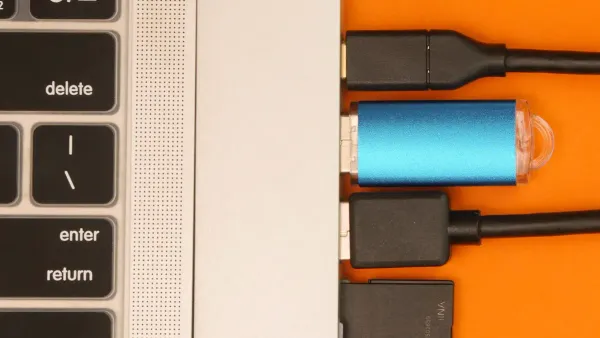
You may ask, is usb a the same as usb? The answer is simple.
No, they are not the same. The term usb refers to the overall technology standard. The rectangular usb-a plug is just the most common physical connector for this usb standard.
Think of usb-a and the newer usb-c as different doors to your devices. Each connector shape, whether usb-a or usb-c, is a physical interface. It links your cable to the internal usb circuits inside your devices. These usb circuits control power and data for your devices, and the usb-c interface supports the most advanced usb functions. Understanding each usb connector helps you use your devices correctly.
Key Takeaways
- USB is a general term for a technology standard, but USB-A is a specific type of connector.
- USB-C is a newer, oval-shaped connector that is reversible and supports faster speeds and more power than USB-A.
- USB-C can transfer data much faster and charge devices quicker, even powering laptops and monitors.
- USB-C is becoming the main connector for new devices, partly due to new rules in Europe.
- You can still use older USB-A devices with new USB-C ports by using adapters.
Is USB A the Same as USB?
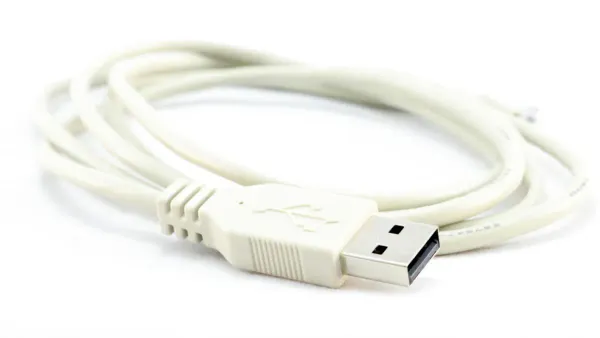
So, is usb a the same as usb? The answer remains no. The Universal Serial Bus (USB) is a broad technical standard. The USB Implementers Forum (USB-IF) manages these usb standards. The connectors you see, like usb-a and usb-c, are the physical ports that give you access to the usb technology inside your devices. Let's look at the different types of usb ends.
The USB-A Connector
You will instantly recognize the usb-a connector. It has a flat, rectangular shape measuring about 12 mm wide and 4.5 mm high. This type-a design is not reversible, so you must plug it in correctly. First introduced with usb 1.0 in 1996, it became the standard with usb 1.1 in 1998. Inside, older usb-a connections use four pins for power and data. Newer type-a ports have nine pins to support faster speeds, connecting directly to the integrated circuits that manage data flow in your devices. You find these usb-a connections on computers, game consoles, and peripherals like keyboards.
The USB-C Connector
The usb-c connector is the modern standard for many new devices. It features a small, oval shape that is fully reversible. You can plug it in upside down, and it still works perfectly.
This convenience comes from its symmetrical 24-pin design. Key pins for data and power are duplicated, so the internal circuits always make a proper connection regardless of orientation.
Major companies like Apple and Intel helped develop the type-c connector. It is important to know that usb-c is the physical port. The performance of that port depends on the usb protocol, such as usb4. A usb-c port is necessary for the fastest usb speeds. You will see usb-c on new smartphones, laptops, and tablets.
Other Common USB Types
Before usb-c became dominant, you probably used other usb types. This usb types comparison shows how connectors have evolved.
- Mini-USB: This smaller, five-sided connector was common on older devices. You might find it on early digital cameras and PDAs.
- Micro-USB: This even smaller, trapezoidal connector replaced Mini-USB. It became the standard for early smartphones, external hard drives, and many other portable devices before the shift to usb-c.
Understanding these different types of usb ends helps you identify the right cables for all your devices, both old and new. While you ask "is usb a the same as usb?", you now see that usb-a is just one part of the larger usb world.
USB-A vs USB-C: Key Differences
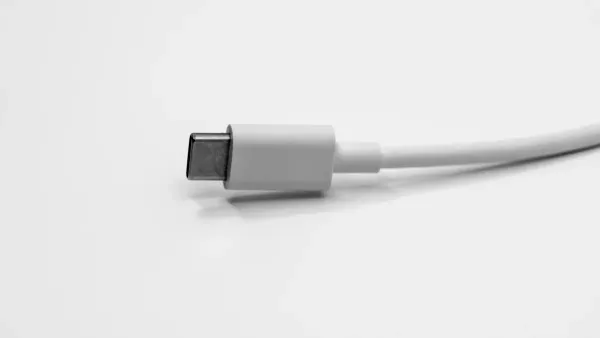
When you compare usb-a vs usb-c, you will find several key differences in speed, power, and convenience. The physical connector you use is the gateway to the integrated circuits inside your devices, and these circuits determine the ultimate performance.
Here is a quick overview of the key differences between the two connectors.
| Feature | USB-A | USB-C |
|---|---|---|
| Shape | Rectangular, non-reversible | Oval, reversible |
| Max Speed | Up to 10 Gbps (USB 3.2 Gen 2) | Up to 40 Gbps (USB4) |
| Max Power | ~4.5W - 15W | Up to 240W (with USB PD) |
| Versatility | Primarily for data and basic power | Data, power, and video (Alt Mode) |
Data Transfer Speed
One of the most important key differences is the potential for data transfer rates. The physical connector must have the right internal wiring to support the usb speed protocols managed by your device's integrated circuits.
The rectangular type-a connector has a long history and good compatibility. You can plug a modern USB 3.0 type-a connector into an old USB 1.1 port, but the internal circuitry will limit the speed to the older standard. The type-a connector design supports these usb standards:
- USB 1.1 (Full Speed)
- USB 2.0 (Hi-Speed)
- USB 3.2 Gen 1 (SuperSpeed 5 Gbps)
- USB 3.2 Gen 2 (SuperSpeed 10 Gbps)
The usb-c connector, however, is built for the future. Its 24-pin design allows the internal circuits to manage more complex data lanes. This makes usb-c essential for the fastest usb standards available today.
- USB 3.0: Up to 5 Gbps
- USB 3.2: Up to 20 Gbps
- USB4: Up to 40 Gbps
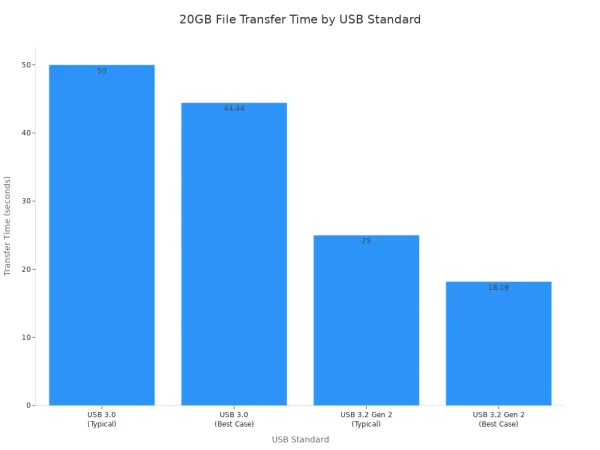
To put that in perspective, a 20GB file transfer shows the real-world usb speed difference. A fast type-a connection might take around 50 seconds, while a high-performance type-c connection can finish the same task in as little as 18 seconds.
Furthermore, the versatile usb-c connector is the foundation for other high-speed data protocols. It allows technologies like Thunderbolt 4 to use its physical interface, enabling a consistent, high-performance experience for data-heavy tasks.
Power and Charging Capability
Power delivery is another area with major key differences. The usb-a connector provides limited power, which is managed by simple power circuits.
- A standard USB 2.0 type-a port delivers about 2.5 watts.
- A USB 3.0 type-a port increases this to 4.5 watts.
This is enough power for a mouse or keyboard, but it is very slow for charging modern devices.
The usb-c connector changes everything with a technology called USB Power Delivery (PD). The internal circuits in your device and charger communicate to negotiate the optimal power level. The latest USB PD 3.1 specification enables Extended Power Range (EPR), allowing a usb-c cable to deliver up to 240 watts (48V at 5A). This enables high-speed charging for a huge range of electronics.
For example, charging an iPhone from 0-50% shows the dramatic improvement:
- 5W USB-A Charger: Takes about 90 minutes.
- 30W USB-C PD Charger: Takes only 30 minutes.
This massive power capability means you can use a single usb-c cable to power demanding devices. You can run and charge gaming laptops and even large 4K monitors, like some ViewSonic models that accept up to 100W of power, entirely through a usb connection.
Convenience and Versatility
Beyond speed and power, usb-c offers superior convenience. You can plug it in upside down, and it just works. This is because its symmetrical 24-pin design ensures the internal circuits always make a proper connection. The old usb-a connector lacks this user-friendly feature.
The true versatility of usb-c shines with Alternate Modes. This feature allows the connector to carry more than just usb data. For example, DisplayPort Alt Mode lets the integrated circuits in your laptop repurpose some of the usb-c pins to send video and audio data directly to a monitor. You no longer need a separate HDMI or DisplayPort cable.
This all-in-one capability makes usb-c the perfect choice for docking stations. You can plug a single type-c cable into your laptop and get access to:
- Multiple monitor outputs (HDMI, DisplayPort)
- A wired Ethernet connection
- Several usb-a ports for older accessories
- An audio jack
- Power for charging your laptop
This level of integration and compatibility is impossible with the older usb-a standard. The usb-c connector is a truly universal port for modern data, power, and video needs.
The Future of USB and Your Devices
The world of technology is moving quickly toward a single, universal connector. You can see this change in the new devices you buy. The future of the usb standard is clearly centered around the versatile usb-c port.
Why USB-C is Taking Over
The usb-c connector is becoming the new standard for a simple reason: it does everything better. Its design supports faster data, more power, and video, all in one reversible plug. Major companies like Apple pushed the industry forward by removing usb-a ports from flagship devices like the MacBook Pro back in 2016. This move encouraged other manufacturers to adopt the superior usb-c port.
A major push comes from government regulation. The European Union has mandated that usb-c become the common charging port for most new electronic devices.
This new rule aims to make your life easier and help the environment.
- Effective Date: Most new devices sold in the EU, like phones and headphones, must use usb-c for charging starting at the end of 2024. Laptops will follow in 2026.
- Consumer Benefits: You will be able to use one usb-c charger for many different devices, saving money.
- Environmental Impact: This change is expected to reduce electronic waste by an estimated 11,000 tons every year.
This regulation solidifies usb-c as the future of usb connectivity.
Is USB-A Obsolete?
You might wonder if your usb-a cables and accessories are now useless. The answer is no. The usb-a connector is not obsolete yet, but its role is changing. While new high-performance devices favor usb-c, usb-a maintains a strong presence. It remains common in budget-friendly electronics and rugged industrial equipment where its simple, robust connection is valued.
The transition to usb-c has also created a large market for adapters and hubs. This ensures backward compatibility for your existing gear. You can easily connect your older usb-a peripherals to a new usb-c laptop. The strong demand for these adapters shows that usb-a will remain relevant for years, providing compatibility between old and new technology. The usb standard is evolving, but it won't leave your older devices behind overnight.
You now know the answer to "is usb a the same as usb". The classic usb-a plug is different from the modern, powerful usb-c usb standard. Your older usb-a devices remain useful with simple usb adapters. For new high-performance devices, you should choose usb-c. The future of usb is usb-c, and a usb-c port on your devices ensures the best usb experience. The usb-c connector is the superior usb choice for power and speed.
FAQ
Can I plug a USB-A device into a USB-C port?
Yes, you can. You just need an adapter or a usb hub. The adapter correctly maps the pins from the older usb connector to the new one. This allows the internal circuits of both devices to communicate properly.
Does every USB-C cable support the fastest speeds?
No, not all cables are the same. A cable must have the correct internal wiring to handle high-speed data. A basic usb-c charging cable might not support the fastest usb speeds. You should always check the cable's specifications.
Why does my phone charge faster with a USB-C cable?
Your phone charges faster thanks to a feature called USB Power Delivery (PD). The internal power circuits in your phone and charger talk to each other to find the fastest safe charging rate. This advanced usb function requires a usb-c connection.
Is a Thunderbolt 4 port the same as a USB-C port?
They use the same physical usb-c connector, but a Thunderbolt 4 port is more powerful. Its internal circuits guarantee top usb speeds, video output, and faster data transfer. Think of it as a supercharged version of a standard usb port.