Your USB B Plug Connector The Unsung Hero
A person holding a squarish USB cable might not recognize the connector. It is the USB-B connector, an unsung hero for sta
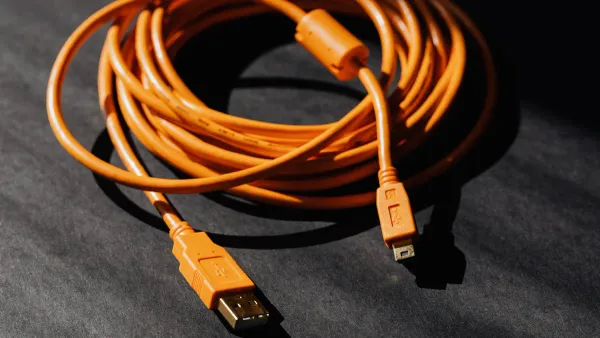
A person holding a squarish USB cable might not recognize the connector.
It is the USB-B connector, an unsung hero for stationary electronics. The USB B plug connector provides a strong, stable connection for the USB standard, linking devices like printers and scanners to a computer. This specific USB connector is designed for reliability, not portability. The robust nature of the USB-B ensures a solid data link, making the USB-B a true workhorse.
Key Takeaways
- The USB-B connector provides a strong and stable connection for devices like printers and scanners. Its unique shape prevents incorrect plugging, protecting your electronics.
- USB-B ports are 'upstream' connections on devices. They send data from the device back to your computer, ensuring smooth communication.
- Many devices, including printers, external hard drives, and audio equipment, use USB-B for reliable data transfer. This is important for tasks like printing or recording music.
- While newer USB-C connectors offer faster speeds, the USB-B remains important. It ensures older, working devices can still connect to modern computers.
What Makes a USB B Plug Connector Unique?
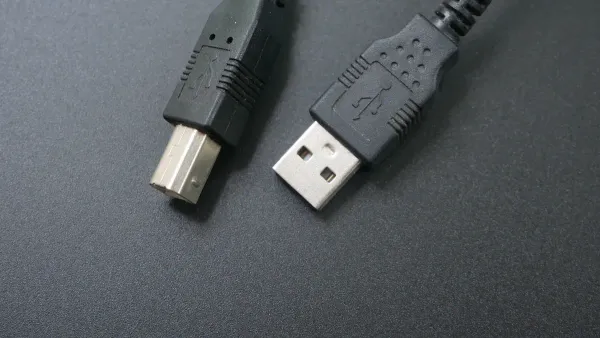
The USB-B connector stands apart from other USB connectors in the family. Its uniqueness comes from two key areas: its physical construction and its specific role within the USB communication hierarchy. These elements work together to make it the perfect choice for certain devices.
Distinctive Shape and Design
The most noticeable feature of the USB-B is its shape. It has a near-square, "blockhead" form with beveled corners on its top edge. This design is not accidental; it serves a critical purpose. The asymmetrical shape guarantees that the connector can only be inserted one way. This prevents incorrect connections that could potentially damage the sensitive integrated circuits inside a device.
This physical design makes the connection incredibly secure. The connector is held firmly in place by friction, making it highly resistant to accidental wiggles or disconnections. This robustness is ideal for stationary equipment that is not meant to be moved often. The USB Implementers Forum (USB-IF) sets clear standards for these physical properties.
Did You Know? Durability Ratings The standard USB-B connector is engineered for reliability over thousands of uses. Official specifications rate it for a minimum of 1,500 insertion and removal cycles, ensuring a long service life for a peripheral that stays put.
This thoughtful engineering is why the usb b plug connector became a standard for peripherals. Its design was specifically intended to prevent users from connecting two host computers together, a scenario that could cause electrical issues.
Upstream vs. Downstream
To understand the usb b plug connector, one must understand the USB data flow. The USB standard organizes devices into a clear structure with a host (the computer) and peripherals (like a printer). This creates a directional flow of data, described as "upstream" and "downstream."
- Downstream Port: This is the port on the host computer (usually a USB-A port). It sends commands and data "down" to the connected device.
- Upstream Port: This is the port on the peripheral device (the USB-B port). It sends data "up" to the host computer.
Think of it like a river. The computer is the source of the river, and data flows "downstream" to the printer. When the printer needs to send information back (like an "out of paper" status), it sends it "upstream" to the computer. The USB-B port is the designated entry point for this upstream communication on the device itself. This clear, directional system is fundamental to how the USB protocol operates, ensuring that data packets travel between the host and the peripheral in an orderly fashion. All usb connectors follow this principle, but the USB-B is the classic physical representation of an upstream port on a device.
Common USB-B Applications
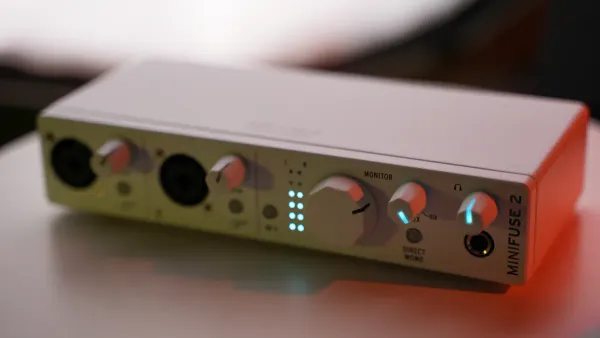
The USB-B connector became a standard for good reason. Its design provides a dedicated, stable link for devices where connection integrity is more important than portability. This makes it a perfect fit for equipment in offices, studios, and even industrial settings.
Office and Home Peripherals
Many office devices rely on the USB-B port. Printers, scanners, and all-in-one machines are prime examples. These peripherals contain complex internal circuit boards that must receive commands from a computer without error. The robust physical connection of a USB-B cable ensures that the data stream remains constant.
Pro Tip: USB vs. Wi-Fi for Printing 🖨️ Experts often recommend using a USB connection over Wi-Fi for printers. A wired USB link offers a more stable and faster data transfer. Wi-Fi signals can drop, which may interrupt or cancel a print job. Some users also report that a direct USB connection provides more accurate color reproduction in images, as wireless drivers can sometimes mismanage color profiles.
Modern office scanners require significant bandwidth to transfer high-resolution images quickly. For example, many scanners need speeds up to 5 Gbit/s, a rate supported by the USB 3.0 standard. The USB-B connector provides the reliable physical interface needed to handle this high-speed data transfer without packet loss, ensuring a clear and complete scan every time. The transfer is direct and efficient.
External Storage and Docks
The need for a secure connection extends to data storage. External hard drive enclosures and multi-port docking stations frequently use a USB-B port. Inside these devices, a bridge controller chip converts data from the hard drive's native format (like SATA) to the USB protocol. A weak connection here could corrupt a large file transfer. The firm fit of the USB-B connector minimizes this risk.
This principle of stability is critical in professional fields. Many industrial and scientific instruments depend on the USB-B for control and data acquisition. Its reliability is essential for a clean data transfer from sensitive equipment. This includes:
- Oscilloscopes and Digital Multimeters
- Waveform and RF Signal Generators
- Specialized PXI Instrumentation
- Industrial gas monitors that transfer safety logs
In these applications, the USB connection is not just for convenience; it is a vital link for instrument control and data integrity. The transfer of precise measurements cannot be compromised.
Audio and Musical Equipment
In the world of professional and high-fidelity audio, signal quality is everything. The usb b plug connector is the industry standard for connecting a wide range of audio gear to a computer. This includes:
- MIDI Keyboards: They transfer musical performance data.
- Audio Interfaces: They handle multi-channel recording and playback.
- Digital-to-Analog Converters (DACs): They convert digital audio files into analog signals for headphones and speakers.
For audio, the timing of the data transfer is just as important as the data itself. A well-designed USB audio device uses an asynchronous transfer mode. This means the device's own high-precision internal clock controls the flow of data, not the computer's less-specialized clock. This process dramatically reduces timing errors, known as "jitter," which can distort sound. The USB-B port provides the stable electrical pathway necessary for this high-fidelity transfer to work perfectly. Many top-rated DACs, from budget models to reference-grade studio equipment, feature a USB-B input as their primary digital connector.
The Different Types of USB B
The USB-B connector has evolved over time. Different versions were created to meet new demands for speed and size. This evolution produced a family of related usb connectors, each with a specific purpose. Understanding these types helps explain why certain devices use a particular port.
Standard USB B
The Standard USB-B is the original, classic version. It first appeared in 1996 with the initial USB specification. This connector supported early USB 1.1 speeds, allowing a data transfer of 12 Mbit/s. The introduction of USB 2.0 in 2000 increased this speed significantly. The USB 2.0 standard enabled a much faster transfer at 480 Mbit/s. This connector became common on devices like printers and early external hard drives. Its design provided excellent backward compatibility, allowing newer computers to connect to older peripherals. This long-term compatibility is a key feature of the USB standard.
A Timeline of USB-B Innovation 🗓️
- 1996: The Standard USB-B plug was released with the first USB specification.
- 2000: The USB 2.0 specification introduced the Mini-B connector.
- 2007: The smaller Micro-B connector was introduced.
- 2008: The USB 3.0 specification launched the SuperSpeed USB-B connector.
USB 3.0 Type B
The need for faster speeds led to the USB 3.0 Type B connector in 2008. This version looks different from the standard one. It has an extra section on top to house more pins. This design change was necessary for high-speed data transfer. The connector provides a theoretical maximum transfer speed of 5 Gbit/s. This massive increase in bandwidth made it ideal for modern high-resolution scanners and large-capacity external storage. The design maintained partial compatibility; a standard USB-B cable could fit into a USB 3.0 port for basic functions, but you need the correct cable for the full speed transfer. This thoughtful engineering ensured a degree of forward compatibility.
Mini and Micro USB B
As electronic devices became smaller, the large Standard USB-B was no longer practical. The industry developed smaller usb connectors to solve this problem. The Mini USB-B arrived in 2000. It was used on devices like early digital cameras and MP3 players. In 2007, the even smaller Micro USB-B replaced it. This connector became the standard for smartphones and other portable gadgets for many years. These smaller connectors were designed for frequent plugging and unplugging. However, their smaller size affected their durability compared to the robust standard USB-B. Their design focused on portability over the rock-solid compatibility needed for stationary devices. The data transfer capabilities of these smaller ports depended on the device's internal USB controller.
The Future of This USB Connector
The usb connector landscape is changing. New standards promise faster speeds and more features. The classic usb-b faces a future defined by both replacement and resilience. Its role is shifting, but its importance in certain areas remains firm.
The Rise of USB-C
The usb standard is evolving with USB-C. This new connector offers a reversible design, so users cannot plug it in the wrong way. It represents a significant leap in technology. USB-C supports much faster data transfer speeds and higher power delivery. This makes it a true all-in-one solution for modern electronics.
The technical advantages of USB-C are clear. It combines data, power, and even video into a single, robust connection. This versatility is why many new devices have adopted it.
| Feature | USB-C | USB-B |
|---|---|---|
| Data Speed | Up to 80 Gbps (USB4 V2) | USB 2.0 and USB 3.0 speeds |
| Power Delivery | Up to 240 watts | Supports various power levels |
| Alternate Modes | DisplayPort Alt Mode supported | Not available |
This advanced capability allows for a much more efficient data transfer and charging ecosystem. The superior design ensures its place as the future of usb connectivity.
Why USB B Endures
Despite the rise of USB-C, the usb-b connector is not disappearing. Its survival is a matter of practicality and reliability. For many existing devices, the usb-b provides a connection that is stable and proven. The principle of backward compatibility is key.
This long-term compatibility ensures that older, yet perfectly functional, equipment continues to work with modern computers. The secure physical connection of the usb-b is essential in professional environments where a failed data transfer is not an option. Its legacy is built on trust and stability. Many industries still depend on this reliable transfer method.
- Printers and Scanners: These devices require stable data transfer for large jobs.
- Musical Equipment: Synthesizers and audio interfaces need a robust connection for flawless performance.
- External Hard Drives: Some models use usb-b for its secure fit, protecting data transfer integrity.
- Industrial Equipment: Factories and labs demand secure connections for instrument control.
- Networking Hardware: Technicians use it for direct management on some switches and routers.
The usb b plug connector is a true workhorse. This usb connector provides a durable, reliable link for stationary peripheral devices. The usb-b ensures stable data transfer for printers, scanners, and audio interfaces. The physical design of the usb-b connector protects the internal circuits. While the usb standard evolves, the usb-b remains vital. The usb-b is a key component in professional and legacy equipment. This usb-b solidifies its role as an unsung hero of usb connectivity.
FAQ
Why do printers still use the USB B connector?
Printers use the USB B connector for its reliability. The secure physical connection protects the internal circuits from signal loss. This ensures a stable data transfer during a print job. A failed transfer can corrupt the entire process, so a strong link is essential.
Can I use a USB 2.0 cable with a USB 3.0 Type B port?
Yes, a standard USB 2.0 cable fits into a USB 3.0 Type B port. The connection, however, will operate at the slower USB 2.0 speed. The extra pins required for the high-speed transfer will not connect, limiting the data transfer rate.
What is the main job of a USB B port?
The primary role of a USB B port is to act as an "upstream" connection on a peripheral device. It provides the pathway for data transfer from the device back to the host computer, completing the communication loop of the USB standard.
Is USB-C better for data transfer?
Yes, USB-C offers a superior data transfer experience. The connector supports newer USB standards with significantly faster speeds. Its advanced pin configuration enables a more efficient transfer of data, making it a more capable and versatile connection for modern electronics.