What Do Graphics Cards Do for Everyday Users
You see graphics cards, also known as GPUs, in most computers today. They process visuals and help your device dis
You see graphics cards, also known as GPUs, in most computers today. They process visuals and help your device display images, videos, and graphics smoothly. You benefit from a graphics card whether you browse the web, stream content, play games, or use creative tools. Many people think powerful GPUs are unnecessary for simple tasks, but future gaming needs and evolving graphics requirements often prove this wrong. Integrated graphics use your computer’s main chip, while dedicated graphics cards have their own hardware for better performance.
- Common misconceptions:
- High-end graphics cards seem wasteful for basic displays.
- Some believe a strong GPU is overkill, not considering future needs.
You don’t need technical expertise to understand what do graphics cards do for your daily computing experience.
Key Takeaways
- Graphics cards enhance your computer's ability to display images, videos, and animations smoothly, improving your overall digital experience.
- A dedicated graphics card is essential for gaming, video editing, and 3D design, providing better performance than integrated graphics.
- Regularly updating your graphics card drivers can significantly improve video playback quality and reduce buffering during streaming.
- Understanding your computing needs helps you choose between integrated and dedicated graphics, ensuring you get the best performance for your tasks.
- Investing in a good graphics card can extend your computer's lifespan and enhance productivity, making it a valuable upgrade.
What Do Graphics Cards Do
Visual Processing
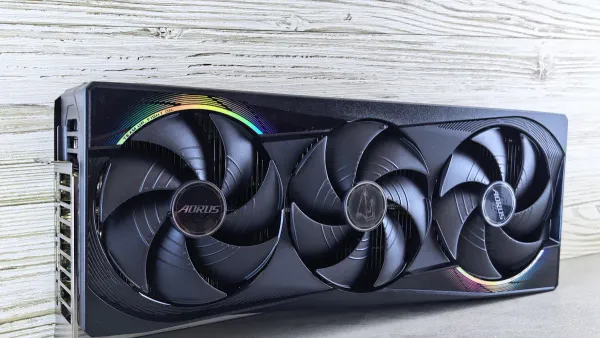
You interact with graphics every time you use a computer. Graphics cards, also called graphics processing units, handle the heavy lifting for visuals. When you ask, what do graphics cards do, you discover that they specialize in rendering images, videos, and animations on your screen. A graphics card, or video card, uses its own hardware to process graphics quickly and efficiently. This means you see high-quality visuals in everything from web pages to movies.
GPUs excel at parallel processing. Unlike your computer’s main processor, which works on one task at a time, graphics processing units can handle many tasks at once. This makes them perfect for rendering complex 3d graphics and animations. When you play games or watch videos, the gpu performs rapid mathematical calculations to create smooth motion and detailed images. This frees up your CPU, so your computer runs faster and more efficiently.
Here’s a quick look at the main functions of graphics cards for everyday users:
- Render images, videos, and animations for your display.
- Process graphics in parallel, making visuals smoother and more detailed.
- Perform fast calculations for graphics, letting your CPU focus on other tasks.
You benefit from these features every day. The gpu ensures that graphics load quickly and look sharp, whether you browse the internet or edit photos. It also accelerates graphics processing, so you experience fewer delays and better performance.
Tip: If you want smooth video playback and crisp images, a good graphics card makes a big difference.
Everyday Uses
You might wonder about the uses for gpus outside of gaming. The answer covers many daily activities. When you stream videos, the graphics processing unit handles video encoding and decoding. This process prepares video content for playback, so you enjoy clear, uninterrupted streams. If you use video conferencing apps, the gpu can enhance your experience with features like noise removal and virtual backgrounds.
Here are some common uses for gpus in everyday life:
- Video streaming: The graphics card processes video content, ensuring smooth playback and sharp visuals.
- Web browsing: Modern websites use animations and interactive graphics. The gpu renders these elements quickly.
- Office productivity: Applications like PowerPoint and Excel use graphics processing units to display charts and images.
- Photo and video editing: The gpu speeds up rendering, so you can edit high-resolution content without lag.
- 3d graphics rendering: If you use creative tools or design software, the gpu handles 3d modeling and animation.
- Machine learning: Some applications use gpus to analyze data and make smart decisions.
- Cryptocurrency mining: The gpu provides the processing power needed for blockchain transactions.
You also see the impact of graphics cards in gaming applications. The gpu processes textures, lighting, and visual effects in real time. This leads to smooth gameplay and realistic graphics. Even if you do not play games, you benefit from the same technology when you watch movies or use creative apps.
Let’s compare how graphics cards offload work from the CPU and improve performance:
| Processing Mode | Inference Time per Frame | Power Consumption |
|---|---|---|
| CPU Only | ~150 ms | Low |
| GPU Only | ~10 ms | High |
| Hybrid CPU-GPU | 5-7 ms | Optimized |
When you use a hybrid approach, you get faster results and optimized power use. This means your computer can handle more tasks without slowing down.
The graphics processing unit also improves image quality through features like anti-aliasing. This technique removes rough edges from images, making visuals look smoother and more natural. Faster memory in gpus helps speed up graphics processing, which boosts overall system performance.
If you ask, what do graphics cards do for your daily routine, you see that they play a key role in almost every digital activity. From rendering 3d graphics to processing video content, the gpu makes your experience faster, smoother, and more enjoyable. The many uses for gpus show why they are essential for modern computing.
Graphics Card Performance
Impact on Gaming
You notice the biggest difference in graphics card performance when you play video games. A modern gpu can boost gaming performance by increasing frame rates and improving visual quality. When you upgrade your gpu, you see smoother gameplay, sharper graphics, and more realistic effects. This matters for both casual and serious gamers. For example, players using newer gpus like the GeForce RTX 20-Series achieve a 53% higher kill/death ratio compared to older cards. You also get better results with high refresh rate monitors, which work best with strong gpus.
Here is a table showing how an upgrade affects popular games:
| Game Title | FPS at 1440p Ultra/Extreme Plus | Performance Gain Compared to RTX 3060 Ti |
|---|---|---|
| Cyberpunk 2077 | 82 FPS | 21% to 75% |
| Forza Horizon 5 | 143 FPS | 21% to 75% |
| God of War Ragnarok | 82 FPS | 21% to 75% |
| Overall Improvement | - | 25% improvement in OpenCL tests |
You experience more immersive virtual reality and virtual reality experiences with a high-performance gpu. A gaming laptop with a powerful gpu and enough vram and memory can handle the latest games and virtual reality content without lag.
Video and Streaming
You rely on your gpu for smooth video playback and streaming. Modern gpus help decode high-resolution video streams, which reduces cpu load and keeps your system running smoothly. For 4K content, both the cpu and gpu work together, but a strong gpu can make a difference when you watch high-definition videos or use multiple screens. Nvidia’s RTX gpus offer AI-based video enhancements that can upscale video quality, making your streaming experience even better.
To avoid buffering, you should keep your graphics card drivers updated. Tools like NVIDIA GeForce Experience or AMD Adrenalin make this easy. Updated drivers improve video rendering and reduce buffering, especially for high-definition content. The table below shows how updates help:
| Evidence | Explanation |
|---|---|
| Updating Graphics Card Drivers | Ensures optimal performance and reduces buffering by using the latest drivers. |
| Accelerated Transcoding | Modern graphics cards support faster video encoding/decoding, enhancing streaming quality. |
Creative Work
You benefit from better graphics card performance when you do creative work like photo editing, video editing, and graphic design. Gpus use parallel processing to speed up rendering times, so you can work faster and more efficiently. GPU acceleration and advanced AI features help you handle high-definition video and complex graphics projects. Modern gpus are programmable, which means you can use them for many creative applications.
Here are some ways a gpu improves your creative workflow:
- You render high-poly models and complex shaders quickly in 3D design software.
- You experience fewer frame drops and smoother playback in video editing programs.
- You handle intricate vector illustrations and 3D rendering with ease.
A gaming laptop with enough vram and memory supports demanding creative tasks. The right gpu architecture boosts productivity and reduces frustration, making your creative process smoother.
Integrated vs. Dedicated Graphics Card
Integrated Graphics Explained
You find integrated graphics built into the CPU of most modern computers. These graphics solutions share system memory with the processor, which helps keep devices slim and energy-efficient. Integrated graphics work well for everyday tasks like web browsing, streaming content, and office work. You can play light games and watch videos up to 1080p without issues. However, integrated graphics struggle with demanding workloads such as video editing, 3D modeling, or complex gaming. The shared memory limits the amount of data the GPU can process, which affects graphics quality and frame rates.
Here is a table that shows the main limitations of integrated graphics:
| Limitation | Description |
|---|---|
| Shared Memory with CPU | Integrated graphics share memory with the CPU, limiting performance in rendering or gaming. |
| Limited Processing Power | Unsuitable for demanding workloads like video rendering or 3D modeling due to limited power. |
| Unsuitable for Demanding Workloads | Tasks like video editing and complex gaming can overwhelm integrated graphics. |
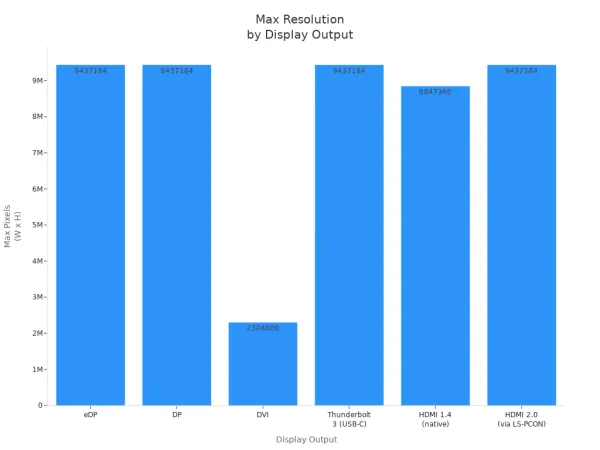
You can connect multiple displays with integrated graphics, but the maximum resolution depends on the output type. For example, HDMI 2.0 supports up to 4096x2160 at 60 Hz.
Dedicated Graphics Card Benefits
A dedicated graphics card comes with its own memory and processing power. You install it separately from the CPU, which means it does not share resources. This setup gives you much higher performance for graphics-intensive tasks. You notice the difference when you play modern games, edit high-resolution videos, or use creative software. Dedicated graphics cards handle 4K gaming, virtual reality, and multitasking with ease. They support multi-monitor setups, which boost productivity by letting you view more content at once.
Here is a table comparing integrated and dedicated graphics cards for everyday computing:
| Feature | Integrated GPU | Dedicated GPU |
|---|---|---|
| Graphics Processing Power | Adequate for everyday tasks, struggles with complex visuals | Built for high-performance tasks, handles 4K gaming and VR |
| Energy Efficiency | Consumes less power, ideal for laptops and mobile devices | Higher power consumption, requires active cooling systems |
| Gaming and 3D Applications | Limited to basic games, struggles with AAA titles | Essential for serious gaming, delivers high frame rates |
| Data-Intensive Workloads | Not suitable for AI and deep learning tasks | Optimized for parallel processing and AI applications |
| Cost and Value | Cost-effective for basic users | Higher investment for professionals needing performance |
A dedicated graphics card also extends the usable life of your computer. Upgrading the GPU can improve performance and delay the need for a new device. You get better cooling and power management, which helps your system last longer.
Choosing for Everyday Use
You should consider your needs before choosing between integrated and dedicated graphics. If you use your computer for browsing, streaming, or office work, integrated graphics offer good value and energy efficiency. For gaming, video editing, or 3D design, a dedicated graphics card is essential for smooth performance.
Here is a quick guide to help you decide:
| Task Type | Recommended GPU Type |
|---|---|
| Everyday tasks (browsing, streaming) | Integrated GPU |
| Modern AAA games | Dedicated GPU |
| Virtual reality experiences | Dedicated GPU |
| Video editing and 3D design | Dedicated GPU |
| Deep learning and rendering | Dedicated GPU |
Tip: If you plan to use multiple monitors or work with high-resolution content, a dedicated graphics card will give you the best experience.
When you choose a GPU, think about your budget, system compatibility, and future needs. Dedicated graphics cards require more power and better cooling, so check your computer’s specifications before upgrading.
Nova Technology Company (HK) Limited serves as a HiSilicon-designated solutions partner. The company specializes in chip-level solutions, system integration, and advanced application scenarios within the integrated circuit industry. You can rely on their expertise for professional support in graphics, multimedia, and AI-driven content processing.
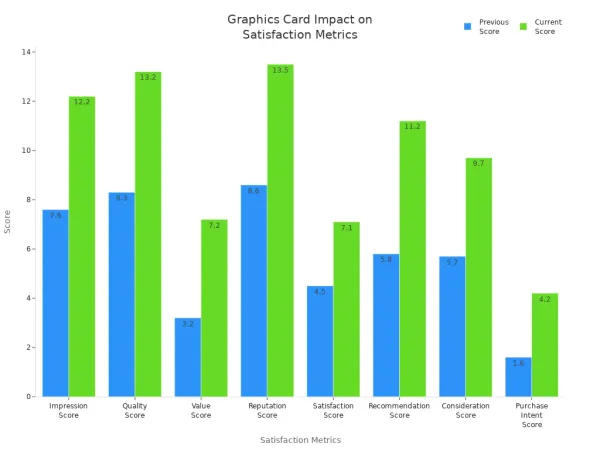
You see real benefits from a good graphics card in your daily life. Graphics cards boost satisfaction, quality, and value, as shown in the table below.
| Metric | Previous Score | Current Score | Change |
|---|---|---|---|
| Impression Score | 7.6 | 12.2 | +4.6 |
| Quality Score | 8.3 | 13.2 | +4.9 |
| Value Score | 3.2 | 7.2 | +4 |
| Reputation Score | 8.6 | 13.5 | +4.9 |
| Satisfaction Score | 4.5 | 7.1 | +2.6 |
| Recommendation Score | 5.8 | 11.2 | +5.4 |
| Consideration Score | 5.7% | 9.7% | +4% |
| Purchase Intent Score | 1.6% | 4.2% | +2.6% |
You can use this table to choose the right graphics card for your needs:
| Type of Graphics Card | Use Cases |
|---|---|
| Integrated Graphics | Everyday tasks like streaming, browsing, and office work. |
| Dedicated Graphics Card | Essential for gaming, 4K video editing, and 3D rendering. |
When you understand graphics cards, you make smarter choices. You learn to check performance, compare value, and pick what fits your needs best.
- You evaluate performance and compatibility.
- You focus on key specs like core count and memory.
- You get the best value for your money.
FAQ
What is the main difference between a GPU and a CPU?
You use a CPU for general tasks like running programs. You use a GPU for processing graphics and visuals. The GPU handles many tasks at once, making it faster for images and videos.
Do you need a dedicated graphics card for web browsing?
You do not need a dedicated graphics card for web browsing. Integrated graphics handle web pages, videos, and basic animations well. You only need a dedicated card for gaming or creative work.
How do you know if your computer needs a graphics card upgrade?
You notice slow performance, lag in games, or poor video quality. You may also see warning messages in creative apps. If you want better visuals or faster processing, consider upgrading.
Can a graphics card help with video editing?
Yes! You speed up video rendering and editing with a good graphics card. You see smoother previews and faster exports, especially with high-resolution videos.
Will a better graphics card improve battery life on a laptop?
A powerful graphics card uses more energy. You may see shorter battery life during heavy tasks. For everyday use, integrated graphics save power and extend battery life.