How to Clean a MAP Sensor for Better Engine Performance
Cleaning your MAP sensor can breathe new life into your engine, giving you smoother starts and better acceleration
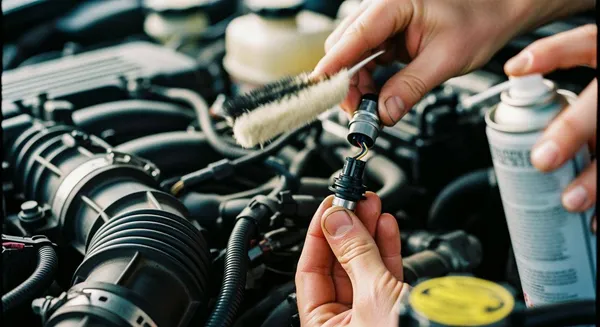
Cleaning your MAP sensor can breathe new life into your engine, giving you smoother starts and better acceleration. This tiny device measures air pressure so your car’s computer can deliver the perfect fuel mix. You only need basic tools to get started. Check out these possible benefits:
- A recent 2023 study found that restoring dirty sensors can improve fuel efficiency by 15-25%.
- Learning how to clean map sensor yourself helps you avoid expensive repairs and keeps your car running longer.
Key Takeaways
- Cleaning your MAP sensor can improve fuel efficiency by 15-25%, saving you money at the pump.
- Look for signs like rough idling or poor acceleration to know when to clean your MAP sensor.
- Follow the step-by-step guide to clean your MAP sensor safely and effectively for better engine performance.
Why Clean the MAP Sensor
MAP Sensor Role in Engine Performance
Your car’s MAP sensor plays a huge role in how your engine runs every day. It measures the pressure inside the intake manifold and sends this data to the engine control unit (ECU). The ECU uses this information to adjust the air-fuel mixture for the best performance. When the MAP sensor works well, you get smooth acceleration, steady idling, and better fuel economy. If the sensor gets dirty or clogged, the ECU can’t make the right adjustments. This can lead to rough idling, stalling, or even increased emissions. You might notice your car feels sluggish or uses more gas than usual.
Tip: In diesel engines, the MAP sensor is especially important for controlling turbocharger performance and fuel delivery. Gasoline engines rely on it too, but diesel engines depend on it for precise air-fuel ratio management.
Signs the MAP Sensor Needs Cleaning
You don’t have to be a mechanic to spot the warning signs. Here are some common symptoms that tell you it’s time to clean the map sensor:
- Poor fuel economy
- Rough idling or engine vibrations
- Engine surges or hesitation during acceleration
- Stalling, especially at stops
- The check engine light comes on
- Error codes related to MAP or Baro Pressure
| Code | Description |
|---|---|
| P0105 | Manifold Absolute Pressure/Barometric Pressure Circuit Malfunction |
| P0106 | Manifold Absolute Pressure/Barometric Pressure Circuit Range/Performance |
| P0107 | Manifold Absolute Pressure/Barometric Pressure Circuit Low Input |
| P0108 | Manifold Absolute Pressure/Barometric Pressure Circuit High Input |
| P0109 | Manifold Absolute Pressure/Barometric Pressure Circuit Intermittent |
If you ignore these signs, you risk poor engine performance, more trips to the gas station, and even failing an emissions test. Regular map sensor cleaning helps you avoid these headaches and keeps your engine running strong.
How to Clean MAP Sensor: Step-by-Step Cleaning Guide
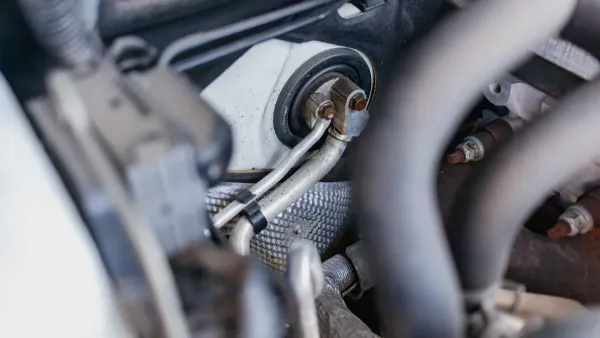
Ready to get your hands a little dirty? This step-by-step cleaning guide will walk you through how to clean map sensor safely and effectively. You don’t need to be a pro mechanic—just follow these steps and your engine will thank you.
Tools and Materials Needed
Before you start, gather everything you need. Here’s a quick checklist:
- A set of screwdrivers (Phillips and flathead)
- A soft-bristled brush or Q-tips
- Electrical contact or MAF sensor cleaner (never use carburetor or brake cleaner)
- Gloves and safety glasses
Tip: Always use a cleaner made for MAP sensors. These products won’t leave residue and are gentle on sensitive electronics. Read the label for instructions.
Locate and Remove the MAP Sensor
You’ll find the MAP sensor in different spots depending on your car. For example, in a 2013 Ford Edge, it sits right after the air filter box. Most vehicles have it on or near the intake manifold. If you’re not sure, check your service manual.
Here’s how to remove the map sensor without causing damage:
- Make sure the engine is cool. Turn off the ignition and remove the key.
- Put on gloves and safety glasses to protect yourself from dirt and chemicals.
- Find the small plastic electrical connector on the sensor. Squeeze the tabs and pull it straight off.
- Use the right screwdriver to remove any screws or bolts holding the sensor in place.
- Gently lift the sensor out. Avoid touching the sensing element.
Safety Note: Don’t rush. The sensor is delicate. Avoid using force or prying tools.
Clean the MAP Sensor Safely
Now you’re ready for the main event—how to clean map sensor the right way.
- Hold the sensor upright with the connector facing up.
- Spray the MAP sensor cleaner directly onto the sensing element. Don’t soak it or spray for too long.
- Use a soft brush or Q-tip if you see stubborn dirt, but never scrub hard.
- Let the sensor air dry completely. Don’t use compressed air or a cloth to speed things up.
Alert: Never use carburetor or brake cleaner. These can ruin the sensor. Stick with products labeled for MAP or MAF sensors.
Reinstall and Test the Sensor
Once the sensor is dry, you can re-install the map sensor:
- Inspect the sensor for cracks or damage. If you see any, replace it instead of reinstalling.
- Place the sensor back in its original spot. Secure it with screws or bolts.
- Reconnect the electrical connector until it clicks.
- Start your engine and let it idle. Watch for smoother performance and check that the engine light stays off.
If you want to double-check your work, you can test the sensor with a multimeter:
- Turn the ignition to “ON” (don’t start the engine).
- Set your multimeter to 20V DC.
- Connect the red probe to the reference power wire and the black probe to ground.
- You should see about 5 volts.
- Start the engine and gently press the throttle. The signal wire voltage should move between 1 and 2 volts.
How Often Should You Clean or Replace the MAP Sensor?
Most experts recommend map sensor cleaning every 30,000 to 50,000 miles. If you notice trouble codes like P0105 or P0106, or if cleaning doesn’t help, it’s time for a new sensor.
| Condition for Replacement | Action |
|---|---|
| Solid trouble code (P0105, P0106) | Replace immediately |
| Physical damage | Replace immediately |
| No improvement after cleaning | Replace immediately |
Pro Tip: Regular cleaning keeps your engine running strong and helps you avoid expensive repairs.
How to Clean MAP Sensor Keyword Recap
You’ve just learned how to clean map sensor from start to finish. This step-by-step cleaning guide makes it easy to keep your car in top shape. Remember, a clean sensor means better fuel economy, smoother driving, and fewer headaches down the road.
Mistakes to Avoid and Testing After Cleaning
Common Cleaning Mistakes
You might feel eager to get your MAP sensor spotless, but rushing can lead to trouble. Many people grab whatever cleaner is handy. That’s a big mistake. Carburetor and brake cleaners leave sticky residues. These residues mess with the sensor’s readings and can cause engine issues. Always choose an electrical contact or MAF sensor cleaner. These products clean without leaving anything behind.
Another common error is scrubbing too hard. The sensing element inside the MAP sensor is delicate. If you press too hard or use a rough brush, you can damage it. You should avoid using compressed air to dry the sensor. Let it air dry naturally. If you reinstall a wet sensor, you risk short circuits.
Tip: Take your time. Handle the sensor gently. Double-check the cleaner label before spraying.
How to Test MAP Sensor Function
After cleaning, you want to make sure your sensor works like it should. Testing your cleaned map sensor is simple if you follow these steps:
- Clear any error codes from your car’s computer.
- Reinstall the MAP sensor.
- Take your car for a test drive. Watch for smoother idling and better acceleration.
- Check if the symptoms you noticed before have improved.
You can also check voltage readings with a multimeter. Here’s what you should see:
| Vacuum (inHg) | Voltage sensor |
|---|---|
| 0 | 4.6 V |
| 10 | 3.0 V |
| 20 | 1.5 V |
When you rev the engine, the voltage should drop between 1 and 2 volts. If the voltage stays the same, your MAP sensor may still be faulty.
Note: Most modern MAP sensors produce a variable DC voltage from about 0.5 V to 4.5 V. If your readings fall outside this range, consider replacing the sensor.
You get a smoother drive and better fuel savings when you clean your MAP sensor. Regular cleaning gives you these benefits:
- Improved fuel efficiency
- Reduced emissions
- Enhanced engine performance
- Fewer engine misfires
Stick to each step and add MAP sensor cleaning to your routine for a reliable ride.
FAQ
How often should you clean your MAP sensor?
You should clean your MAP sensor every 30,000 to 50,000 miles. If you notice performance issues, check it sooner.
Can you use WD-40 or carburetor cleaner on a MAP sensor?
No, you should avoid WD-40 and carburetor cleaner. Use only electrical contact or MAF sensor cleaner for safe results.
What happens if you ignore a dirty MAP sensor?
You might see rough idling, poor fuel economy, or engine stalling. Cleaning helps your engine run smoother and saves money.