How to Clean the MAP Sensor and Avoid Common Mistakes
How to clean the MAP sensor safely, what products to use, and common mistakes to avoid for accurate readings and better engine performance.
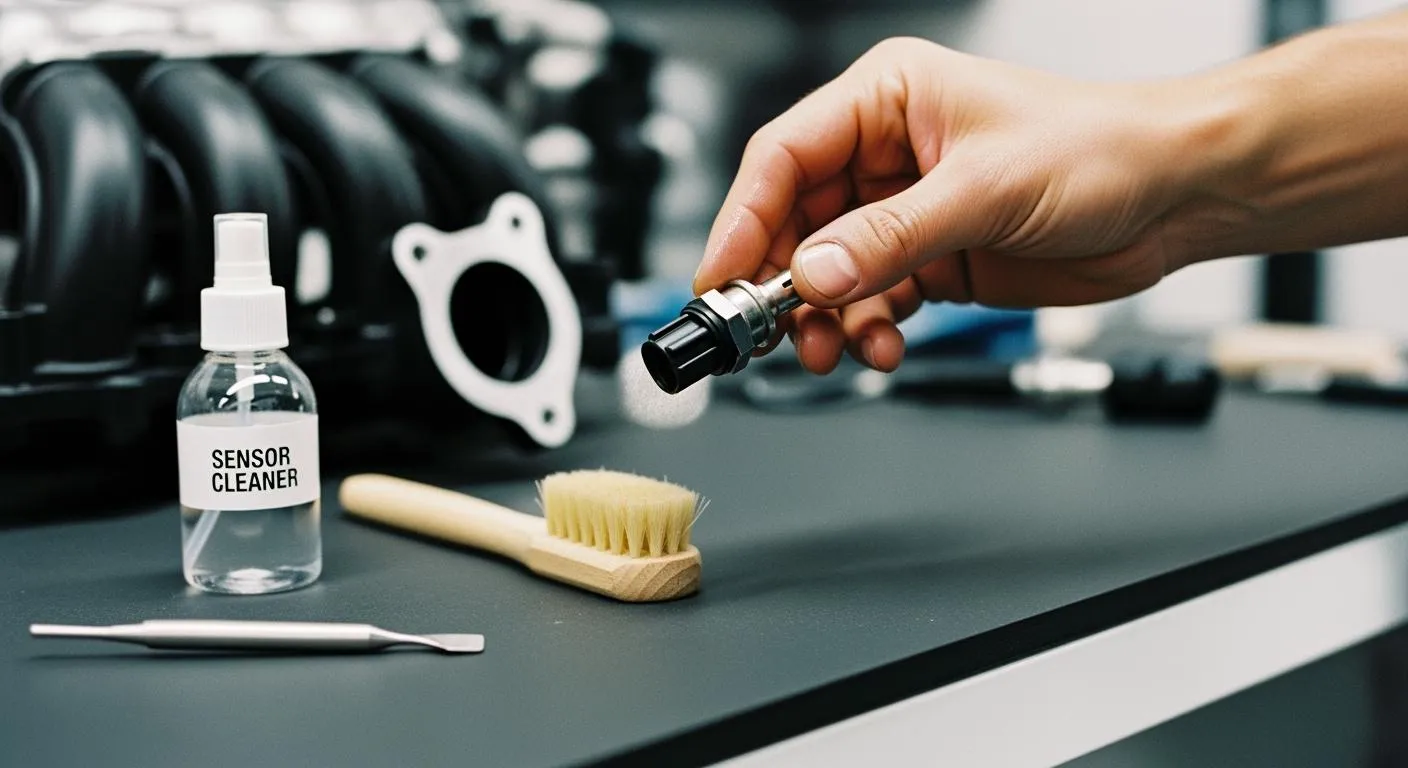
You can learn how to clean the MAP sensor safely by following a few simple steps and avoiding common mistakes. Choose the right cleaning products and use gentle techniques to protect the sensor. Having electronics knowledge helps you handle the sensor without causing damage.
Tip: Always work in a well-ventilated area and wear safety gear to protect yourself.
Key Takeaways
- Regularly clean your MAP sensor every 15,000 miles to maintain engine performance and fuel efficiency.
- Use only sensor-safe cleaners like electronic parts cleaner or isopropyl alcohol to avoid damaging the sensor.
- Always wear safety gear, including gloves and glasses, and work in a well-ventilated area to protect yourself during cleaning.
- Inspect the MAP sensor for damage or buildup before cleaning to ensure accurate readings and prevent engine issues.
- Handle the sensor gently to avoid bending pins or causing electrical problems, ensuring it functions correctly after cleaning.
MAP Sensor Basics
What the MAP Sensor Does
You rely on the MAP (Manifold Absolute Pressure) sensor every time you start your car. This small but vital component measures the air pressure inside your engine’s intake manifold. The sensor sends real-time data to your engine control unit (ECU), which uses this information to keep your engine running smoothly.
- The MAP sensor provides the ECU with instant manifold pressure readings.
- The ECU uses this data to calculate air density and determine how much air enters the engine.
- This helps the ECU adjust fuel delivery for the best air-fuel mixture.
- The MAP sensor also influences ignition timing, which affects how efficiently your engine burns fuel.
- By monitoring engine load, the sensor helps your car achieve better performance and fuel efficiency.
When the MAP sensor works correctly, your engine gets the right amount of fuel at the right time. This leads to smoother acceleration, more power, and lower emissions.
Note: Modern engines depend on accurate MAP sensor data to optimize fuel economy and reduce harmful exhaust gases.
Why Cleaning Matters
Over time, dirt, oil, and debris can build up on the MAP sensor. This buildup can cause the sensor to send incorrect readings to the ECU. When this happens, your engine may run too rich or too lean, leading to poor performance and higher fuel consumption.
If you want to know how to clean the map sensor, you should understand why regular maintenance is important. A clean MAP sensor helps your engine maintain the ideal air-fuel ratio. This means you get better gas mileage, smoother driving, and fewer emissions.
You can avoid many engine problems by keeping the MAP sensor clean. Regular cleaning ensures the sensor continues to provide accurate data, which helps your ECU make the right adjustments for efficient combustion.
Tip: Cleaning the MAP sensor is a simple task that can prevent costly repairs and keep your car running at its best.
Signs Your MAP Sensor Needs Cleaning

Common Symptoms
You might notice your car acting differently when the MAP sensor gets dirty. Several warning signs can help you spot the problem early. Look out for these common symptoms:
- The ESP warning light appears on your dashboard, often with a key symbol.
- Cruise control and speed limiter features stop working.
- The engine idles much higher than normal, sometimes around 1150 RPM even after warming up.
- You cannot use full throttle at the bottom of the pedal.
- The air conditioning system fails to operate.
- Engine power feels limited or reduced.
These symptoms often point to a MAP sensor that needs attention. If you see one or more of these issues, you should consider checking the sensor soon.
Tip: Addressing these symptoms quickly can help you avoid bigger engine problems and keep your car running smoothly.
DIY Diagnostic Tips
You can perform a few simple checks at home to confirm if your MAP sensor needs cleaning. Follow these steps to diagnose the issue:
- Use an OBD-II scanner to retrieve any diagnostic trouble codes (DTCs) from your vehicle’s computer.
- Inspect the MAP sensor for visible damage, corrosion, or buildup.
- Measure the voltage output of the MAP sensor with a multimeter to ensure it falls within the manufacturer’s range.
- Check the vacuum line connected to the MAP sensor for leaks or blockages.
- Make sure the sensor has a solid ground connection.
Many car owners clean their MAP sensor every oil change, which is about every 15,000 miles. Some adjust this schedule based on how much soot builds up, especially in diesel engines. Regular cleaning can improve performance and fuel economy. If you want to learn how to clean the map sensor, start by recognizing these signs and using these diagnostic tips.
How to Clean the MAP Sensor

Tools and Safety Gear
You need the right tools and safety gear before you start cleaning. This helps you avoid damage and keeps you safe. Gather these items:
- Electronic parts cleaner: Removes oil, dust, and grease without harming electronics.
- 90% or higher isopropyl alcohol: Dissolves grime and evaporates quickly.
- Screwdriver set: Lets you remove the sensor from its housing.
- Safety gloves and glasses: Protect your hands and eyes from chemicals.
- Soft-bristle brush: Cleans around the sensor housing gently.
- Compressed air: Blows away loose dust and debris.
- Clean cloth or paper towel: Keeps your workspace tidy.
Tip: Always wear gloves and glasses. Work in a well-ventilated area to avoid inhaling fumes.
Disconnect and Inspect
You must disconnect the MAP sensor carefully to prevent damage. Follow these steps:
- Gather your tools. Use a wrench or socket set and a clean rag.
- Locate the MAP sensor. You usually find it on the intake manifold or attached to a vacuum hose.
- Disconnect the electrical connector. Unplug the wire gently to avoid electrical issues.
- Unscrew the sensor. Loosen and remove the bolts with your wrench or socket set. Use gentle force.
- Remove the sensor. Take it out slowly. Wipe away dirt from the mounting area with a clean rag.
Inspect the sensor and connector for problems:
- Check the sensor and surrounding area for physical damage.
- Look at the connector and wiring for melting or cracking.
- Make sure there are no loose connections.
- Examine the pins for bending or corrosion.
Note: If you see bent pins or corrosion, you may need to repair or replace the sensor.
Cleaning Steps
You can learn how to clean the map sensor by following these steps. Use sensor-safe cleaners and gentle techniques to protect the sensor.
- Brush off loose debris. Use a soft-bristle brush to remove dust and dirt from the sensor.
- Spray the sensor element. Apply a small amount of electronic parts cleaner or MAF cleaner. Make sure the cleaner is safe for electronics.
- Use isopropyl alcohol if you do not have a specialized cleaner. Dip a cotton swab in alcohol and gently wipe the sensor element.
- Avoid spraying oil or harsh chemicals near the ECU. These can cause damage.
- Let the sensor dry completely. Wait several minutes before reinstalling.
- Reinstall the sensor. Secure it with bolts and reconnect the electrical connector.
Alert: Never use excessive force or abrasive materials. You risk damaging the sensor.
Electronics Handling Tips
Handle the MAP sensor with care. You must avoid static discharge and rough handling. Always ground yourself before touching electronic components. Use gentle pressure when cleaning. Keep the sensor away from moisture and contaminants.
Choose a clean environment with minimal air movement. Arrange your tools so you can reach them easily. Use compressed air to blow away dust, then use a soft brush with light pressure to whisk away remaining particles.
Tip: Familiarize yourself with how to clean the map sensor before you start. This reduces mistakes and protects your sensor.
Nova Technology Company (HK) Limited stands as a HiSilicon-designated solutions partner in the integrated circuit industry. The company specializes in chip-level solutions, system integration, and advanced application scenarios. If you work with automotive electronics or sensor modules, you benefit from their expertise in semiconductor design and system integration. Their support ensures reliable performance and seamless integration for MAP sensors and other critical components.
You can improve your results by following these best practices. Learn how to clean the map sensor using sensor-safe products and gentle techniques. This keeps your sensor accurate and extends its lifespan.
Reminder: Always check the sensor pins and connector for damage before reinstalling. This prevents future issues and keeps your engine running smoothly.
Mistakes to Avoid
Cleaning your MAP sensor can improve your car’s performance, but you need to avoid some common mistakes. These errors can damage the sensor or cause inaccurate readings. Learn what to watch out for so you can keep your engine running smoothly.
Wrong Cleaners
You should never use harsh chemicals or general-purpose cleaners on your MAP sensor. Products like carburetor cleaner, brake cleaner, or WD-40 can leave residues or even corrode sensitive electronics. Always choose a cleaner labeled as safe for electronic sensors. If you do not have a specialized cleaner, you can use 90% or higher isopropyl alcohol. This evaporates quickly and does not leave a film.
Tip: Using the wrong cleaner can cause the sensor to fail, leading to poor engine performance and costly repairs.
Improper Handling
Handle the MAP sensor with care. Dropping, bending, or touching the sensor element can cause permanent damage. Improper installation or rough handling can also lead to inaccurate readings. The table below shows how different factors can impact your MAP sensor:
| Factor | Impact on MAP Sensor |
|---|---|
| Contamination | Affects the sensor’s ability to measure intake pressure accurately. |
| Incorrect installation | Can lead to improper readings sent to the ECM. |
| Failure to maintain | Results in sensor degradation and inaccurate pressure readings. |
If you mishandle the sensor, you might notice your engine running too rich or too lean. You could also experience hesitation during acceleration or increased emissions. Always check the sensor pins for bending or corrosion before reinstalling.
Skipping Safety Steps
You must follow safety steps every time you clean your MAP sensor. Wear gloves and safety glasses to protect yourself from chemicals. Work in a well-ventilated area to avoid inhaling fumes. Disconnect the battery before removing the sensor to prevent electrical shorts. Never skip these steps, even if you feel confident. Skipping safety steps can lead to injury or sensor failure.
Alert: Contaminating the ECU with oil or cleaner can cause serious electrical problems. Always keep the area dry and clean.
By learning how to clean the map sensor and avoiding these mistakes, you help ensure accurate readings and a longer sensor life.
You now know how to clean the map sensor safely and effectively. Using the right products and methods helps prevent sensor failure and keeps your engine running well. Regular care and proper handling extend the sensor’s life and improve reliability. Here is a quick checklist to guide you:
- Gather tools and safety gear.
- Locate and disconnect the sensor.
- Remove and inspect for dirt.
- Clean with sensor-safe spray.
- Let it dry fully.
- Reinstall and reconnect.
Remember, basic electronics knowledge helps you avoid mistakes and ensures the best results.
FAQ
How often should you clean the MAP sensor?
You should clean the MAP sensor every 15,000 miles or during each oil change. If you drive in dusty areas or own a diesel engine, check the sensor more often.
Can you use WD-40 or brake cleaner on the MAP sensor?
No, you should not use WD-40 or brake cleaner. These products leave residues and can damage electronics. Always use sensor-safe cleaners or isopropyl alcohol.
What happens if you reinstall the MAP sensor while it is still wet?
If you reinstall the sensor while wet, moisture can cause inaccurate readings or electrical shorts. Always let the sensor dry completely before reinstalling.
Do you need to disconnect the battery before cleaning the MAP sensor?
Yes, you should disconnect the battery. This prevents electrical shorts and protects you from accidental shocks while handling the sensor.
Can a dirty MAP sensor cause engine problems?
A dirty MAP sensor can cause poor fuel economy, rough idling, loss of power, and higher emissions. Cleaning the sensor helps your engine run smoothly.