

Discover The Best Mouse And Keyboard Solution
Have you thought about how your Mouse and Keyboard affect tasks? Whether writing reports, playing games, or surfing online, the right tools help a lot. That’s why the NEARLINK Mouse & Keyboard Solution exists. It’s made to improve comfort, work speed, and performance easily.

Have you thought about how your Mouse and Keyboard affect tasks? Whether writing reports, playing games, or surfing online, the right tools help a lot. That’s why the NEARLINK Mouse & Keyboard Solution exists. It’s made to improve comfort, work speed, and performance easily.
Key Takeaways
-
Pick ergonomic Mouse and Keyboard to stay comfy and avoid injuries. These designs can make work 25% more enjoyable.
-
Think about what features you need. For gaming or work, choose devices with fast response times and settings you can adjust for a better experience.
-
Make sure they work with your devices before buying. Check if the Mouse and Keyboard connect easily to your PC, tablet, or phone to prevent problems.
Key Factors to Think About for Mouse And KeyBoard
Picking the right Mouse And KeyBoard can seem tricky with so many choices. But don’t stress! Let’s simplify it by focusing on the key things to help you pick what’s best for you.
Comfort and Ergonomics
Comfort matters when using a Mouse And KeyBoard for long hours. Bad ergonomics can cause pain or even injuries over time. Did you know 33% of work injuries come from ergonomic problems? On the bright side, ergonomic tools can raise job happiness by 25%. Choose designs that support your hands and wrists, like curved keyboards or mice with easy grips. Your body will feel better!
|
Evidence Type |
Details |
|---|---|
|
Workplace Injuries |
33% of work injuries are due to bad ergonomics. |
|
Job Satisfaction |
Ergonomic tools can improve job happiness by up to 25%. |
|
Market Growth |
Ergonomic tools market grows over 10% every year. |
Functionality and Features
What do you need your Mouse And KeyBoard to do? Whether gaming, working, or browsing, features matter. For example, the NEARLINK Mouse & Keyboard Solution has a 4K report rate for quick responses. Things like latency, bandwidth, and throughput affect performance. Devices with custom keys or lights can make your setup unique.
|
Metric |
Details |
|---|---|
|
Latency |
Time delay before data starts moving. |
|
Bandwidth |
Maximum speed of data transfer. |
|
Throughput |
Actual speed of successful data transfer. |
|
Scalability |
Ability to handle more work as needed. |
|
Performance per Watt |
Measures how well a system works using power. |
Compatibility with Devices
Imagine buying a Mouse And KeyBoard that doesn’t work with your device. Annoying, right? Compatibility is important. Companies like Netflix and Spotify test to ensure their services work on all devices. Similarly, check if your peripherals work with your system. The NEARLINK solution connects easily to PCs, tablets, and phones without extra parts.
-
Netflix: Makes sure it works on popular devices using feedback.
-
Spotify: Tests on many platforms for smooth use.
Build Quality and Durability
You want your Mouse And KeyBoard to last, right? Strong materials and good design make a big difference. Durability tests mimic years of use in a short time to check reliability. Buying sturdy peripherals saves money and boosts performance. Look for products that feel solid and have good reviews.
-
Durability tests check lifespan, strength, and performance under stress.
-
Strong materials last longer and lower repair costs.
Budget and Value for Money
Let’s talk about cost. You don’t need to spend a lot for a good Mouse And KeyBoard. For example, the Logitech MK270 Combo is affordable and has spill resistance and easy setup. It may not last as long as premium models, but it’s great for light use. Compare features and quality with price to get the best deal.
-
Logitech MK270 Combo: Cheap, spill-proof, and simple to use.
-
Great for basic tasks but not for heavy use.
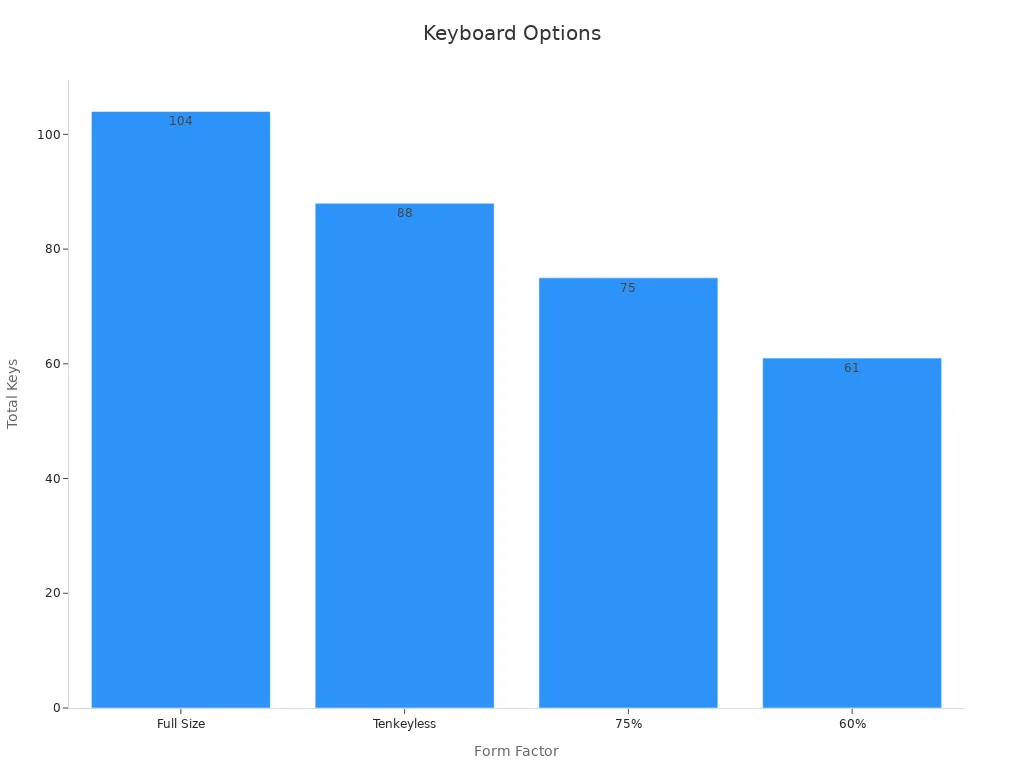
Best Mouse And KeyBoard Solutions for Different Needs

Choosing the right Mouse And KeyBoard depends on your daily activities. Whether you play games, work in an office, or need tools for simple tasks, there’s a solution for you. Let’s look at some great options.
NEARLINK Mouse & Keyboard Solution
The NEARLINK Mouse & Keyboard Solution is a top choice. It uses advanced technology and easy-to-use features for a great experience. The keyboard has a 4K report rate, making typing fast and accurate. This is ideal for gaming or office work.
The mouse has a single-chip design that lowers delays and blocks interference. It works smoothly, even during intense gaming. You can connect it directly to PCs, tablets, and phones without extra parts. It’s simple and affordable.
NEARLINK also offers customization. You can change key functions, set macros, and adjust lights using software. This makes your setup unique and personal.
For Gamers
Gamers need tools that are fast, precise, and durable. Devices like the Razer Huntsman Elite keyboard and Basilisk mouse are great for gaming. They have quick keys and designs that reduce hand strain during long sessions.
|
Metric |
Value |
|---|---|
|
Tracking Accuracy |
|
|
Durability |
Rated for over 20 million clicks |
Polling rates are important for gamers. Higher rates mean smoother and more accurate mouse movements. Common rates include 125Hz, 500Hz, 1000Hz, and 2000Hz for top gaming mice.
For Office Professionals
Office workers need comfort and efficiency for long hours of typing. Ergonomic designs, like the Microsoft Sculpt Ergonomic Keyboard, help reduce wrist pain. Its split layout and soft palm rest are perfect for workdays.
The NEARLINK Mouse & Keyboard Solution is also great for offices. It connects easily to different devices, saving time. Its simple setup makes switching between PC, tablet, and phone easy.
For Creative Professionals
Creative jobs, like graphic design or video editing, need precise tools. The Logitech MX Keys keyboard and MX Master mouse are popular choices. They offer smooth control and buttons you can customize for your tasks.
NEARLINK’s customization features are helpful for creatives too. You can set macros and adjust settings for editing photos or creating 3D designs.
For General Everyday Use
Not everyone needs fancy features. If you want a basic Mouse And KeyBoard for browsing or emails, affordable options exist. The Logitech MK270 Combo is cheap, spill-proof, and easy to set up.
NEARLINK also works well for everyday users. Its simple design and direct connection make it a good choice for many tasks. It’s a reliable and versatile option.
Tip: Think about your main activities before choosing a Mouse And KeyBoard. This helps you find the best mix of features, comfort, and price.
Wired vs. Wireless Mouse And KeyBoard

Choosing between wired and wireless devices can be tricky. Let’s make it simple so you can decide easily.
Pros and Cons of Wired Devices
Wired devices are very dependable. They don’t need batteries, so they won’t stop working during important tasks. They also have faster response times, which is great for gamers and professionals needing accuracy.
But wires can mess up your desk space. They also limit how much you can move around, which might bother you if you like a tidy and flexible setup.
|
Keyboard Model |
Wired Latency |
Wireless Latency |
Bluetooth Latency |
|---|---|---|---|
|
Keychron V5 Max |
6 ms |
7 ms |
12 ms |
|
Razer Pro Type Ultra |
5 ms |
6 ms |
12 ms |
|
Keychron K10 |
23 ms |
N/A |
35 ms |
|
Logitech MK270 |
N/A |
23 ms |
N/A |
|
Nuphy Air75 V2 |
9 ms |
9 ms |
N/A |
|
Omoton Ultra-Slim |
N/A |
N/A |
32 ms |
Pros and Cons of Wireless Devices
Wireless devices give you freedom to move. They make your desk look neat and modern. Many wireless options, like the NEARLINK Mouse & Keyboard Solution, work well with little delay.
However, wireless devices need batteries or charging, which can be annoying. Some models might have small delays, especially when using Bluetooth.
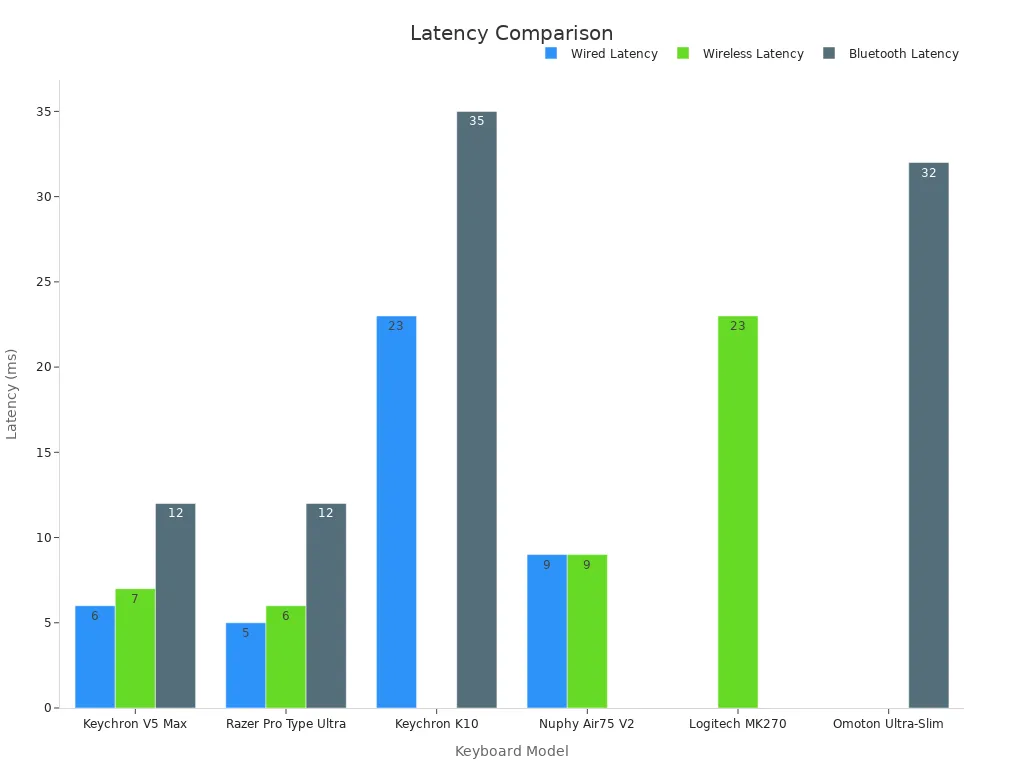
Choosing Between Wired and Wireless
Pick what works best for you. If you need speed and dependability, go for wired devices. If you want flexibility and a clean desk, wireless is better. The NEARLINK Mouse & Keyboard Solution offers both low delay and easy wireless use, without messy wires.
Tip: Think about how you use your Mouse And KeyBoard every day. This will help you choose the right one for your needs.
Tips for Picking the Right Mouse And KeyBoard
Try Before You Buy
Testing a Mouse And KeyBoard before buying is smart. Go to a store and see how they feel. Is the keyboard easy to type on? Does the mouse fit your hand well? These small things matter, especially for long use. If shopping online, check if you can return it after testing.
Tip: Look for stores with demo units or trial options to ensure the device suits you.
Read Reviews and Opinions
Customer reviews are super helpful. They show what’s good and bad about a product. Reviews can help you avoid mistakes and find the best choice. They also tell you about common problems and how companies fix them. For example:
-
Reviews show what people like or dislike.
-
They help brands improve their products.
-
Feedback warns you about issues before buying.
Don’t skip reviews. They make choosing easier and smarter.
Think About Long-Term Use
Consider how long you want your Mouse And KeyBoard to last. Mechanical keyboards can work for over 10 years if cared for. Membrane keyboards often wear out in 1-2 years. Mechanical switches handle 50-100 million presses, making them a better choice. Durable options save money and effort over time.
Fun Fact: A good mechanical keyboard lasts much longer than membrane ones, making it a greener choice.
Check Warranty and Support
A solid warranty is important if something breaks. Read the warranty details before buying. Does it cover repairs or replacements? Is filing a claim simple? Companies with good warranties usually have better support. Here’s how they handle warranties:
|
Step |
Description |
|---|---|
|
Set up processes |
Make systems to handle claims quickly. |
|
Study data |
Check warranty use to find and fix common issues. |
|
Gather feedback |
Use customer input to improve warranty programs. |
|
Report findings |
Share claim insights to make better products. |
|
Track results |
Watch trends to ensure the warranty meets needs. |
Tip: Pick brands with clear warranties and good support. It’s worth it for peace of mind.
Choosing the right Mouse And KeyBoard can transform how you work, play, and create. It’s all about finding tools that fit your needs and make life easier. The NEARLINK Mouse & Keyboard Solution offers speed, accuracy, and seamless connectivity, making it a standout choice. Did you know users improved task accuracy by 219.1% and worked 21.1% faster with optimized tools? Take your time, explore options, and test what feels right. Your perfect setup is waiting!
FAQ
What makes the NEARLINK Mouse & Keyboard Solution special?
The NEARLINK solution has a 4K report rate and low delay. It connects directly to devices without extra parts. It’s quick, precise, and great for work or gaming.
Can I change settings on the NEARLINK Mouse & Keyboard?
Yes! The PC software lets you adjust keys, set macros, and change lights. Make it fit your style and tasks easily.
How can I tell if a keyboard is ergonomic?
Check for curved shapes, wrist rests, or split designs. These features lower strain and make typing more comfortable for long hours.
Tip: Try the keyboard before buying to see if it feels right.


