

Microcontroller vs Microprocessor: Choosing the Right Solution for Your Next Project
Expert guide on Microcontroller vs Microprocessor: Choosing the Right Solution for Your Next Project. Technical specs, applications, sourcing tips for engineers and buyers.
Introduction
As the landscape of embedded systems continues to evolve, the choice between using a microcontroller (MCU) or a microprocessor (MPU) for a project is becoming increasingly critical. This decision can significantly impact the design, functionality, and cost-effectiveness of your project. With the global semiconductor industry reaching unprecedented heights, as noted by the Semiconductor Industry Association, engineers are faced with a plethora of components to choose from. Understanding the differences between MCUs and MPUs, and how to select the right one based on specific requirements, is vital for achieving optimal results.
Technical Overview
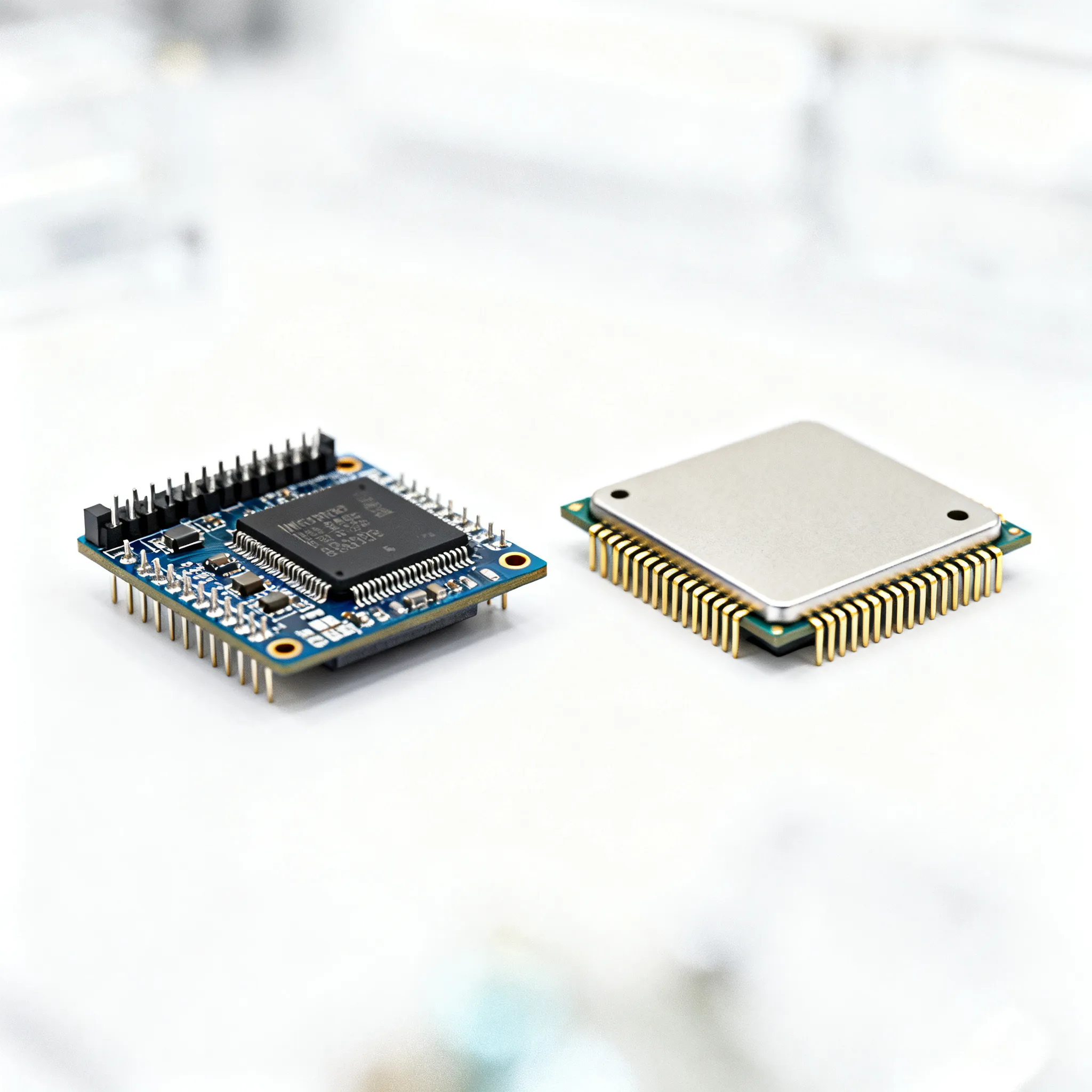
Microcontrollers and microprocessors are integral components in the world of electronics. A microcontroller is essentially a compact integrated circuit designed to govern a specific operation in an embedded system. It typically combines a processor core, memory, and programmable input/output peripherals on a single chip. This makes MCUs ideal for applications where cost, power consumption, and space are critical factors. Common examples include ATmega2560 and MSP430G2553.
On the other hand, a microprocessor is primarily focused on executing complex computations and is generally used in systems requiring higher processing power. Unlike microcontrollers, MPUs usually rely on external components for memory and peripheral interfaces, making them suitable for applications where performance and flexibility are prioritized. Examples include the AM3358 and RK3399.
Understanding the electrical, thermal, and mechanical specifications of these components is crucial for making an informed decision. Below, we present detailed tables to guide you through these specifications.
Detailed Specifications
Table 1: Electrical Specifications
| Specification | Microcontroller | Microprocessor | Units | Notes |
|---|---|---|---|---|
| Operating Voltage | 1.8V - 5.5V | 1.0V - 3.6V | Volts | Depends on model |
| Current Consumption (Active) | 5mA - 30mA | 50mA - 200mA | mA | Higher for MPUs |
| Clock Speed | 1MHz - 200MHz | 600MHz - 3GHz | MHz/GHz | MPUs have higher speeds |
| Flash Memory | 8KB - 2MB | External | KB/MB | MCUs have onboard memory |
| RAM | 2KB - 256KB | External | KB | MPUs use external RAM |
| GPIO Pins | 10 - 100 | Up to 50 | Pins | MCUs generally have more GPIOs |
| Power Consumption (Idle) | 0.1mA - 2mA | 10mA - 30mA | mA | MCUs are more power-efficient |
| ADC Channels | 8 - 24 | None | Channels | MCUs have built-in ADCs |
| Communication Interfaces | I2C, SPI, UART | PCIe, USB, Ethernet | - | MPUs support high-speed interfaces |
| Package Type | TQFP, QFN, DIP | BGA, LGA | - | Varies by application |
Table 2: Thermal & Mechanical Specs
| Specification | Microcontroller | Microprocessor | Units | Notes |
|---|---|---|---|---|
| Operating Temperature | -40°C to 85°C | -20°C to 70°C | °C | MCUs support wider range |
| Thermal Resistance (Junction to Ambient) | 20°C/W | 15°C/W | °C/W | Varies with package |
| Package Dimensions | 7mm x 7mm to 20mm x 20mm | 10mm x 10mm to 40mm x 40mm | mm | MPUs generally larger |
| Weight | 1g - 5g | 5g - 20g | g | Depends on package |
| Pin Count | 28 - 100 | 64 - 300 | Pins | MPUs have more pins |
| Heat Dissipation | Low | High | - | Heatsinks may be needed for MPUs |
| Mounting Style | Surface Mount | Surface Mount | - | Common for both |
| Vibration Resistance | High | Medium | - | MCUs are more robust |
| Shock Resistance | High | Medium | - | MCUs are more robust |
Table 3: Application Comparison
| Application | Microcontroller | Microprocessor | Notes |
|---|---|---|---|
| Home Automation | Preferred | Not Ideal | MCUs provide cost-effective solutions |
| Industrial Control | Preferred | Possible | MCUs offer real-time capabilities |
| Mobile Devices | Not Ideal | Preferred | MPUs provide higher performance |
| Wearable Electronics | Preferred | Not Ideal | MCUs are power-efficient |
| Automotive Systems | Preferred | Possible | MCUs handle real-time processing |
| High-Performance Computing | Not Ideal | Preferred | MPUs excel in high-computation tasks |
The tables above provide a comprehensive comparison of microcontrollers and microprocessors across various specifications. These details are essential for selecting the appropriate component for your project, whether it involves simple control tasks or complex computations. For further reading on the latest trends and innovations in microelectronics, consider visiting EE Times.
Design Considerations
When designing a system that incorporates either a microcontroller or a microprocessor, several factors need to be considered to ensure optimal performance and cost-effectiveness. Below are some practical guidelines to aid in the design process:
1. Define the Application Requirements: Clearly outline the specific needs of your application. For simple control tasks, a microcontroller such as the ATmega328P may suffice. However, for applications requiring high processing power, an MPU like the RK3399 might be more appropriate.
2. Power Consumption: Consider the power budget of your design. Microcontrollers are generally more power-efficient, making them suitable for battery-powered applications. On the other hand, microprocessors tend to consume more power due to their higher processing capabilities.
3. Peripheral Integration: Evaluate the required peripherals and interfaces. MCUs often come with integrated peripherals such as ADCs and UARTs, which can simplify design and reduce cost. MPUs may require additional components to achieve similar functionality.
4. Real-Time Processing: If real-time processing is crucial, microcontrollers offer deterministic performance and real-time operating systems (RTOS) support, which can be critical in applications like robotics and industrial automation.
5. Development Tools and Ecosystem: Assess the availability of development tools and community support. A robust ecosystem with development boards, compilers, and debugging tools can significantly reduce development time and effort.
6. Cost and Scalability: Finally, consider the cost implications and scalability of your design. Microcontrollers are often more cost-effective for large-scale deployments, while microprocessors might provide better scalability for feature-rich applications.
Step-by-Step Guide
Designing a project with microcontrollers or microprocessors involves several steps. Below is a step-by-step guide to help streamline the process:
- Identify the Application Requirements: Begin by understanding the functional and performance requirements of your application. Determine whether the project demands real-time processing, high computational power, or specific interface support.
- Select the Appropriate Component: Based on the requirements, choose between a microcontroller or microprocessor. Use datasheets and supplier resources such as DigiKey Electronics to compare specifications and availability.
- Design the Circuit: Create a schematic of the circuit, incorporating the chosen MCU or MPU and any necessary peripherals. Ensure that power supply and signal integrity are considered in the design.
- Develop the Firmware/Software: Write the code necessary for the operation of the microcontroller or microprocessor. Utilize integrated development environments (IDEs) and libraries to expedite development.
- Prototype and Test: Build a prototype of the design and perform thorough testing to validate functionality and performance. Identify and rectify any issues that arise during testing.
- Iterate and Optimize: Based on testing feedback, make necessary adjustments to the design and code. Optimize for power consumption, performance, and cost where possible.
- Finalize the Design: Once optimized, finalize the design for production. Create detailed documentation to assist with manufacturing and future maintenance.
- Production and Deployment: Proceed with manufacturing and deployment, ensuring quality control measures are in place to maintain consistency and reliability.
Common Issues & Solutions
When working with microcontrollers and microprocessors, several common issues may arise. Here are some real problems and potential solutions:
- Power Supply Issues: Ensure that the power supply is stable and capable of delivering the required current. Use decoupling capacitors to filter out noise and provide transient current.
- Overheating: If overheating occurs, consider using heatsinks or fans for microprocessors. Ensure that the thermal design is adequate for the operating conditions.
- Signal Integrity Problems: Use proper routing techniques and termination resistors to maintain signal integrity, especially for high-speed interfaces.
- Firmware Bugs: Implement thorough testing and debugging to identify and fix firmware issues. Utilize debugging tools and simulators to isolate problems.
- Communication Failures: Verify that communication interfaces are correctly configured and that the correct protocols are being used. Check for issues such as incorrect baud rates or mismatched settings.
Applications & Use Cases
The choice between microcontrollers and microprocessors can significantly impact the success of various applications. Here are some real-world examples:
- Home Automation: Microcontrollers are commonly used in smart home devices due to their low cost and power efficiency. Products like smart thermostats and lighting systems often use MCUs.
- Industrial Automation: Microcontrollers are preferred for controlling machinery and processes in industrial settings, where real-time performance is critical.
- Mobile Devices: Microprocessors are utilized in smartphones and tablets, where high performance and multimedia capabilities are required.
- Wearable Technology: The compact size and low power consumption of microcontrollers make them ideal for wearable devices like fitness trackers and smartwatches.
Selection & Sourcing Guide
Selecting the right component for your project is crucial. Utilize resources such as IC Online to search and source components efficiently. Ensure that you compare pricing, availability, and lead times to make an informed decision.
FAQ
- What is the main difference between a microcontroller and a microprocessor? Microcontrollers are designed for specific control tasks with integrated peripherals, while microprocessors are used for general-purpose computing with external components.
- Can I use a microcontroller for high-performance applications? While possible, microcontrollers are generally not ideal for high-performance applications due to their limited processing power.
- What are the advantages of using a microprocessor? Microprocessors offer higher processing power, flexibility, and support for complex operating systems.
- How do I decide which component to use? Consider your application's requirements, including processing power, cost, power consumption, and peripheral needs.
- Are microcontrollers more power-efficient than microprocessors? Yes, microcontrollers are typically more power-efficient, making them suitable for battery-powered applications.
- What development tools are available for microcontrollers? Many development environments and tools are available, including IDEs, compilers, and debugging tools.
Related Articles
 Blog
Blog1N4148W Supply Risk Assessment: What to Ask Before You Buy
What to verify on 1N4148W before you buy: date code, CoC, test evidence, and allocation-backed lead time. Ask these RFQ questions on IC-Online.
 Blog
BlogThe T Flip-Flop and Its Role in Today's Circuits
A T flip-flop stores one bit and toggles its output on each clock edge. It's key for frequency division, counters, and one-bit storage in modern circuits.
 Blog
BlogWhat Does the VSC Light Mean? Key Electronics Insights
The VSC light means your stability system is active, disabled, or faulty. A flashing light shows correction, a solid light signals a fault. Know the difference.
 Blog
Blog3224W-1-103E Datasheet, Pinout, and Sourcing Checks
3224W-1-103E pinout, package, and datasheet limits buyers actually check — plus lot inspection notes. Request a quote on IC-Online; no invented stock claims.
 Blog
BlogHow to Source and Inspect Digital Counter ICs for OEM Production RFQs
Buyer-side specification, inspection, and RFQ checks on this technical topic. Not a hobby explainer. Request a quote on IC-Online.
 Blog
BlogBad Camshaft Sensor Always in Electronics Discussions
A bad camshaft sensor appears in electronics talks because it shows how a simple electromagnetic part can disrupt complex control systems, teaching signal integrity.