Where to Find the Best Free Motion Sensor SVGs
You need a high-quality motion sensor svg free for your next project. You might be designing a UI for an embedded system or

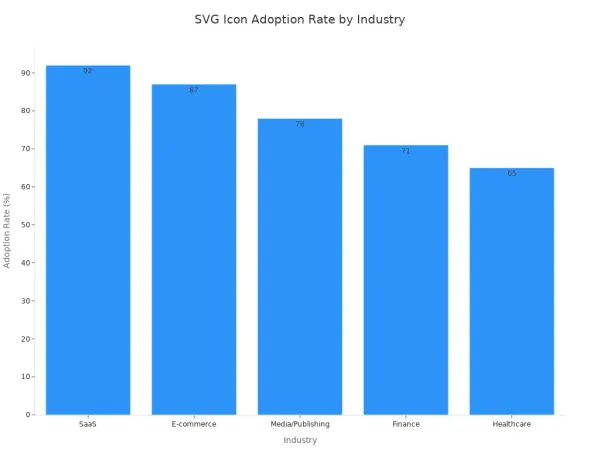
You need a high-quality motion sensor svg free for your next project. You might be designing a UI for an embedded system or creating a detailed circuit schematic. SVG icons are crucial in modern design. Their adoption is high across many tech industries.
Here are the best websites to download free svg icons and illustrations for your work. These sites offer many free downloads.
- Flaticon
- SVG Repo
- The Noun Project
- Icons8
- Freepik
- Vecteezy
- Iconfinder
- Pixabay
- Motion Array
- unDraw
Key Takeaways
- Many websites offer free SVG icons for your projects. These sites include Flaticon, SVG Repo, and The Noun Project.
- Always check the license for each icon. Some licenses need you to give credit, while others do not.
- SVG files are good for user interfaces. They look clear on any screen size and save space.
- You can edit SVG icons. Use tools like Figma to change colors or shapes to fit your design.
1. Flaticon
Flaticon stands out as a massive resource for vector icons. You can find a suitable icon for almost any project. The platform is a top choice for designers working on technical projects.
Available Assets
You gain access to an enormous illustration library. A quick search reveals over 2,400 motion sensor icons alone. This variety ensures you can find the perfect visual for your schematic or user interface. Flaticon provides assets in multiple formats. You can download icons as SVG, PSD, PNG, and EPS files. This flexibility helps you integrate the graphics smoothly into your design software. Whether you are creating a detailed hardware diagram or a simple UI element, you will find the right file type for your needs.
License Info
You must understand the licensing before you download. Flaticon requires attribution when you use its assets for free. This rule applies to both personal and commercial projects. You need to credit the icon's author.
Note: For any project using free downloads, you must provide proper credit. Flaticon offers clear guidelines on how to attribute correctly for web, print, and other media.
If you need a motion sensor svg free of attribution requirements, you can choose a Premium plan. A subscription removes the need to credit the author, giving you more freedom in your commercial work.
Key Benefits
Flaticon offers powerful tools to streamline your workflow. Its search filters help you find icons quickly. You can filter results by style or browse entire icon packs to maintain visual consistency in your project. The "Collections" feature is another major benefit. You can use it to group icons for a specific embedded system or hardware project.
- Organize: Create collections for different projects, like a "Smart Home UI" or "Security System Schematics."
- Edit: Change the color of an entire collection at once to match your brand or diagram's color scheme.
- Download: Download your organized collections as an SVG sprite for efficient web use.
This free illustration website helps you manage your visual assets effectively. You can find icons and free illustrations, organize them, and customize them for any technical application.
2. Get Your Motion Sensor SVG Free from SVG Repo

SVG Repo is a fantastic resource when your project demands simplicity and freedom. You will find it is a straightforward platform dedicated to providing high-quality, open-license vector graphics. It is an excellent choice for technical projects where licensing needs to be as simple as possible.
Available Assets
You gain access to a massive public library of over 53,529 free SVG icons. The site organizes its vectors into helpful categories and collections, making your search efficient. You can easily find a motion sensor svg free for your specific need, whether it's for a circuit schematic or a hardware UI. The icons are available in various styles, from simple outlines to more detailed multicolor vectors, ensuring you can match them to your project's aesthetic.
License Info
This is where SVG Repo truly shines for professional use. The vast majority of its icons are licensed under permissive terms like the MIT License or are in the Public Domain. The MIT No Attribution License (MIT-0) is a public-domain-equivalent license. This means you have incredible freedom.
You can use, copy, modify, and distribute the icons for free, even in commercial hardware projects. You do not need to provide attribution or include a copyright notice in your final product, which is ideal for technical documentation or user interfaces where extra text is undesirable.
This simple licensing removes a major headache for designers working on commercial applications.
Key Benefits
The primary benefit of this free illustration website is its "no strings attached" approach. You can quickly find and use assets without worrying about complex attribution rules. This is perfect for rapid prototyping and development.
- Advanced Search: You can filter vectors by style (multicolor, duotone, outline, solid) to quickly find what you need.
- On-the-Fly Editing: The site offers basic tools to edit the colors of an icon directly in your browser before you download it. This helps you match the free illustrations to your diagram's color palette.
- Developer Friendly: SVG Repo provides tools for developers, including ready-to-use code snippets for implementing the SVG in HTML or React. This feature helps you move from design to implementation for an embedded system interface seamlessly.
3. The Noun Project
The Noun Project positions itself as a visual language, offering one of the most comprehensive icon collections available. You will find its massive library invaluable when you need specific symbols for technical diagrams or hardware interfaces. The platform is a favorite for designers who require a high degree of specificity and visual consistency.
Available Assets
You gain access to a library of over 5 million icons created by a global community of designers. This vast selection means you can almost certainly find a motion sensor svg free icon that fits your exact needs, whether for a circuit schematic or a user interface on an embedded device. The icons are known for their clean, minimalist style, which helps you create professional and easy-to-read technical documentation. The consistency across the platform makes it simple to build a cohesive visual system for your project.
License Info
You need to understand the two main ways to use icons from this platform: the free Basic plan and the paid Pro plan. The free option requires you to give credit to the icon's creator. For commercial hardware projects where attribution is not practical, a Pro license is the better choice.
Important Note: When using icons for free, you must provide attribution. For an embedded system's UI or a printed schematic, adding a credit line can be difficult, making the Pro license a more straightforward option for commercial work.
The table below breaks down the key differences for you.
| Feature | Free Icon (Creative Commons) | Pro License Icon (Royalty-Free) |
|---|---|---|
| Cost | Free | Requires a subscription fee |
| Attribution | Required for every icon used | Not required |
| Commercial Use | Permitted with attribution | Unlimited use with no attribution |
| Customization | Basic color changes on site | Full customization and API access |
Key Benefits
This free illustration website offers powerful tools that integrate directly into your design workflow. You can find and use high-quality free illustrations and icons without ever leaving your favorite design application.
- Powerful Plugins: You can use add-ons for software like Figma, Adobe Illustrator, and PowerPoint. This allows you to drag and drop icons directly into your hardware schematics or UI mockups.
- Easy Customization: The website lets you change the color and rotation of any icon before you download it. This helps you quickly match the icon to your project's color palette.
- API Access: For advanced applications, a Pro account gives you API access. You could use this to dynamically load icons into a custom software tool or web-based hardware configurator.
4. Icons8
Icons8 gives you a massive, cross-consistent library of design assets. You can maintain a uniform look across your entire project, from technical diagrams to the final user interface. This platform is more than just an icon repository; it's a complete design ecosystem.
Available Assets
You will find icons in dozens of different styles, ensuring you can match them to your project's specific design language. Whether you are building a UI for an embedded system or creating documentation, you can find a suitable style. For example, you can find free illustrations and icons in styles like:
- iOS 17 Outlined: This style is perfect if you are designing an Apple-compliant application. It works well for vertical lists and modern interfaces.
The platform also offers photos, music, and design tools, but its icon library is the main attraction for technical designers.
License Info
You can use many assets from Icons8 for free, but you must provide attribution. The platform has a clear linking policy for web-based projects.
When you use free assets on a website, you must add a link to
icons8.com. If you use their content on most of your site's pages, you can place a single link in the footer.
This rule is simple to follow for project documentation sites or web-based control panels. A paid plan removes this attribution requirement entirely.
Key Benefits
This free illustration website provides powerful tools for developers. Its well-documented API is a major advantage for teams working on complex hardware projects. You can programmatically search for a motion sensor svg free icon and integrate it directly into your software. Key API benefits include:
- High-Quality Code: The SVG assets require minimal cleanup, preventing performance issues in your application.
- Consistent Naming: The logical naming of icons makes it easier to manage and implement them through code.
- Dynamic Integration: You can use the API to build personalized dashboards that change visuals based on user settings or system states.
The API is reliable and integrates smoothly with various tech stacks, making it a go-to for automating visual assets in your applications. Icons8 also offers desktop apps, allowing you to work with assets offline.
5. Freepik

Freepik offers you a massive and diverse collection of graphic resources. You will find it is a go-to platform for designers who need a wide variety of visual assets for complex technical projects. The platform blends icons, photos, and vector art, giving you many options.
Available Assets
You gain access to a huge library containing millions of assets. This includes a pool of approximately 20 million free icons and photos. This vast selection makes it easy to find a motion sensor icon for your hardware schematics or a set of visuals for an embedded system's user interface. You can discover everything from simple line icons to detailed, full-color free illustrations, ensuring you find a style that matches your project's requirements.
License Info
You must understand Freepik's licensing terms before downloading. The free plan has daily download limits and requires you to give credit for any content you use. Free users can download up to 10 files per day.
Attribution is mandatory. You must credit Freepik when you use a free resource. The way you attribute depends on how you use the asset. If the icon is the most prominent part of your design, like in a simple diagram, it is considered a 'main element' and requires clear credit.
This rule is important for commercial hardware projects where adding attribution might be difficult. The free plan is excellent for testing ideas, but its attribution rules can make it impractical for final commercial products.
Key Benefits
The primary advantage of this free illustration website is the sheer volume and variety of its content. You can find almost any visual you need in one place, which saves you valuable time.
- Vast Selection: The enormous library almost guarantees you will find a suitable icon for any electronic component or system state.
- Style Variety: You can find icons in numerous styles, helping you maintain a consistent look across all your technical documentation and UI mockups.
- Integrated Search: The platform's powerful search engine helps you quickly filter through millions of assets to find the perfect graphic for your specific application.
Freepik is an excellent starting point when you need a wide range of visual options for your hardware design projects.
6. Vecteezy
Vecteezy gives you a curated collection of high-quality vector art, stock photos, and videos. You will find it is a strong contender when you need professional-looking graphics for your hardware projects, from UI mockups to technical manuals.
Available Assets
You can explore a large library of vector graphics. The platform offers a good mix of icons and more detailed free illustrations. This variety helps you find the right visual for a complex circuit diagram or a simple status indicator in an embedded system's interface. The assets are created by a global community of artists, ensuring a fresh and diverse selection.
License Info
You must pay close attention to Vecteezy's licensing. While commercial use is permitted under the Free License, it comes with important restrictions. You are required to provide attribution for all free assets you use.
Important Note: The Free License has specific limits that can impact hardware projects. For example, you can only make up to 50 print copies of a design using a free vector. This is a key consideration if you are printing user manuals or packaging.
Here are some key restrictions for free vectors:
- Print Use: Limited to 50 copies.
- Merchandise Use: Not permitted. This applies if you plan to put a design on a physical product for sale.
- Digital Use: Limited to 10,000 views.
These rules make the free license suitable for early prototypes or small-scale projects. For larger commercial runs, you will need a Pro license.
Key Benefits
This free illustration website provides an excellent user experience with powerful search tools. You can quickly find the exact asset you need for your schematic or UI design. The advanced filtering is a major advantage.
- Color Filtering: You can search for icons using a specific hex code. This helps you match visuals perfectly to your brand's color palette or the color-coding system in your technical diagrams.
- Orientation Filter: You can filter by orientation (horizontal, vertical, square). This is incredibly useful when designing a UI for a device with a specific screen shape, like a vertical display on a smart thermostat.
These features save you time and help you maintain visual consistency across all your project's documentation and interfaces.
7. Iconfinder
Iconfinder acts as a massive search engine for icons, giving you access to one of the largest and most varied collections online. You will find it is an excellent resource for sourcing specific graphics for your technical documentation and hardware interface designs.
Available Assets
You can search through a library of over 8 million icons and 3D illustrations. This huge selection includes both premium and free assets. You can easily find a motion sensor icon for any application, from a detailed schematic to a simple UI element on an embedded device. The platform features a wide range of styles, including outline, filled, and flat designs, allowing you to find visuals that match your project's aesthetic. You can also find entire icon sets to maintain consistency across your hardware project's documentation and free illustrations.
License Info
You must check the license for each icon you download. Iconfinder hosts content from many different designers, and each uses a specific license. Some icons are free for commercial use without attribution, while others have strict rules.
Tip: Always check the license details on the icon's download page before using it in a commercial hardware project. This step prevents legal issues later.
The table below shows the common licenses you will encounter.
| License Type | Commercial Use | Attribution Required |
|---|---|---|
| Creative Commons Attribution | Yes | Yes |
| Creative Commons Attribution-ShareAlike | Yes | Yes |
| Creative Commons Attribution-NoDerivatives | Yes | Yes |
| Creative Commons Attribution-NonCommercial | No | Yes |
| GNU GPL / LGPL | Yes | No (link to license required) |
| Free for Commercial Use | Yes | No (some designers may add requirements) |
Key Benefits
Iconfinder's main advantage is its powerful search and filtering capability. You can quickly narrow down millions of options to find the perfect icon for your electronic component or system status indicator.
- Advanced Filtering: You can filter results by license type, price (free), and style. This helps you find commercially usable icons for your schematics fast.
- Online Editor: The platform includes a basic online icon editor. You can make simple changes like adjusting colors to match your UI's color palette before you download the SVG.
- API Access: For larger teams, Iconfinder offers an API. You could use it to integrate icon search directly into a custom software tool for creating technical diagrams.
8. Pixabay
You can think of Pixabay as a massive community-driven library of stock media. It offers a wide range of high-quality content that goes far beyond simple icons. You will find it is a valuable resource when your hardware project needs more than just a vector graphic, such as for a presentation or marketing materials.
Available Assets
You gain access to a diverse collection of over 4.9 million royalty-free assets. While its vector selection is smaller than specialized icon sites, its strength lies in variety. You can find a motion sensor graphic for your technical manual and also source other media for related project needs. This makes it a one-stop shop for many visual requirements. The platform provides a wide array of content types.
- Photos
- Illustrations
- Videos
- Music and Sound Effects
- 3D Models
- GIFs
This selection is useful when you need to create a complete package for your hardware project, including free illustrations for documentation and videos for product demos.
License Info
Pixabay offers one of the simplest licenses available, which is a major advantage for commercial projects. The Pixabay Content License is straightforward and permissive. You can use all content on the site for free for both commercial and noncommercial purposes.
The license allows you to use, copy, and modify the content without needing to ask for permission or provide credit to the artist. This is ideal for use in an embedded system's UI or on a printed circuit board schematic where adding attribution is not practical.
This simple, "do-what-you-want" approach removes legal worries and lets you focus on your design work.
Key Benefits
The primary benefit of Pixabay is its hassle-free licensing combined with a broad media library. You can download and use assets with confidence, knowing you will not face attribution issues. This is perfect for rapid prototyping or creating public-facing documentation for your electronic components.
- All-in-One Resource: You can find a vector for your UI mockup and a high-quality photo for your project's landing page in the same place.
- No Attribution Required: You can freely use the assets in any commercial hardware project without needing to credit the creator.
- Powerful Search: The platform's search filters help you quickly find what you need. You can filter by media type, orientation, and even color to match your project's visual style.
9. Motion Array
You can think of Motion Array as a complete toolkit for video creators and motion designers. It is not a typical icon library. Instead, it offers dynamic assets that can bring your hardware project presentations and user interfaces to life.
Available Assets
You will find a vast library of professional video templates, stock footage, and music. While it is not a primary source for static SVGs, its templates often contain vector elements you can use. The platform offers a limited selection of free assets, including some free illustrations and video templates. These are perfect for creating a dynamic product demo for your new electronic device or an animated status indicator for an embedded system's display. The assets are designed to work with popular motion graphics software.
License Info
Motion Array operates on a subscription model, but you can create a free account. A free account gives you access to a limited number of free downloads.
Important: Assets downloaded with a free account are for personal use only. You cannot use them in a commercial hardware project. For commercial use, you must purchase a paid subscription, which grants you a universal license for all assets.
This simple commercial license is a major benefit. It allows you to use the assets in unlimited projects without worrying about complex attribution rules.
Key Benefits
The main advantage of this platform is its focus on high-quality animated content. It provides some of the best tools for motion design. You can elevate your project beyond static diagrams. Imagine creating a marketing video that shows your motion sensor in action using professional templates.
- Professional Templates: You can quickly create high-quality videos and animations for your hardware products.
- All-in-One Platform: You get access to video, music, and sound effects in one place.
- Software Integration: The templates are compatible with leading motion graphics software like Adobe After Effects and Premiere Pro.
Motion Array is one of the best tools for motion design when you need to create compelling visual stories for your hardware. Its integration with professional motion graphics software makes it a powerful choice for marketing and advanced UI development.
10. unDraw
unDraw gives you a different kind of resource. It is not just for icons. You will find it is an excellent source for modern, minimalist, and customizable illustrations perfect for bringing your hardware project's documentation or user interface to life.
Available Assets
You get access to a constantly updated illustration library filled with high-quality images. These are not simple icons but complete scenes that you can use to explain complex ideas in your technical manuals or create beautiful onboarding screens for an embedded system's UI. The platform provides open-source, free illustrations that you can use immediately. A key feature is that you can generate images with colors that match your specific brand identity directly on the website before you even download them.
License Info
unDraw offers one of the most straightforward and generous licenses available. You can use the graphics for any purpose, completely free and without any requirement for attribution.
This means you can use the illustrations in any personal or commercial project. You do not need to credit unDraw, which is perfect for commercial hardware applications where adding a credit line is impractical.
This simple license removes legal concerns, letting you focus on creating great designs for your electronic products.
Key Benefits
The main advantage of unDraw is its powerful and easy-to-use customization. You can create perfectly branded visuals with minimal effort. The platform is built to help you integrate high-quality graphics seamlessly into your projects.
- On-the-Fly Color Editing: You can use the color picker at the top of the website to change the main color of all illustrations instantly. This helps you match the visuals to your brand's color palette before downloading the customizable svgs.
- Developer-Friendly SVGs: The downloaded SVGs are optimized for developers. You can control their color directly in your project's code by setting a simple CSS variable. For example, adding
:root { --primary-svg-color: #123456; }to your stylesheet will change the color of all your unDraw graphics. - Further Customization: Because you get free vector illustrations, you can easily make more detailed edits after downloading. You can open the SVG file in a vector editor like Figma or Adobe Illustrator to change individual shapes and colors to fit your exact needs.
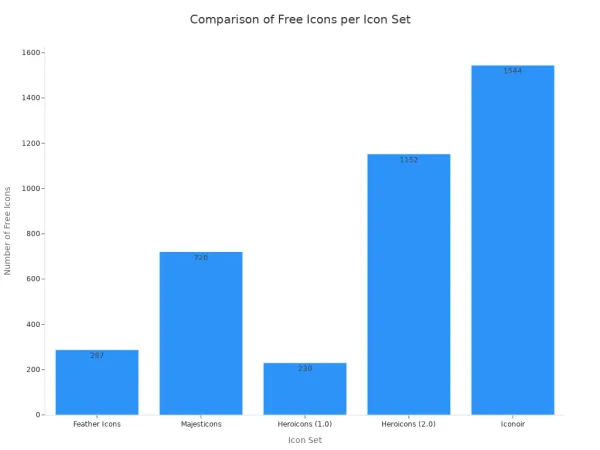
You now know the best websites to download assets for your hardware project. This quick guide helps you choose the right resource for your specific need. If you need minimalist icons for a clean UI on an embedded device, you can also download free illustrations from these excellent open-source libraries.
| Icon Set | Minimalist UI Icons | Projects Requiring No Attribution (License) |
|---|---|---|
| Feather Icons | Yes (simple, consistent) | Yes (open source) |
| Majesticons | Yes (super minimal) | Yes (MIT License) |
| Heroicons | Yes (beautifully crafted) | Yes (MIT Licensed) |
| Iconoir | Yes (ideal for modern UI) | Yes (100% free and open source) |
FAQ
### What is the best license for commercial hardware projects?
You should look for icons with a Public Domain, MIT, or similar permissive license. These licenses let you use the graphics in your commercial products without needing to give credit. Sites like SVG Repo and Pixabay are excellent for this.
### Can I edit these SVGs for my circuit diagrams?
Yes, you can. SVG files are vector-based, so you can easily edit them. You can use software like Figma or Adobe Illustrator to change colors or shapes. This helps you match the icon to your schematic's specific needs.
### Why use SVG over PNG for an embedded system's UI?
You should use SVGs because they scale without losing quality. Your icons will look sharp on any screen size. SVGs also have smaller file sizes than high-resolution PNGs. This saves valuable space on your device's memory.
### Do I need to give credit on a physical product?
It depends on the license. Most free licenses require attribution. This can be difficult on a physical product. To avoid this, you should use icons with a "no attribution required" license or purchase a commercial plan.