Why Type C to Type C 3.1 Cables Are Essential for Fast Data Transfer
You need fast data transfer for your daily tasks. Whether you move large files, stream videos, or back up devices, the right
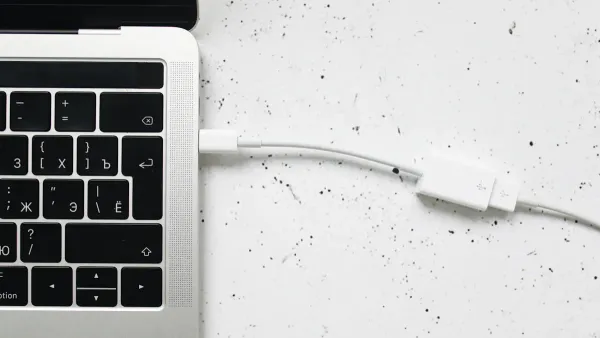
You need fast data transfer for your daily tasks. Whether you move large files, stream videos, or back up devices, the right cable makes a difference. The type c to type c 3.1 cable stands out for reliability and speed.
The market for high-speed data transfer in the United States was valued at $6.9 billion in 2024 and may reach $13.8 billion by 2033. This growth comes from the rising use of data in smart devices and electronics.
| Year | USB Type-C Cable Market Size (USD Billion) | CAGR (%) |
|---|---|---|
| 2024 | 6.45 | N/A |
| 2033 | 17.07 | 14.5 |
You see this demand when you choose the right usb-c cable for your electronics. Data moves quickly and safely, so you stay ahead with high-speed data transfer.
Key Takeaways
- Type C to Type C 3.1 cables enable fast data transfer, moving large files in seconds, which enhances productivity.
- These cables offer universal compatibility, allowing you to connect various devices like laptops, smartphones, and gaming consoles with one cable.
- Strong power delivery capabilities let you charge devices quickly, supporting up to 100W, which is ideal for laptops and other high-power devices.
- Using certified cables ensures stable data transfer and protects your devices from potential damage caused by low-quality alternatives.
- Investing in Type C to Type C 3.1 cables future-proofs your tech setup, as they comply with upcoming standards and work with new devices.
What Is USB Type-C?
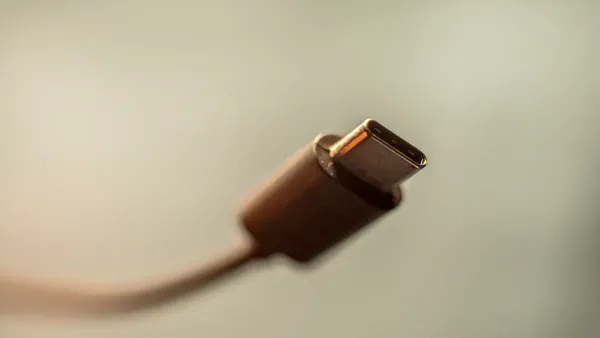
Connector Design
You see the difference when you look at a type-c connector. The design stands out from older usb connectors.
- You can plug it in either way, so you never need to check the orientation.
- The connector is small, measuring about 8.4mm by 2.6mm. This size fits well in slim devices and tight spaces on circuit boards.
- Inside, you find 24 pins arranged in two rows. This layout gives the connector a symmetrical and flippable shape.
- Engineers built type-c connectors for durability. They include features that protect against electromagnetic interference and work well in tough environments.
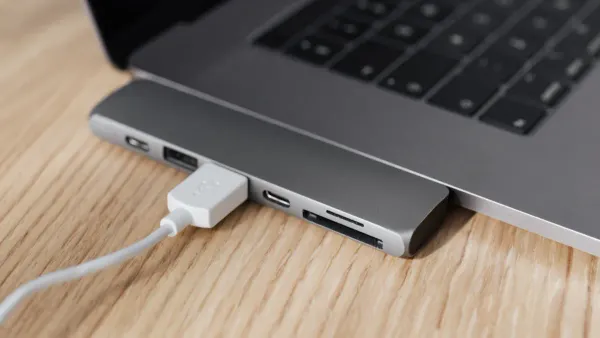
These design choices help you connect devices quickly and safely. You avoid bent pins and broken ports. The small size also lets manufacturers add more features to electronic components and integrated circuits. You get faster data speeds and better power delivery in your devices.
Universal Use
You use usb type-c in many devices. The connector works with laptops, smartphones, tablets, and even gaming consoles.
Here is a table showing some examples:
| Device Category | Examples |
|---|---|
| Laptops | MacBooks |
| Smartphones | Android phones |
| Gaming Consoles | Nintendo Switch |
You do not need different cords for each device. Usb type-c supports data transfer, charging, and video output.
- You can use one cable for many tasks.
- You save space and reduce clutter.
- You connect devices across brands and platforms.
Usb type-c helps you future-proof your electronics. Manufacturers use it in new products because it works with advanced integrated circuits. You get better performance and easier upgrades. The connector supports the latest standards in usb technology, so your devices stay compatible as technology changes.
Type C to Type C 3.1 Speed
Speed Comparison
You want your devices to move data fast. The type c to type c 3.1 cable helps you reach the highest data transfer speeds possible with modern electronics. When you compare usb standards, you see big differences in how quickly they can transfer files. Here is a table that shows the official data transfer rates for each usb standard:
| USB Standard | Data Transfer Rate (Gbps) |
|---|---|
| USB 2.0 | 0.48 (480 Mbps) |
| USB 3.0 | 5 |
| USB 3.1 | 10 |
| USB 3.2 | 20 |
| USB4 | 40 |
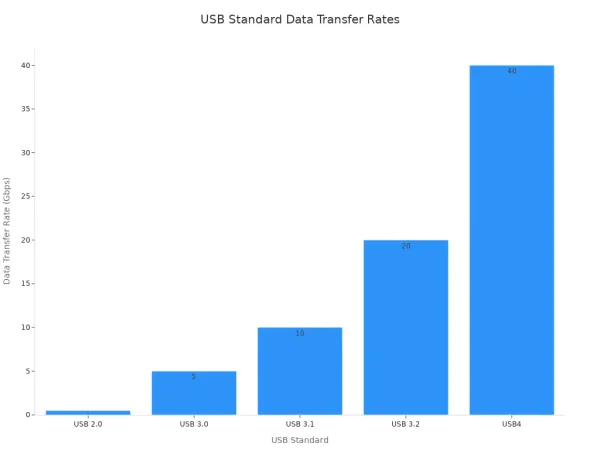
You see that usb 3.1 cables can reach up to 10 Gbps. This is more than twenty times faster than usb 2.0. The latest usb-c standards, like usb4 and Thunderbolt 4, can even reach 40 Gbps. Some new integrated circuits now support up to 80 Gbps, which means your devices can handle huge files in seconds.
When you use a type c to type c 3.1 cable, you unlock the full potential of your device’s electronic components. These cables work with advanced integrated circuits that manage high-speed data transfer. You get the most out of your laptop, smartphone, or external drive.
Real-World Impact
You may wonder if these high numbers matter in daily life. The answer is yes. Real-world tests show that a usb 3.2 gen2 cable, which is similar to type c to type c 3.1, has a theoretical speed of 10 Gbps. In practice, you get about 800MBps, or 6.4Gbps. This is still much faster than older cables.
| Cable Type | Theoretical Speed | Real-World Speed |
|---|---|---|
| USB 3.2 Gen 2 (10Gbps) | 10Gbps (1250MB/sec) | ~800MBps (6.4Gbps) |
| USB 3.2 Gen 1 (5Gbps) | 5Gbps (625MB/sec) | ~400MBps (3.2Gbps) |
You notice the difference when you transfer large files, like videos or backups. A type c to type c 3.1 cable can move a 10GB video in about 13 seconds. With usb 2.0, the same file would take over five minutes. This speed helps you save time and keeps your workflow smooth.
Tip: Always choose certified type c to type c 3.1 cables. Low-quality cables may not support high data transfer speeds. Some cables only charge devices and do not transfer data at all. Others may lack the right components, like the E-marker chip, which helps with power delivery and stable data transfer.
Professionals who work with large media files, like photographers and video editors, rely on these cables. You can transfer raw images, 4K videos, or project backups quickly. This means less waiting and more time to focus on your work. Developers and engineers also benefit from faster data transfer when working with large codebases or device backups.
The right cable also protects your devices. Certified type c to type c 3.1 cables follow strict standards for signal integrity and power delivery. This keeps your electronic components and integrated circuits safe from damage caused by unstable connections.
Type-C Benefits
Power Delivery
You get powerful charging when you use a type-c cable with usb 3.1. This technology lets you charge phones, tablets, and even laptops with one port. The cable supports up to 5A of current and delivers up to 100W of power. Your devices draw more energy safely, so you see faster charging times. Older usb standards cannot match this level of fast charging. You do not need multiple adapters for different devices. The cable works with advanced integrated circuits that manage power and data at the same time.
| Feature | USB Type-C 3.1 (PD 3.0) | Previous USB Standards |
|---|---|---|
| Maximum Current Delivery | 5A | Lower than 5A |
| Data Transfer Speed | Up to 10Gbps | Varies, generally lower |
| Compliance | USB PD 3.0 | Not applicable |
You can charge and transfer data together. This saves you time and keeps your electronic components safe. The usb type-c cable supports fast charging for many devices. You see the difference in your daily routine.
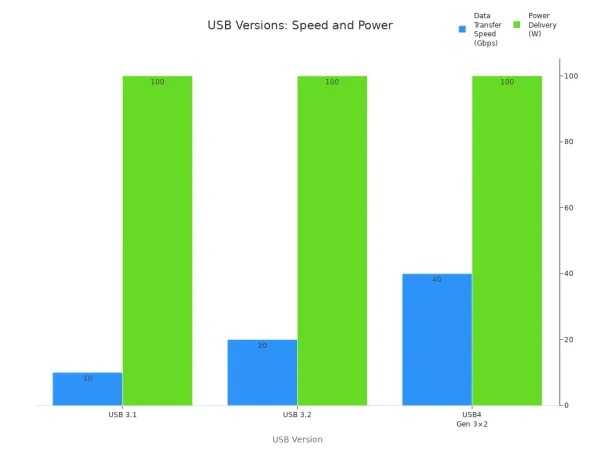
Video and Audio Output
You can use a type-c cable to connect your device to monitors and speakers. The usb type-c 3.1 standard supports high-resolution video and audio output. You get ultra HD video up to 5K at 60Hz or dual 4K displays. The cable also supports 5.1-channel surround sound. You enjoy clear images and rich audio for work or entertainment. Integrated circuits inside your device handle these signals and send them through the cable.
| Feature | Description |
|---|---|
| Video Output | Supports dual 4K@60Hz displays or single 5K@60Hz display through DisplayPort and HDMI ports. |
| Resolution | Ultra HD video resolution up to 5K (5120x2880) @60Hz or Dual 4K (3840x2160) @60Hz. |
| Audio Output | Supports 5.1-channel surround sound through the same connections. |
You can connect usb peripherals, transfer data, and charge your device all at once. The cable makes your workspace cleaner and more efficient. You do not need extra adapters for video or audio. The usb type-c cable supports fast charging and high-speed data transfer while sending video and audio signals.
Reversible Connector
You never worry about plugging in your cable the wrong way. The type-c connector is reversible. You can insert it in any direction. This design makes connecting devices easy and quick. You avoid frustration and protect your device’s ports. The connector’s slim shape fits well with modern electronic components and integrated circuits.
| Advantage | Description |
|---|---|
| Reversible Design | Plug in either direction, no need to check orientation. |
| User Experience | Easier connection, less frustration, and faster setup. |
| Device Longevity | Reduces wear on ports, helps devices last longer. |
You get reliable data transfer and fast charging every time. The connector’s durability means your cable lasts longer. You spend less time fixing broken ports or replacing cables. The usb type-c cable supports your devices and keeps your workflow smooth.
USB-C Cable Compatibility
Device Support
You want your devices to work together without problems. The usb-c cable helps you connect many types of electronics, from laptops to smartphones. The usb-c standard lets you use one cable for charging, data transfer, and video output. You do not need different cables for each device. This makes your workspace cleaner and your life easier.
- The usb-c cable links older technology with new devices.
- You get efficient power delivery and fast data transfer.
- High data transfer rates improve how you use your devices.
You can use a usb-c cable with MacBooks, Android phones, tablets, and even gaming consoles. The usb-c standard supports bidirectional power, so you can charge one device from another.
USB-C’s bidirectional power capability lets you charge other usb-c-compatible gadgets using your device as the power source.
You also find USB-A to USB-C cables. These bridge older laptops and chargers with new devices. You avoid slow charging and device damage by choosing the right cable.
- USB-A to USB-C cables connect old and new technology.
- You can use existing USB-A chargers and ports.
- Picking the right cable keeps your devices safe.
| Compatibility Issue | Description | Solution |
|---|---|---|
| Variations in Specifications | Different usb-c cables may have varying specifications, leading to performance issues. | Use certified cables. |
| Power Delivery Standards | Not all cables support the same power delivery standards, affecting charging capabilities. | Check power delivery specifications. |
| Physical Damage | Cables can suffer from physical damage, leading to connection failures. | Inspect cables for damage. |
Physical damage can cause usb-c cable malfunctions. You should check for fraying, exposed wires, or loose connectors. This keeps your electronic components and integrated circuits safe.
Future-Proofing
You want your tech setup to last. The usb-c standard keeps your devices ready for new technology. Many countries now require mobile devices to use usb type-c charging ports. This means your usb-c cable will work with future phones, tablets, and laptops.
| Date | Requirement | Devices Affected |
|---|---|---|
| December 28, 2024 | All mobile devices must have USB Type C charging port and comply with PD. | Handheld mobile phones, Tablets, Digital cameras, Headphones, Handheld videogame consoles, etc. |
| April 28, 2026 | USB Type C and PD requirements extend to laptops. | Laptops |
| Every five years | Regular assessment for additional devices to include in the mandate. | Potentially all devices rechargeable via wired cable with power delivery up to 240 W. |
You see that the usb-c standard will support more devices over time. You do not need to buy new cables every year. The usb-c cable supports faster data transfer, higher power delivery, and works with many brands.
| Feature | Description |
|---|---|
| Faster Data Transfer | USB-C can transfer data at speeds of up to 80 Gbps, ideal for large files and high-resolution videos. |
| Higher Power Delivery | Supports power delivery of up to 100W, charging smartphones, laptops, and tablets efficiently. |
| Universal Compatibility | Works across a wide range of devices, reducing the need for multiple cables and chargers. |
You protect your investment in electronic components and integrated circuits by choosing a certified usb-c cable. You avoid slow charging, connection failures, and keep your devices ready for new standards. The usb-c cable helps you stay ahead as technology changes.
You need the right cable to get the best from your devices. Experts recommend type c to type c 3.1 cables for several reasons:
- You achieve fast data transfer, moving large files in seconds.
- You enjoy universal compatibility, connecting many devices with one cable.
- You get strong power delivery, charging laptops and running monitors with ease.
| Feature | USB 3.1 Type C | Older USB Types |
|---|---|---|
| Data Speed | Up to 10 Gbps | Up to 480 Mbps |
| Power Delivery | 20V 3A/5A | Lower power |
| Compatibility | Multiple protocols | Limited |
Upgrade to a quality usb-c cable. You will see better performance from your electronic components and integrated circuits, and your setup will be ready for the future.
FAQ
What makes a Type C to Type C 3.1 cable better for data transfer?
You get faster speeds because these cables use advanced electronic components and integrated circuits. They support up to 10 Gbps, which helps you move large files quickly. Older cables cannot match this performance.
Can I use a Type C to Type C 3.1 cable with any device?
Most modern devices with USB-C ports support these cables. You should check your device’s specifications. Some older devices may not use the full speed, but the cable remains safe and reliable.
Does cable quality affect data transfer and charging?
Yes. High-quality cables use better materials and integrated circuits. You get stable data transfer and safe power delivery. Cheap cables may cause errors or even damage your device’s electronic components.
Why do some Type C cables not support video output?
Not all cables include the right wiring or integrated circuits for video signals. You need a cable that supports DisplayPort or HDMI over USB-C. Always check the cable’s specifications before buying.
How do I know if my cable supports fast charging?
Look for labels like “USB 3.1,” “PD,” or “E-marker chip.” These features show the cable can handle higher power and faster charging. You protect your device’s integrated circuits by using certified cables.