Understanding Parametric Data for PCB Components in Consumer Electronics: Selection Criteria and Specifications
When you begin a printed circuit board design, parametric data helps you pick the right parts. You use parametric data to look at important things like voltage, current, and size.

When you begin a printed circuit board design, parametric data helps you pick the right parts. You use parametric data to look at important things like voltage, current, and size. These details help you reach your performance and reliability goals. Good electronic component selection means you look at all parts and their details. You check if each part matches your needs and works for the design. This process helps your pcb meet high performance and reliability standards for consumer electronics.
Key Takeaways
-
Use parametric data like voltage, current, and size to choose the right PCB parts. This helps your design work well and stay reliable.
-
First, figure out what your design needs. Know your system limits. Then pick parts that match your needs for size, power, and cost.
-
Always look at datasheets closely for electrical, physical, and environmental specs. This helps you avoid problems like overheating or signal loss.
-
Use parametric filters and comparison tools to find the best parts fast. This helps you avoid parts that are old or hard to find.
-
Keep good records and test your PCB parts often. This helps you find problems early and make strong, long-lasting consumer electronics.
Parametric Data in PCB Design

What Is Parametric Data?
When you pick parts for your pcb, you use parametric data. This data gives more details than just a part number. Engineers say parametric data is organized and has lots of details. You can see things like resistance, capacitance, voltage rating, and package type. These details help you compare parts in the same group. For example, you can look at two resistors and decide which one is better for your project. Tools like Altium Designer show you this data from live sources. You can find the right part fast by checking these details. This helps keep your design strong and helps you avoid errors.
Why Parametric Data Matters
You should care about parametric data because it keeps your pcb design safe. Each detail changes how your circuit works. If you pick a part with the wrong voltage or size, your signal might not work right. Good parametric data lets you check if a part can handle power, speed, and temperature. When you make consumer electronics, you want every part to help signal integrity and system integrity. Studies show that controlling things like power and frequency can make a pcb work better. Even in metal recovery, engineers use parametric data to get better results. You can use this idea in your own projects. By looking at the right details, you keep your design safe and make sure your pcb works well. Always use parametric data to help you choose parts and keep signal integrity in your pcb design.
Defining Requirements
Functional Needs
When you start designing a pcb, you first list what you need. These needs help you know what each part should do. In consumer electronics, you use resistors, capacitors, and inductors to control signals and block noise. Transistors and integrated circuits help with switching, making signals stronger, and logic. You also need connectors and switches for power and letting people use the device. Each part must have the right resistance, capacitance, or gain. You want your parts to keep the circuit working the same way every time. For example, resistors set how much current flows and what logic levels are used. Capacitors help clean up power. New designs often put many jobs into one IC. This saves space and makes things work better. Always check if your parts fit what you need for signal conditioning, noise filtering, and working with other parts.
Tip: Make a checklist of what you need before picking parts. This helps you remember all the important things for your pcb.
System Constraints
You also have to think about system constraints when you design a pcb. These rules help you pick the right parts and meet your needs. Size is very important in consumer electronics. Small packages like 0402 or QFN make boards smaller and easier to carry. Power and heat limits help you choose parts that can handle getting hot. FR-4 is used a lot because it is cheap and works well. Sometimes you need aluminum PCBs to get rid of more heat in powerful devices. Cost is also important. Using standard sizes and parts can make things cheaper to build. You need to think about how close you can put parts without causing heat or signal problems. Multi-layer boards save space but can cost more. Always pick parts that fit your system’s size, power, and cost rules so you meet your needs.
-
Common system constraints:
-
Board size and shape
-
Power and thermal management
-
Manufacturing limits (spacing, assembly)
-
Cost targets
-
When you know both what your parts must do and what limits you have, you make a strong plan for your pcb. This helps your design work the way you want.
Key Parameters for Component Selection
When you pick parts for your pcb, you need to check some key parameters. These help you find the right chip or part for your project. You want your devices to work well and last a long time. You also want them to meet all the needed rules. Let’s look at the most important things you should check.
Electrical Parameters
Electrical parameters show how a part acts in a circuit. You should check voltage, current, power, accuracy, and speed. Each one changes how your device works.
-
Voltage Rating: This is the highest voltage a part can take. For example, a resistor’s voltage rating depends on its resistance and power rating. If you use a 100 Ω resistor with a 0.5 W rating, it can handle about 7 V. If you use more than this, the resistor might break.
-
Current Rating: This tells you the most current a part can carry. For resistors, current depends on resistance and power rating. For example, a 0.5 W, 100 Ω resistor can handle about 70 mA.
-
Power Rating: This is the most power a part can safely use. Common resistor power ratings are from 1/8 W to 5 W. Bigger power ratings mean bigger parts.
-
Accuracy and Speed: For analog and digital chips, accuracy and speed are very important. Precision resistors and capacitors keep signals clean and steady. Fast ICs need short, direct paths to stop noise and distortion. You should use low-jitter clock sources and keep analog and digital parts apart to lower interference.
Tip: Always read the datasheet for each chip or part to find these details. This helps you stop problems like overheating or signal loss.
Here is a table with usual electrical specs for common parts:
|
Component |
Standard Voltage Rating |
Standard Current Rating |
Standard Power Rating |
Typical Size / Notes |
|---|---|---|---|---|
|
Resistors |
Depends on resistance and power rating; e.g., 100 Ω, 0.5 W: ~7 V |
0.5 W, 100 Ω: ~70 mA |
1/8 W, 1/4 W, 1/2 W, 1 W, 5 W |
SMD: 1210, 1206, 0805, 0603, 0402, 0201 |
|
Capacitors |
Rated by max voltage; varies by type |
Not direct; depends on use |
Not direct; rated by voltage/capacitance |
Ceramic, electrolytic, oil-filled |
|
ICs |
N/A |
N/A |
N/A |
See package types below |
-
Example: If you make a wearable device, you might use a 0402 resistor because it is small and has a 1/8 W power rating to save space.
Physical and Package Parameters
Physical parameters are the size, shape, and how you put each part on the pcb. These things change how you place chips and other parts on your board. In small devices like phones and wearables, you need the smallest packages you can get.
-
Package Size: Small packages like 0402 or 01005 are used in new devices. These sizes help you fit more parts on a small pcb.
-
Mounting Type: Surface Mount Technology (SMT) is the main way to put parts on a board. SMT lets you put parts right on the pcb surface, which saves space and helps with high-density layouts.
-
Footprint and Height: The footprint is the space a part takes up on the pcb. Height matters if your device is thin. You need to check the datasheet for the right size and pad shape. If you use the wrong footprint, you might have trouble soldering or fitting the part.
Here is a table of common SMD package sizes and how they are used:
|
Package Size (Imperial) |
Package Size (Metric) |
Typical Use in Smartphones and Wearables |
|---|---|---|
|
1210 |
3225 |
Larger power components |
|
1206 |
3216 |
Power supplies |
|
0805 |
2012 |
General purpose |
|
0603 |
1608 |
Consumer electronics |
|
0402 |
1005 |
High-density applications |
|
0201 |
0603 |
Compact, high-performance devices |
|
01005 |
0402 |
Miniaturized products like wearables |
-
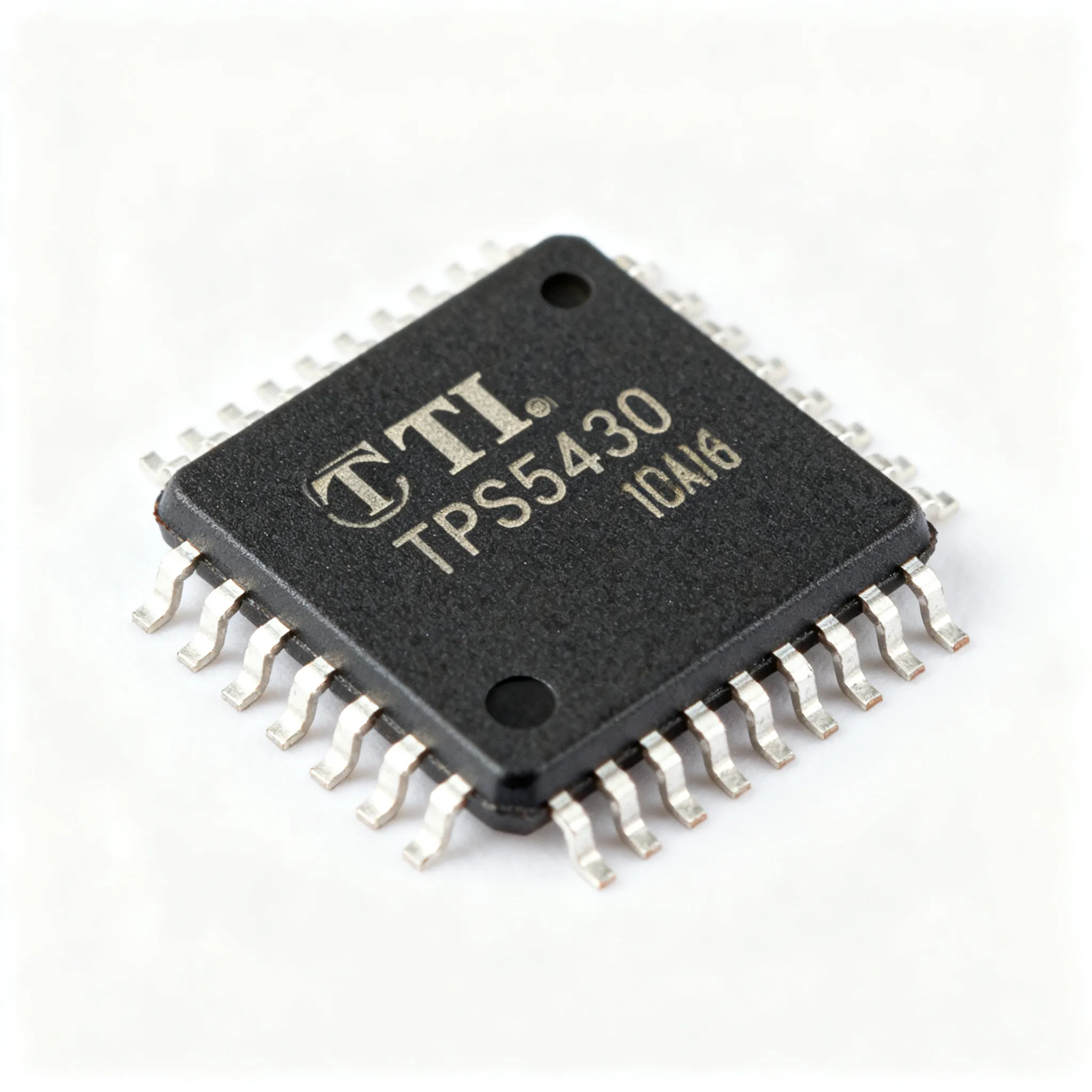
IC Package Types: QFN, BGA, and WLCSP are popular for chips in mobile devices. WLCSP lets you use very small chips, which is great for wearables.
-
Mounting Type: SMT is used in most consumer electronics. It lets you put more chips and parts on both sides of the pcb.
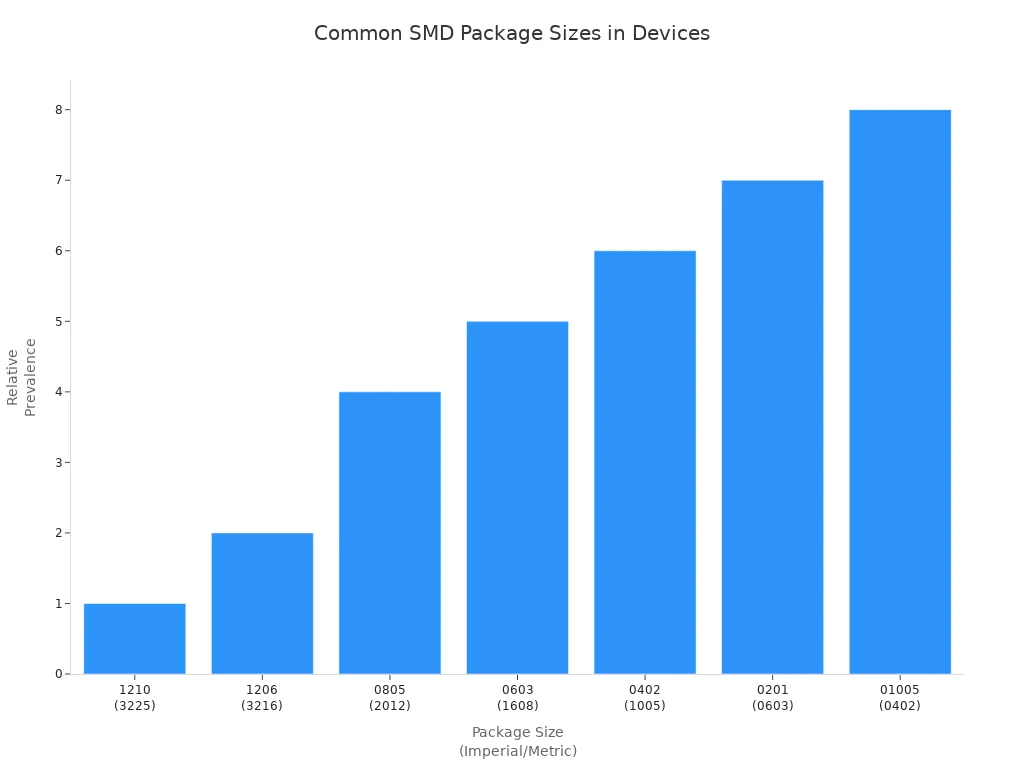
Note: Always check the footprint and height of each part. Mistakes can make it hard to build your device or make it too thick.
Environmental and Thermal Parameters
Environmental and thermal parameters show how well your parts handle heat, cold, and other stress. You need to check the working temperature range and thermal ratings for each chip and part. These details help you make sure your devices work in real life.
-
Operating Temperature Range: Most chips and parts in consumer electronics work from 0°C to 70°C. Some industrial devices need a wider range, from -40°C to 85°C. Always pick parts that match your device’s environment.
-
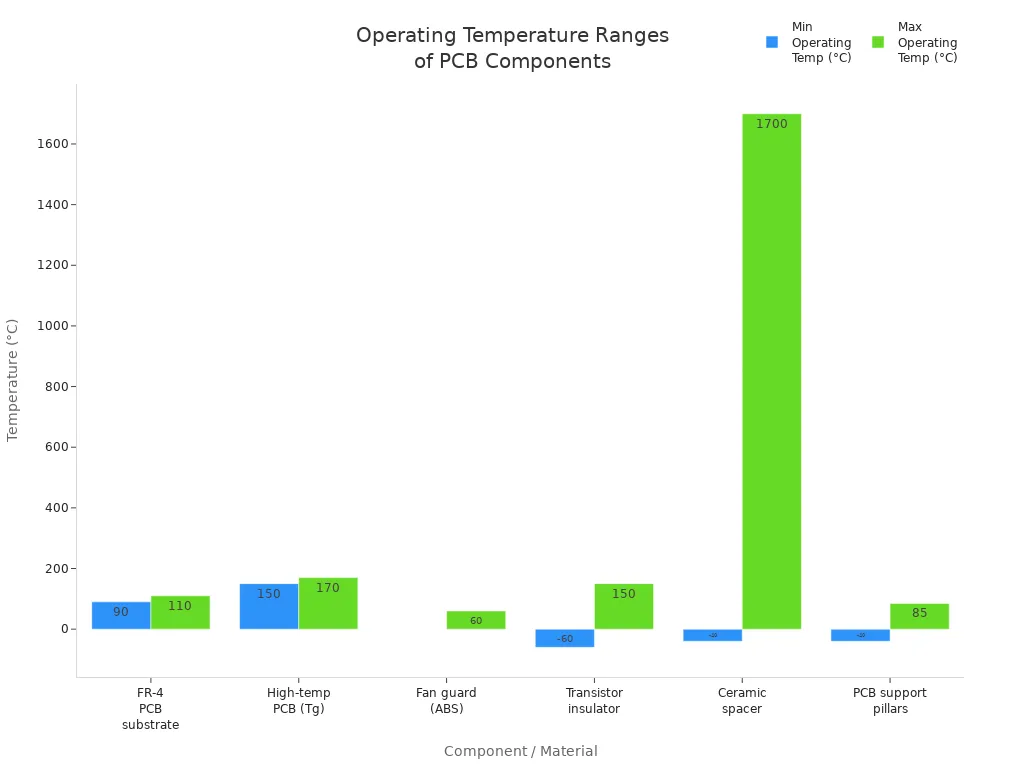
Thermal Ratings: Power chips and ICs make heat. You need to check how much heat each part can take. For example, FR-4 pcb material works up to 90–110°C. High-temperature boards can go above 150°C. If your chip gets too hot, it can break or slow down.
-
Humidity and Mechanical Stress: Water can cause rust and short circuits. Vibration and shock can crack solder or break parts. You should use parts tested for these stresses, especially in portable devices.
Here is a table of usual working temperature ranges and thermal ratings:
|
Component / Material |
Operating Temperature Range (°C) |
Notes |
|---|---|---|
|
FR-4 PCB substrate |
Up to 90 to 110 |
Common PCB material |
|
High-temperature PCB (Tg) |
Above 150 to 170 |
For high-heat applications |
|
Fan guard (ABS plastic) |
0 to 60 |
Cooling fan accessory |
|
Transistor insulator |
-60 to 150 |
Heat-resistant insulation |
|
Ceramic spacer |
-40 to 1700 |
High-temp support |
|
PCB support pillars (Nylon 6/6) |
-40 to 85 |
Mechanical support |
-
Reliability: Very hot, cold, wet, or shaky places can make your devices break sooner. You should use tests to see how your pcb and chips handle these things. This helps you make products that last.
Callout: Always pick parts with specs that match or beat your device’s working temperature and environment. This keeps your devices safe and working well.
Datasheets and Parametric Tables
Reading Datasheets
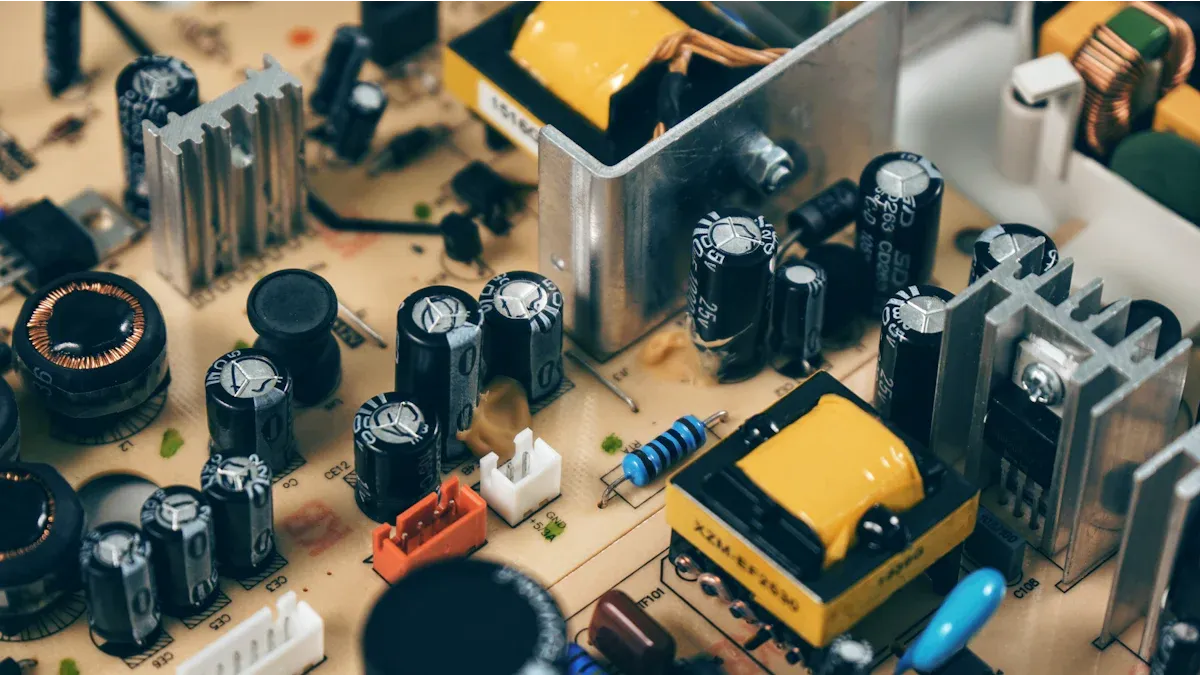
When you pick parts for your pcb, you need to read datasheets. Datasheets have all the important facts about each part. You can find out things like voltage, current, size, and temperature limits. These facts help you know if a part will work in your project.
You should always look at these main parts in datasheets:
-
Graphs and charts show how the part works in different ways.
-
Package info and pinout help you match the part to your board.
-
Ordering info helps you get the right part.
Here is a table that shows what to check in datasheets:
|
Parameter |
Why It Matters for Selection |
Key Datasheet Data to Check |
|---|---|---|
|
Voltage/Current Rating |
Must be higher than your circuit needs |
Electrical specs, absolute max ratings |
|
Environmental Rating |
Must match where your device will be used |
Temperature and humidity ratings |
|
Performance & Tolerance |
Helps you pick parts that are accurate and stable |
Tolerance values, thermal coefficients |
|
Physical Footprints |
Makes sure the part fits your board |
Package info, pinout details |
Tip: Always check the datasheet numbers with what your design needs before you pick a part.
Extracting Key Data
You can save time if you know how to find the key facts in datasheets. Look for the most important numbers first. These are voltage, current, size, tolerance, and temperature range. You can use tables or search tools to compare parts fast.
-
Voltage and current ratings keep your parts safe.
-
Size and footprint help you fit parts on your board.
-
Tolerance shows how close a part is to its value.
-
Temperature coefficients tell you how a part changes with heat.
Many engineers use software to keep track of datasheets and data. You can add parametric data, attach datasheets, and compare parts from different places. Some tools show model info and quality, which helps you pick the best part.
Note: Put your data in a table or spreadsheet. This helps you compare parts and find the best one for your project.
Filtering and Comparing Components
Using Parametric Data for Selection
You need to look at many parts before you pick one. First, write down what you need for each part. These needs can be voltage, current, package size, and temperature range. Use tools like Altium Designer to search for ic, chip, and other devices. This tool lets you sort by things like cost, supplier, and if a chip is still made. You can see if a chip is new or not made anymore. Altium 365 helps you see changes in parametric data between pcb versions. You can find out if ic were added or removed and how this changes your pcb.
Component search engines help you pick electronic parts faster. They let you compare ic, chip, and other devices by showing specs, prices, and if they are in stock. You can sort by electrical ratings, package, and how long it takes to get the part. These tools help you find the best part for your device and keep signal integrity strong. You can also check if a chip might run out soon.
Tip: Always use parametric filters to make your list shorter. This saves time and helps you find the best parts for your pcb.
Trade-Offs and Priorities
You will have to make choices when picking parts. Sometimes, you must pick between cost, how easy it is to get, and how well it works. For example, a high-performance ic or chip may cost more or take longer to get. You need to think about these things to keep your device working and not too expensive.
Engineers use ways like voting to decide what is most important. You can give more points to things like integrity or cost. Tools like Octopart show prices, if a part is in stock, and if it is still made. This helps you avoid chips that might stop being made and keeps your device safe from supply problems. Always check if your choice helps with long-term integrity and meets your needs for performance.
Note: Make a table to compare each ic, chip, and device. Write down key specs, cost, and if it is still made. This helps you see which part is best for your pcb and keeps your design strong.
Reliability Considerations
Parametric Tests
You want your consumer electronics to work every time. To make this happen, you need strong reliability. Parametric tests help you check if each PCB component matches its datasheet values. These tests look at voltage, current, timing, and other electrical parameters. If a part does not match these values, you could have signal integrity problems or even total failure.
Here is a table that shows common parametric tests and how they help with reliability:
|
Test Type |
Description |
Parameters Measured |
Role in Reliability Assurance |
|---|---|---|---|
|
Checks each circuit on the board |
Voltage, current, timing, resistance, capacitance, inductance |
Finds faults and checks datasheet values |
|
|
Flying Probe Testing |
Uses probes to test without powering the board |
Resistance, capacitance, inductance, diode issues |
Finds open circuits, shorts, and part issues |
|
Functional Testing |
Powers up the board to see if it works right |
Operational voltage, current, timing, behavior |
Finds parametric and functional failures |
|
Burn-In Testing |
Runs the board at high temperature and power |
Load capacity, thermal stress |
Finds early failure and helps reliability |
You need these tests to keep signal integrity high and avoid failure. If you skip parametric testing, you might see random failure or weak signal integrity in your devices. Always use these tests to make sure your PCB meets reliability standards.
Tip: Use parametric tests early and often. This helps you find problems before they cause failure in the field.
Quality and Compliance
You must follow strict quality rules to keep your products safe and reliable. International standards help you build PCBs that last and protect signal integrity. Here are some key standards and rules you should know:
-
IPC standards (like IPC-A-600, IPC-6012, IPC-A-610, IPC-2221, IPC-7711/7721) set the rules for PCB quality and safety.
-
These standards say how your board should look, work, and how to fix it.
-
IPC standards help you meet legal rules, like FDA and REACH, and sell worldwide.
-
RoHS rules limit toxic substances, making electronics safer for people and the planet.
-
The IPC classification system matches your product’s quality and testing to its use, from simple gadgets to high-reliability devices.
You also need strong quality assurance steps to keep signal integrity and reliability high:
-
Check laminate glass transition temperature and decomposition temperature with outside labs.
-
Measure metal thickness and purity on every job.
-
Inspect solder samples and cross sections for tough jobs.
-
Clean boards with ultrasonic tools and vacuum sealing for less contamination.
-
Use multi-step reliability checks, including process parameter checks and automatic design file checks.
-
Measure board thickness, V-CUT depth, and other sizes with laser tools.
-
Run electrical tests for continuity and impedance to keep signal integrity strong.
-
Inspect BGA pad alignment with X-ray.
-
Track all inspection data in a digital system for fast fixes.
Note: Following these quality steps and standards helps you avoid failure, keep signal integrity, and build reliable products.
IC and Specialized Component Selection
IC Parametric Data
When you pick an ic, you need to look at many details. These details help you make sure the ic works in your device. You should always check these things:
-
Package type: Plastic packages are cheap and work for most electronics.
-
Thermal management: Check what materials are used to attach the die and the base. These materials change how much heat the ic can take.
-
Signal integrity: Look at inductance, capacitance, and resistance. The way the package is made and how it connects, like wire bond or flip chip, changes how the ic handles fast signals.
-
Environmental robustness: Some packages are better at handling shock and vibration. This is important for devices you carry around.
You have to balance power, performance, and size when picking parts. The way the ic is laid out changes its resistance, capacitance, and inductance. These things affect signal integrity, how much power is used, and timing. As chips get smaller, these effects matter more. Always check ic specifications and chip specifications to make sure your design works.
Tip: Make a table to compare ic specifications for each chip. This helps you see which ic is best for your device.
|
Parameter |
Why It Matters |
What to Check in Datasheet |
|---|---|---|
|
Package Type |
Cost, size, and heat control |
Plastic, QFN, BGA, WLCSP |
|
Thermal Management |
Prevents overheating |
Die attach, base material |
|
Signal Integrity |
High-speed performance |
Inductance, capacitance, layout |
|
Environmental Specs |
Durability in real use |
Shock, vibration ratings |
Application-Specific Criteria
You need to pick parts that do what your device needs. In consumer electronics, special needs often mean using special chips like ASICs. These chips put many jobs, like CPU, GPU, and AI, into one ic. This makes devices faster, smaller, and saves energy.
-
ASICs help you get the best speed and power use for your device.
-
Semi-custom ASICs give you some custom features but still save money.
-
System on Chip (SoC) designs put many parts into one chip. This saves space and power.
-
Devices like phones, tablets, smart TVs, and game consoles use these chips for things like pictures, sound, and wireless.
For example, Apple’s A17 Pro chip in the iPhone 15 Pro shows how special needs change chip specifications. This chip gives fast processing and graphics for top devices. Smart TVs use chips for better video and color, like Samsung’s Quantum Processor 4K. You need to check that each chip meets your device’s needs for speed, power, and how much it can do.
Note: Always check the specifications for each chip and ic. Make sure they fit your device’s needs for speed, power, and size. This helps your devices work well and stay up to date.
Availability and Sourcing
Lead Time and Obsolescence
You must plan for how long it takes to get each PCB component. Lead time means the weeks from ordering a part to getting it. Some parts come fast, but others take much longer. For example, connectors might take 9 to 21 weeks. Capacitors and resistors can take more than 52 weeks. This big difference means you should check lead times before you start.
|
Component Category |
Average Lead Time Range (weeks) |
Notes on Trends and Variability |
|---|---|---|
|
Connectors |
9 to 21 |
Slight variation from 2022; relatively stable |
|
Capacitors |
20 to 52+ |
Lead times remain high, stable at upper range |
|
Resistors |
20 to 52+ |
Significant increase compared to previous years |
|
General Passive Components |
52+ |
Persistently long lead times |
|
SMD Inductors |
8 to 80 |
Wide variability; some lead times spiked |
|
Lead Inductors |
10 to 14+ |
Some reduction at high end compared to prior data |
|
Power Devices |
12 to 48 |
Stable lead times |
|
Electromechanical Parts |
52+ |
Consistently long lead times |
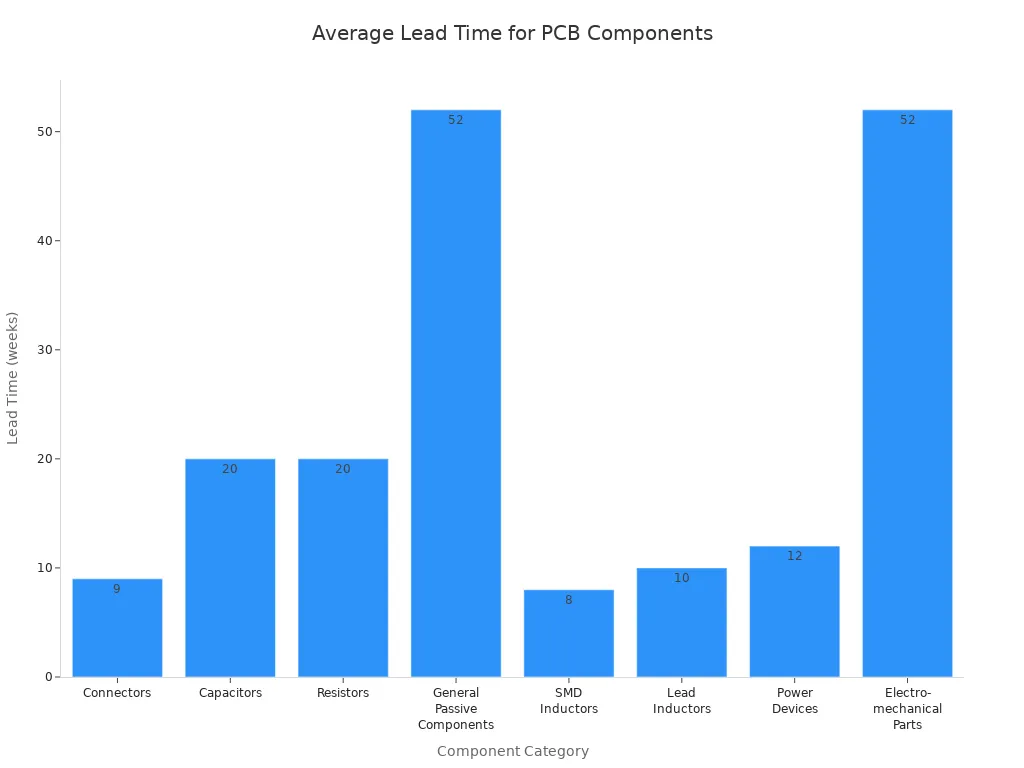
Obsolescence is when a part is no longer made or sold. New technology and changing needs can make parts disappear fast. You might need to change your design if this happens. Using obsolete parts can cause delays and cost more money. To avoid this, pick parts that will be around for a long time. Try to use standard components when you can. Modular and upgradable designs help your products last longer.
Tip: Always check if a part might become obsolete soon. Use design tools that show supply chain data in real time. This helps you avoid risky parts.
Supplier Evaluation
You want to buy from suppliers who give you good and reliable parts. Good suppliers help you avoid problems and keep your products safe. When picking a supplier, look for these things:
-
Durability and reliability of their parts
-
Compatibility and standardization with other parts
-
Material quality for better performance and longer life
-
Industry certifications like IPC, UL, and RoHS
-
Strong quality checks, like testing samples before big orders
-
A good balance between cost and quality
Always test a few samples before you buy a lot. Stay away from suppliers who have no certifications or a bad record. High-quality parts may cost more at first, but they save money by stopping repairs and failures.
Note: Picking the right supplier keeps your product’s quality high and helps your devices last longer.
Data Management in PCB Projects
Organizing Parametric Data
You need to keep your parametric data neat and easy to find. This helps you protect signal integrity and finish your PCB projects without trouble. When you start a project, decide what documents you need. These can be schematics, layout files, BOMs, Gerber files, and test steps. Keeping clear records helps you check signal integrity at every step.
Use version control like Git to watch for changes. This lets you know who made updates and when. You can find problems early and fix them fast. Tools like Altium 365 help you track everything as you work. You can check signal integrity and data integrity as you go. This saves time and helps you make good products.
Give your files and folders names that make sense. This makes it easy to find what you need. Use names that show what each file is for. This helps you keep track of signal integrity tests and data for each part. Always update your records as you work. Add notes, cross-references, and checklists to keep your data and signal integrity strong.
Tip: Keep your data safe with passwords, backups, and cloud storage. This protects your work and keeps your signal integrity safe from loss or damage.
Documentation Best Practices
You need good documentation to keep signal integrity and integrity high in your PCB projects. Start by making clear rules for what you will write down. Make sure you cover every step, from design to testing. Use checklists to track signal integrity checks and data updates.
Keep your documentation up to date at every step. Use feedback from your team to catch mistakes early. Regular updates help you find problems with signal integrity before they get big. Store your data in a safe place. Use encryption and backups to protect your files and keep your integrity strong.
Here are some best practices for documentation:
-
Decide what you need to write down before you start.
-
Use version control to track changes and keep your signal integrity history clear.
-
Name files and folders in a way that makes sense for your team.
-
Update your records often and use notes to explain changes.
-
Protect your data with strong security steps.
A table can help you see what to include in your documentation:
|
Documentation Item |
Why It Matters for Signal Integrity |
How to Keep Integrity Strong |
|---|---|---|
|
Schematics |
Shows connections for signal paths |
Update with every design change |
|
BOMs |
Lists parts for signal integrity |
Check for correct part numbers |
|
Test Procedures |
Verifies signal integrity |
Record results and feedback |
Note: Good documentation and data management help you keep signal integrity and integrity at the highest level. You can find and fix problems before they reach your customers.
You can use parametric data to help stop problems and make your PCB more reliable. First, check what your parts need for electricity and the environment. Then, look at how the parts are made and their packaging to stop problems before they start. Always pick suppliers who show proof that their parts work well and last a long time. Use a checklist to watch for risks, track reliability steps, and keep up with where you get your parts. This helps you find problems early, keep your products strong, and make sure every project works well.
FAQ
What is the most important parametric data when picking a PCB component?
You should always check voltage, current, and power ratings first. These numbers help you know if a part will work safely in your circuit. If you skip these, your device might fail.
How do you find parametric data for a component?
You can find parametric data in the component’s datasheet. Look for tables and charts that list ratings and limits. Many online tools and supplier websites also show this data for quick comparison.
Why do you need to care about package size?
Package size affects how many parts you can fit on your board. Smaller packages save space but can be harder to handle. Always match the package size to your design needs and assembly process.
What happens if you use a part outside its rated temperature?
If you use a part outside its rated temperature, it may stop working or break. Always check the temperature range in the datasheet. This keeps your device safe and reliable.
How can you avoid using obsolete components?
You should check supply chain data before you pick a part. Use tools that show if a part is still made. Pick standard parts when possible. This helps you avoid delays and redesigns.