Comparing UART and I2C for Embedded Systems
You should choose between UART and I2C based on your project’s needs. If you want faster data transfer and simple hardware,
You should choose between UART and I2C based on your project’s needs. If you want faster data transfer and simple hardware, UART works well for direct connections between electronic components. I2C fits best when you need to connect several integrated circuits, save power, or use sensors and memory chips. The table below shows how engineers compare uart vs i2c for embedded systems:
| Criteria | UART | I2C |
|---|---|---|
| Speed and Performance | Generally faster | Slower than UART |
| Hardware Complexity | Simpler hardware requirements | More complex due to addressing |
| Scalability | Limited scalability | Highly scalable |
Key Takeaways
- Choose UART for fast, direct connections between two devices. It offers simple hardware and high data rates.
- Select I2C when connecting multiple devices. It supports up to 127 devices on one bus, making it ideal for complex systems.
- Consider power consumption. I2C uses lower voltage levels, making it suitable for battery-powered applications.
- Understand the hardware complexity. UART is easier to set up for point-to-point communication, while I2C requires addressing and more wiring.
- Match the protocol to your project needs. Use UART for speed and simplicity, and I2C for scalability and multiple connections.
Protocol Basics
UART Overview
You often use UART when you want to connect two electronic components directly. UART stands for Universal Asynchronous Receiver/Transmitter. This protocol works with two wires: one for transmitting data (TX) and one for receiving data (RX). You do not need a shared clock signal. Each device sets its own speed, called the baud rate, and both must match for communication to work. Data travels in small packets. Each packet starts with a start bit, followed by data bits, sometimes a parity bit for error checking, and ends with a stop bit.
Tip: UART is popular for simple, point-to-point connections between microcontrollers and integrated circuits.
Here are the main features of UART:
- Uses two wires: TX and RX.
- Sends data asynchronously, without a clock.
- Frames data with start, data, parity, and stop bits.
- Requires matching baud rates.
- Can use different voltage levels, such as RS-232 (+12 V for '0', -12 V for '1') or RS-485.
You find UART in many embedded systems, especially when you need reliable, direct communication between chips.
I2C Overview
I2C stands for Inter-Integrated Circuit. You use I2C when you want to connect several integrated circuits, like sensors or memory chips, on the same board. I2C uses two wires: SCL for the clock and SDA for data. Unlike UART, I2C is synchronous. The master device generates the clock signal, and all devices follow this timing. Each device has a unique address, so you can connect up to 127 devices on one bus.
- I2C supports multiple masters and slaves.
- The master controls the clock and addresses the slaves.
- Data moves over a shared bus, making it easy to add more components.
- I2C uses lower voltage levels, which helps save power.
You often choose I2C for projects that need many sensors or chips working together. The protocol makes it simple to scale your system and connect different integrated circuits.
When you compare uart vs i2c, you see that UART is best for simple, direct links, while I2C shines in complex systems with many devices.
UART vs I2C: Key Differences
Speed
When you compare uart vs i2c, speed is one of the first things you notice. UART can reach high data rates, especially in direct connections between electronic components. Many embedded systems use common baud rates like 115200 bps or 230400 bps. Some chips, such as the TL16C752D, support speeds up to 3 megabits per second.
| Device | Maximum Data Rate |
|---|---|
| TL16C752D | 3 megabits per second |
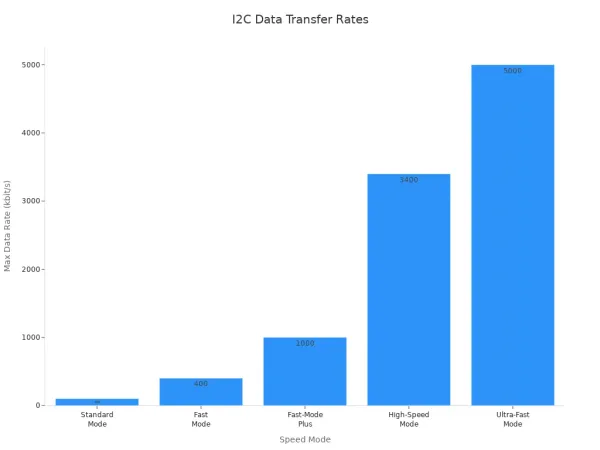
I2C offers several speed modes. Standard Mode supports up to 100 kbit/s, Fast Mode goes up to 400 kbit/s, and High-Speed Mode reaches 3.4 Mbit/s. Ultra-Fast Mode can hit 5 Mbit/s, but you rarely see this in typical sensor or memory chip connections.
| Speed Mode | Maximum Data Transfer Rate |
|---|---|
| Standard Mode | 100 kbit/s |
| Fast Mode | 400 kbit/s |
| Fast-Mode Plus | 1 Mbit/s |
| High-Speed Mode | 3.4 Mbit/s |
| Ultra-Fast Mode | 5 Mbit/s |
Note: You should choose UART for fast, direct data transfer between two integrated circuits. I2C works well for connecting multiple devices, but speed drops as you add more components.
Power Consumption
Power matters when you design embedded systems with sensors or memory chips. I2C uses lower voltage levels and supports power-saving features. You often see I2C in battery-powered devices because it helps you save energy. UART can use higher voltages, such as RS-232, which may increase power use. If you want to connect two chips and do not worry about battery life, UART works fine. If you build a system with many low-power sensors, I2C is a better choice.
Hardware Complexity
You need to think about wiring and pin count when you compare uart vs i2c. Both protocols use two wires, but the way you connect devices is different.
| Feature | UART | I2C |
|---|---|---|
| Pin Count | 2 (Tx and Rx) | 2 (SDA and SCL) |
| Wiring Complexity | Simple, point-to-point | Complex with multiple devices and addressing |
- UART uses a two-wire system (Tx and Rx) for direct communication between two electronic components.
- I2C also uses two wires (SDA and SCL), but you can connect many integrated circuits on the same bus. Each device needs a unique address, which adds complexity.
Tip: If you want simple wiring between two chips, UART is easier. If you plan to connect several sensors or memory chips, I2C helps you manage the connections, but you need to handle more complex wiring and addressing.
Scalability
Scalability is important when you build systems with many electronic components. UART is mainly for one-to-one communication. You can connect two devices easily, but adding more is hard. If you try to connect many chips, you may run into problems with data conflicts and cable length.
- UART is best for 1:1 connections. You can use RS232 for up to 50 feet at 19200 Baud, but adding more devices is tricky.
- I2C uses 7-bit addressing, so you can connect up to 127 devices on one bus. The actual number depends on bus capacitance and device support.
| Protocol | Maximum Devices Supported | Notes |
|---|---|---|
| UART | 2 (point-to-point) | Adding more devices increases complexity |
| I2C | Up to 127 | Limited by address space and bus capacitance |
Callout: If you need to connect many sensors or memory chips, I2C is the better choice. For simple, direct links between two integrated circuits, UART is easier to use.
When you compare uart vs i2c, always match the protocol to your system’s needs. Speed, power, hardware complexity, and scalability all affect how your electronic components and integrated circuits work together.
Communication Methods
Point-to-Point
You often use point-to-point communication when you connect two electronic components directly. UART makes this setup simple. You only need two wires, and you do not have to worry about device addresses. This method works well for basic links between microcontrollers and integrated circuits. You get low overhead and wide availability, which helps you build reliable connections quickly.
I2C also supports point-to-point communication, but it adds features like device addressing and error detection. These features make I2C more extensible, so you can upgrade your system later. However, I2C runs at lower speeds and can be more complex to set up. Both protocols have limits on distance, but UART can be easier to use for short, direct links.
Here is a table that shows the advantages and disadvantages of using point-to-point communication with UART and I2C:
| Protocol | Advantages | Disadvantages |
|---|---|---|
| UART | 1. Simple Implementation 2. Wide Availability 3. Low Overhead | 1. Limited Distance 2. Limited Functionality 3. No Addressing |
| I2C | 1. Addressing 2. Error Detection 3. Extensible | 1. Limited Speed 2. Limited Distance 3. Complexity |
When you compare reliability, UART requires both devices to match baud rates. If you set the rates incorrectly, you may see data corruption. I2C uses a clock signal and flow control, which helps keep data safe. You get better data integrity with I2C, especially when you need to validate information between integrated circuits.
Multi-Device
You may need to connect several electronic components or integrated circuits in your project. I2C makes this easy. You can add up to 127 devices on one bus. Each device gets a unique address, so you avoid conflicts. I2C uses an arbitration system to handle data collisions. If two masters send data at the same time, the protocol lets one master back off, so communication stays smooth.
UART does not support multi-device setups well. If you try to connect more than two devices, you may run into problems. UART cannot manage address conflicts or data collisions, which can lead to errors.
When you use I2C for multi-device communication, you face some challenges:
- You may see slower speeds because pull-up resistors limit performance.
- The system gets more complex as you add devices, which can cause communication issues.
- You need extra space on your circuit board for pull-up resistors, which can be a problem in small designs.
You should think about these factors when you choose between uart vs i2c for connecting multiple electronic components and integrated circuits. I2C gives you better control and reliability, but you must manage the added complexity.
Use Cases
When to Use UART
You should choose UART when you need reliable, direct communication between two electronic components or integrated circuits. UART works best for point-to-point connections, especially when you want simple hardware and fast data transfer. You often see UART in projects where microcontrollers talk to modules or sensors. The protocol helps you send and receive data without a shared clock, which makes setup easy.
Here are some common use cases for UART in embedded systems:
| Use Case | Description |
|---|---|
| Microcontroller communication | You can exchange data between microcontrollers and peripheral devices in robotics and automation. |
| Wireless Communication Modules | UART lets you connect modules like Zigbee or LoRa for wireless data transfer. |
| GPS Modules | You use UART to get location data from GPS modules to your microcontroller. |
| Bluetooth communication | UART connects microcontrollers to Bluetooth modules for wireless control. |
| Programming Microcontrollers | You upload firmware or debug microcontrollers using UART interfaces. |
| Industrial Automation | UART enables real-time monitoring and control in industrial systems. |
| Smart Metering | You send consumption data between smart meters and microcontrollers. |
| Human-Machine Interface (HMI) | UART links microcontrollers to display units for user interfaces. |
| Automotive Electronics | You facilitate communication among microcontrollers and sensors in vehicles. |
| Serial Communication | UART supports serial ports for data transfer between computers and peripherals. |
Tip: If your project needs fast, simple connections between two devices, UART gives you a straightforward solution.
When to Use I2C
You should use I2C when you want to connect several electronic components or integrated circuits on the same board. I2C works well for short-distance communication, especially on printed circuit boards (PCBs) or between modules that sit close together. The protocol uses only two wires, which keeps your design simple and lowers costs. You save power, making I2C a smart choice for battery-powered devices.
I2C helps you link sensors, EEPROMs, and small displays to your microcontroller. You can add up to 127 devices, each with a unique address. Many platforms, such as Arduino and Raspberry Pi, support I2C natively, so you can start building projects quickly. You often use I2C in systems that need multiple sensors or memory chips working together.
Note: I2C is ideal for scalable designs where you need to connect many integrated circuits or electronic components with minimal wiring.
Limitations
UART Challenges
You may face several challenges when you use UART to connect electronic components and integrated circuits. Signal quality drops over long cables. Noise can cause errors, especially in busy environments. If you use UART for long-distance communication, you risk losing data because signals degrade. You also need to match baud rates between devices. If you set different speeds, you may see missing characters or data shifts.
- Limited cable length can lead to communication errors.
- Lack of built-in flow control may cause data overruns if your receiving device cannot keep up.
- UART supports only two devices at a time, which makes it hard to scale your system.
- Synchronization problems can occur if devices do not match baud rates and settings.
- Debugging can be slow. You may need to check UART output manually, which takes time.
Tip: You can improve reliability by adding error checking, such as checksums. Engineers often select lower baud rates for longer cables or use differential signaling like RS-485 to reduce noise.
If you want to connect more than two integrated circuits, UART may not be the best choice. You need extra hardware or complex wiring to expand beyond point-to-point links.
I2C Challenges
I2C also has its own set of limitations when you connect multiple electronic components and integrated circuits. The bus can only handle a certain amount of capacitance. If you add too many devices or use long wires, signals slow down and timing issues appear. You must keep the bus capacitance below 400 pF to avoid errors.
- Clock signal problems can corrupt data.
- Address conflicts may happen if two devices share the same address.
- Pull-up resistors must have correct values. If not, communication suffers.
- Noise and crosstalk can cause data errors.
- Clock stretching problems may lead to timeouts.
- Firmware bugs can disrupt communication.
Note: You can solve many I2C challenges by using tools to check addresses and calculate capacitance. Some devices let you change addresses by connecting pins to ground or supply voltage. I2C buffers help manage capacitance and allow communication between devices with different voltage levels.
You must check that all devices support the same supply voltage and clock rate. If you mix up SDA and SCL connections, your system will not work. Careful design helps you avoid these problems and build reliable embedded systems.
You have seen that UART gives you simple, direct links between two electronic components or integrated circuits. I2C lets you connect many devices with less wiring. Each protocol has strengths:
| Protocol | Strengths |
|---|---|
| UART | Simple, reliable for point-to-point, no clock needed |
| I2C | Supports many devices, uses unique addresses, saves wiring |
Choose UART for fast, simple connections. Pick I2C for scalable systems. Always match your protocol to your project’s needs for the best results.
FAQ
What is the main difference between UART and I2C for electronic components?
UART connects two integrated circuits directly. I2C links many electronic components on one bus. You use UART for simple, fast communication. I2C helps you manage multiple devices with unique addresses.
Can you use UART and I2C together in one embedded system?
Yes, you can combine UART and I2C. You connect some integrated circuits with UART for speed. You use I2C for sensors or memory chips. This setup gives you flexibility.
Which protocol saves more power in battery-powered devices?
I2C uses lower voltage levels. You save more power when you connect sensors or memory chips. UART may use higher voltages, which increases power use.
How many electronic components can you connect with UART and I2C?
| Protocol | Maximum Devices |
|---|---|
| UART | 2 |
| I2C | Up to 127 |
You connect only two integrated circuits with UART. I2C lets you add many electronic components.
What happens if two I2C devices share the same address?
You may see communication errors. The master cannot tell the devices apart. You must set unique addresses for each integrated circuit to avoid problems.