USB Mini Type B Explained
You often find the usb mini type b connector in small electronic devices. This compact connector links your gadgets for data
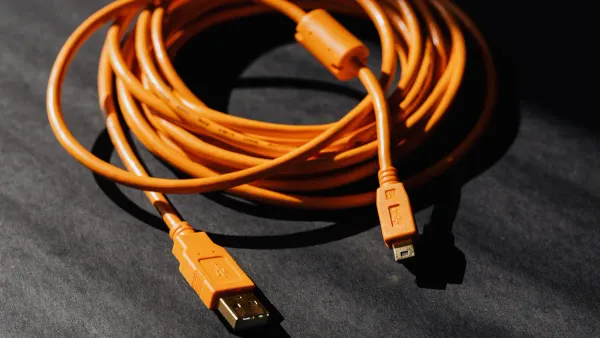
You often find the usb mini type b connector in small electronic devices. This compact connector links your gadgets for data transfer and charging. Many portable electronics use it, such as:
- MP3 players
- Digital cameras
- Mobile phones
- PlayStation 3 controllers
If you manage older equipment, you may still rely on this connector. Its design fits the needs of compact devices and supports important functions in electronic components.
Key Takeaways
- USB Mini Type B connectors are essential for connecting older portable devices like digital cameras and MP3 players for data transfer and charging.
- The compact design of the Mini-B connector allows it to fit into tight spaces, making it ideal for small electronic devices.
- Always check your device's specifications to ensure compatibility with the correct USB cable, as Mini-B connectors are not interchangeable with Micro-B or Type-C.
- The Mini-B connector supports data transfer speeds up to 480 Mbps, allowing for quick file transfers between devices.
- As technology evolves, newer connectors like Micro-B and Type-C offer improved durability and faster data transfer, but Mini-B remains important for legacy devices.
USB Mini Type B Overview
What Is USB Mini Type B
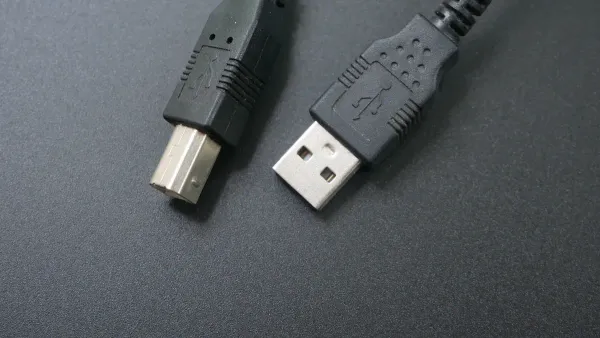
You see the usb mini type b connector in many small devices. This connector belongs to the universal serial bus family. Engineers designed this type to fit compact electronics. You find it in gadgets like digital cameras, MP3 players, and some older cell phones. The mini-b type appeared when manufacturers needed a smaller usb connector for portable devices.
The mini-b type measures about 3 by 7 millimeters. You notice its rectangular shape with slightly beveled corners. This design helps you plug it in easily and prevents damage to the port. The mini-b type supports both data transfer and charging. You use it to connect your device to a computer or a charger. The mini-b type became popular because it saves space on circuit boards and inside electronic components.
Tip: If you work with integrated circuits or repair electronics, you often encounter the mini-b type on older boards. This connector helps you link devices for testing or programming.
Mini-B vs. Standard USB
You might wonder how the mini-b type compares to the standard usb connector. The standard usb type, known as Type-A, is much larger. You see Type-A on desktop computers, laptops, and many accessories. The mini-b type is smaller and lighter. Manufacturers chose the mini-b type for devices where space matters.
Here is a table to help you compare the two types:
| Feature | Mini-B Type | Standard USB Type-A |
|---|---|---|
| Size | Small (3x7 mm) | Large (12x4.5 mm) |
| Shape | Rectangular, beveled | Rectangular |
| Use Case | Portable devices | Computers, peripherals |
| Pin Count | 5 | 4 |
| Data Transfer | Yes | Yes |
| Charging | Yes | Yes |
You use the mini-b type when you need a compact solution. The standard usb type works best for bigger devices. The mini-b type fits into tight spaces on electronic components and integrated circuits. You see it in devices that need to stay light and portable.
When you compare the mini-b type to the standard usb type, you notice the difference in size and application. The mini-b type lets you connect small gadgets without taking up much room. The standard usb type gives you a sturdy connection for larger equipment.
You find both types in the world of electronics. The mini-b type stands out for its role in portable devices and legacy equipment. You rely on the mini-b type when you work with older technology or need to repair compact electronic components.
USB Mini-B Connector Features
Physical Design
You notice the physical design of the usb mini-b connector stands out in portable electronics. Engineers made this connector compact and reliable. The small size fits tight spaces on circuit boards and inside electronic components. You see the unique shape with beveled corners. This shape helps you insert the connector correctly and prevents accidental damage.
- Mini-USB connectors are compact and reliable, enhancing usability in portable devices.
- Their rugged design contributes to durability, making them suitable for frequent connections and disconnections.
- The unique shape of Mini-USB connectors helps prevent accidental insertion.
You find these features important when you work with devices that need to withstand daily use. The connector supports repeated plugging and unplugging, which is common in gadgets like digital cameras and MP3 players. You rely on the sturdy build to keep your devices working over time.
5-Pin Configuration
The usb mini-b connector uses a 5-pin layout. Each pin has a specific job. You see this configuration in many electronic components and integrated circuits. The table below shows the function of each pin:
| Pin Number | Function Description |
|---|---|
| 1 | VBUS: Serves as the power supply source of +5V DC. |
| 2 | D-: Works with D+ as a differential pair for smooth data transfer. |
| 3 | D+: Works with D- for data transmission and reception. |
| 4 | ID: Mode identification pin to determine host or peripheral device. |
| 5 | GND: Serves as the electrical ground for stability. |
You use the VBUS pin to deliver power to your device. The D- and D+ pins handle data transfer. The GND pin keeps the connection stable. The ID pin plays a special role. In a USB On-the-Go setup, the ID pin helps your device switch between host and peripheral modes. When the ID pin connects to ground, your device acts as the host. If the ID pin stays floating, your device becomes a peripheral. This automatic switching makes it easy for devices to communicate without manual setup.
Note: The 5-pin configuration allows you to connect and power devices while transferring data. You see this setup in many integrated circuits and electronic components.
Data Transfer and Compatibility
You benefit from fast data transfer rates when you use the usb mini-b connector. Under USB 2.0 specifications, you reach speeds up to 480 Mbps. This speed lets you move large files quickly between devices. You use a USB 2.0 A to Mini-B cable to connect your gadgets. The actual speed depends on your device’s USB version.
- The maximum data transfer rate for USB Mini-B connectors under USB 2.0 is 480 Mbps.
- A USB 2.0 A to Mini-B cable can provide transfer rates up to 480 Mbps, depending on the peripheral's USB version.
You find the usb mini-b connector compatible with many devices. You see it in digital cameras, MP3 players, and older cell phones. The connector supports both data transfer and charging. You use it to link devices to computers, chargers, or other electronic components. The features of the usb mini-b connector make it a reliable choice for legacy equipment and integrated circuits.
Tip: Always check your device’s specifications before choosing a cable. You want to make sure the connector matches your device and supports the required data transfer speed.
Mini-B Applications
Portable Electronics
You see the usb mini type b connector in many portable electronics. This connector helps you link devices for data transfer and charging. You find it in older cell phones, e-readers, digital cameras, and small portable hard drives. These devices use the usb mini type b because it fits well in compact spaces. The connector works with electronic components and integrated circuits inside each device. You rely on the usb mini type b when you need to connect a cable for charging or moving files.
- Older cell phones
- E-readers
- Digital cameras
- Small portable hard drives
You notice that these devices often need a special cable. The cable must match the usb mini type b port. You use the cable to connect your device to a computer or charger. The cable helps you transfer photos, music, and documents. You also use the cable to charge the battery in your device.
Data Transfer and Charging
You use the usb mini type b for two main applications: data transfer and charging. The cable lets you move files between your device and your computer. You plug one end of the cable into your device and the other end into the computer. The usb connection sends data through the cable. You can copy pictures from your digital camera or music from your MP3 player. The cable also charges your device while you transfer data.
You see the usb mini type b in many electronic components. The connector works with integrated circuits to manage data and power. You use the cable for otg applications. The otg feature lets your device act as a host or a peripheral. You connect a cable to use otg and share files between devices. The cable supports otg by switching roles based on the connection.
Tip: Always check the type of cable before you buy. Some cables only support charging, while others support both charging and data transfer. You need the right cable for your device and application.
Legacy Device Support
You still find the usb mini type b in legacy equipment. Many older devices use this connector for important applications. You may need a cable to connect your old digital camera or cell phone. You face challenges when you try to find the right cable. The market now focuses on newer usb connectors like usb-c. You see less demand for mini-USB cables, so sourcing them becomes harder.
- Declining relevance of mini-USB cables due to the shift towards usb-c
- Intense competition from newer technologies
- Adapting to changing market demands complicates sourcing efforts
You need to pay attention to compatibility. The cable must fit the usb mini type b port. You use the cable to keep your legacy equipment working. The connector still plays a role in electronic components and integrated circuits in older devices. You rely on the cable for otg applications and data transfer. You keep your legacy devices running by using the right cable.
USB Mini Type B vs. Newer USB Connectors
Mini-B vs. Micro-B
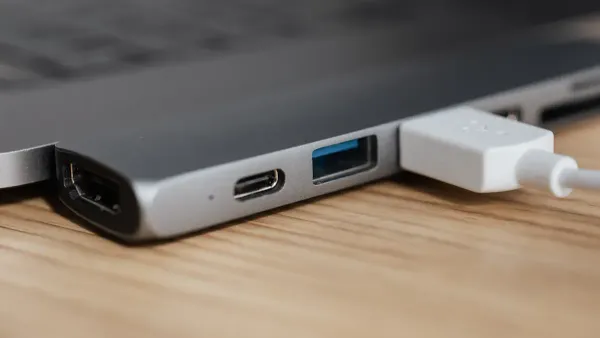
You often compare the mini-b cable to the micro-b cable when you work with electronic components and integrated circuits. The micro-b connector replaced the mini-b in many devices. You see this change because manufacturers needed slimmer cables for thinner phones and portable electronics.
- The micro-b cable is smaller than the mini-b cable.
- You notice the micro-b cable fits better in slim devices, making it ideal for modern designs.
- Both cables support a maximum data transfer rate of 480 Mbps, so you do not lose speed when you switch from mini-b to micro-b.
- The micro-b connector lasts longer. You can insert a micro-b cable up to 10,000 times, while the mini-b cable supports only 5,000 insertions.
- The micro-b cable is more robust, which helps you avoid damage during frequent use.
You benefit from the micro-b cable’s durability and compact size. The switch to micro-b cables made it easier for you to use one cable for many devices. This standardization improved your experience with electronic components and integrated circuits in portable gadgets.
Tip: If you need a cable for a slim device, choose the micro-b cable. You get a longer-lasting connection and a better fit for modern electronics.
Mini-B vs. Type-C
You see another big change when you compare the mini-b cable to the usb type-c cable. The type-c connector now appears in most new devices. You notice type-c cables offer much higher data transfer speeds and power delivery.
| Feature | USB Mini-B | USB Type-C |
|---|---|---|
| Maximum Data Transfer | 480 Mbps (USB 2.0) | 10 Gbps (USB 3.1 Gen 2) |
| Power Delivery | Lower capacity | Up to 100W (20V, 5A) |
You use the type-c cable for fast charging and quick data transfer. The type-c cable supports up to 100 watts of power, which lets you charge laptops and other high-power devices. You also transfer files at speeds up to 10 Gbps or more, which is much faster than the mini-b cable.
- The type-c cable is now the standard for modern devices.
- You find type-c cables in smartphones, tablets, and laptops.
- The type-c cable supports audio and video transmission natively, while the mini-b cable needs adapters for these functions.
- You get future-proofing with type-c cables because manufacturers plan long-term support.
You notice the mini-b cable has been replaced in most new electronics. The mini-b cable cannot match the speed, power, and versatility of the type-c cable. You still use the mini-b cable for legacy devices and older electronic components, but you rely on type-c cables for new equipment.
Note: Always check your device’s port before buying a cable. You want to match the cable to your device’s connector for the best performance.
You rely on the usb mini type b connector for many legacy devices, especially in electronic components and integrated circuits. This connector stands out for its unique trapezoidal shape, USB 2.0 speeds, and durable build.
- Always check that your cable matches the connector and device port.
- Look for reinforced shielding and corrosion-resistant materials for longer life.
- Remember, mini and micro connectors are not interchangeable.
Tip: Donate or recycle old cables at local e-waste drives to help reduce environmental impact.
FAQ
What devices use USB Mini Type B connectors?
You find USB Mini Type B connectors in digital cameras, MP3 players, and older cell phones. Many electronic components and integrated circuits in these devices rely on this connector for data transfer and charging.
Can you use a USB Mini Type B cable for both data and power?
Yes, you can use a USB Mini Type B cable for data transfer and charging. The cable connects to integrated circuits inside your device, allowing you to move files and supply power at the same time.
How do you identify a USB Mini Type B connector?
You see a small, rectangular connector with beveled corners. The port usually sits on the side of portable electronics. Integrated circuits near the port help manage data and power flow.
Is USB Mini Type B compatible with USB Micro-B or Type-C?
No, you cannot use USB Mini Type B cables with Micro-B or Type-C ports. Each connector has a unique shape and pin layout. Electronic components and integrated circuits require the correct cable for proper function.
Why do some legacy devices still use USB Mini Type B?
Legacy devices use USB Mini Type B because their integrated circuits and electronic components were designed for this connector. You need the right cable to keep these older devices working and transfer data reliably.