What Makes Mini USB and USB A Essential in Devices
You rely on mini usb usb a connectors every day. These connectors help you charge devices, move files, and keep your electro
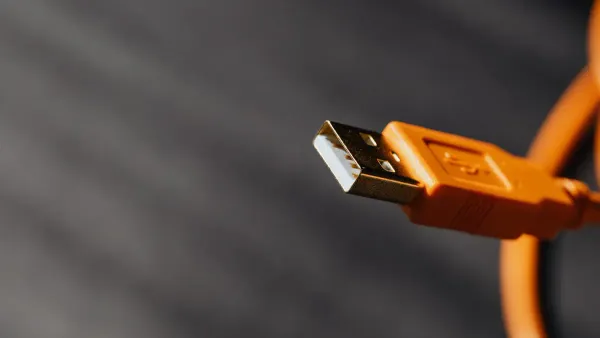
You rely on mini usb usb a connectors every day. These connectors help you charge devices, move files, and keep your electronics running smoothly. Mini USB lets you connect smaller gadgets like digital cameras to computers for quick data transfer and charging. USB-A ports remain common in laptops, desktops, and chargers. > You benefit from these usb connectors because they make your devices easy to use and dependable, even as technology changes. Their design fits perfectly with modern electronic components and integrated circuits.
Key Takeaways
- Mini USB connectors are compact and ideal for older devices like digital cameras and MP3 players, ensuring compatibility with legacy technology.
- USB-A connectors are widely used in laptops and desktops, providing reliable connections for various devices such as printers and external drives.
- Both Mini USB and USB-A support charging and data transfer, making them essential for everyday electronic tasks.
- Despite the rise of USB Type-C, Mini USB and USB-A remain important for maintaining connections with older devices and systems.
- Using USB-A and Mini USB connectors allows you to keep your favorite gadgets functional, even as newer standards emerge.
Mini USB and USB-A Overview
What Is Mini USB?
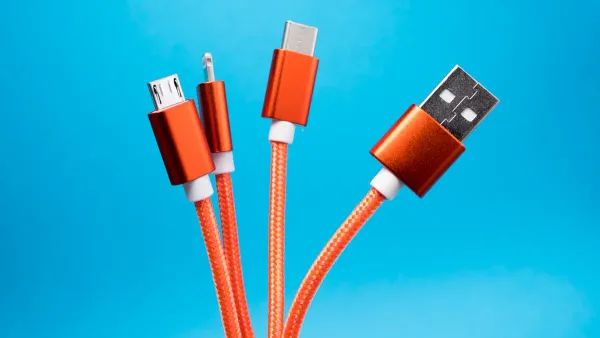
Mini USB stands out as a compact connector designed for smaller electronic devices. You often find it in gadgets like digital cameras, MP3 players, and some older smartphones. This connector measures about 3 x 7 mm, making it much smaller than standard USB-A. Mini USB comes in two main forms: Mini-A and Mini-B. The Mini-B version, with its 5-pin design, fits perfectly into slim electronics and supports both charging and data transfer.
Note: Mini USB connectors have become less common in new devices. Most manufacturers now use Micro USB or USB Type-C for better speed and efficiency.
Here is a quick look at where you might see Mini USB in action:
| Feature/Use Case | Description |
|---|---|
| Size | Smaller than standard USB Type-A but larger than Micro-USB and USB Type-C. |
| Typical Devices | Used in MP3 players, digital cameras, and older mobile phones. |
| Phasing Out | Largely replaced by Micro USB and USB Type-C in modern consumer electronics. |
Over the past decade, the electronics industry has moved toward smaller and more efficient connectors. This shift helps devices handle higher data transfer rates and improved power delivery, which are important for modern portable electronics and integrated circuits.
What Is USB-A?
USB-A is the connector you see most often on laptops, desktop computers, and USB chargers. It features a rectangular shape and a sturdy build, making it easy for you to plug in and remove cables. USB-A supports a wide range of devices, from keyboards and mice to external hard drives and printers. Its design allows for reliable connections and consistent power delivery.
Here is a simple table showing where you usually find USB-A and Mini USB:
| USB Type | Common Devices |
|---|---|
| USB-A | Laptops, desktop computers, USB chargers |
| Mini USB | MP3 players, some smartphones, external hard drives |
You benefit from USB-A because it remains a standard port in many electronic components and integrated circuits. Even as new types of USB connectors appear, USB-A continues to provide dependable support for charging and data transfer.
Roles and Benefits of USB Type-A and Mini USB
Device Compatibility
You need your devices to work together without hassle. Mini usb usb a connectors make this possible. These connectors fit into many electronic components and integrated circuits, so you can connect a wide range of gadgets. You find mini usb on digital cameras, MP3 players, older cell phones, e-readers, and small portable hard drives. Usb-a appears on laptops, desktops, printers, and chargers. This wide compatibility means you can use one usb port for many devices.
Here is a table showing which devices use each connector:
| Device Type | Connector Type |
|---|---|
| Digital Cameras | Mini USB |
| MP3 Players | Mini USB |
| Older Cell Phones | Mini USB |
| E-Readers | Mini USB |
| Small Portable Hard Drives | Mini USB |
Usb-a and usb type-a connectors remain popular because they work with so many devices. You do not have to worry about finding the right cable or adapter. Usb-a connectors are still the standard in most computers and chargers, so you can always find a usb port when you need one.
When you compare usb type-a and mini usb to newer connectors like usb type-c, you see some differences. Usb type-c offers a reversible design and faster transfer rates, but usb-a and mini usb still provide strong compatibility with older and current devices. Here is a quick comparison:
| Feature | USB Type-A | Mini USB | USB Type-C |
|---|---|---|---|
| Connector Shape | Rectangular | Smaller rectangular | Oval |
| Plug Orientation | One way | One way | Reversible |
| Transfer Rate | Up to 5 Gbps | Up to 480 Mbps | 5-10 Gbps |
| Power Delivery | Limited | Limited | Up to 100 Watts |
| Current Usage | Widely used | Less common | Increasingly common |
Tip: Usb-a and mini usb connectors help you keep older devices running, even as new standards appear. You can still use your favorite gadgets with modern computers and chargers.
Power and Data Transfer
You rely on usb connectors for more than just compatibility. Usb-a and mini usb also deliver power and support high-speed data transfer. When you plug your device into a usb port, you can charge it and move files at the same time. This dual function makes these connectors essential for electronic components and integrated circuits.
Usb-a supports a 5V DC power supply, which is enough to charge most small devices. Mini usb allows both charging and data transfer, which was a big step forward when it first appeared. You can use a usb a to usb mini cable to connect older devices like cameras and GPS units to your computer. This cable lets you back up photos, update firmware, and transfer files quickly.
Here is a table showing the maximum data transfer speeds and power delivery for each connector:
| Connector Type | Maximum Data Transfer Rate | Maximum Power Delivery |
|---|---|---|
| Mini USB | 480 Mbps | N/A |
| USB-A | N/A | 5V DC power supply |
Usb-a and mini usb connectors support high-speed data transfer for many everyday tasks. You can move music, photos, and documents between devices without delay. Usb 3.0 technology boosts these speeds even more, reaching up to 5 Gbps for usb type-a. This means you spend less time waiting for files to transfer and more time using your devices.
- Usb-a connectors are widely compatible with most devices, making them a reliable choice for printers, smartphones, and external drives.
- Mini usb connectors are robust and ideal for frequent use, ensuring reliable data transfer and charging.
- Usb a to usb mini cables help you connect older devices to modern computers without compatibility issues.
- Usb 3.0 ports and cables offer faster data transfer speeds, so you can handle large files with ease.
Durability
You want connectors that last. Usb-a and mini usb connectors stand up to repeated use. They are built to handle thousands of plug and unplug cycles, which is important for electronic components and integrated circuits that need reliable connections.
Here is a table showing the durability ratings for each connector:
| Connector Type | Durability Rating (Cycles) |
|---|---|
| Mini USB | 5,000 |
| USB-A | 1,500 |
Mini usb connectors, especially the mini-b type, can handle up to 5,000 cycles. Usb-a connectors last for about 1,500 cycles. This means you can trust these connectors for daily use in your devices.
You can see how usb-a and mini usb compare to other connector types in the chart below:
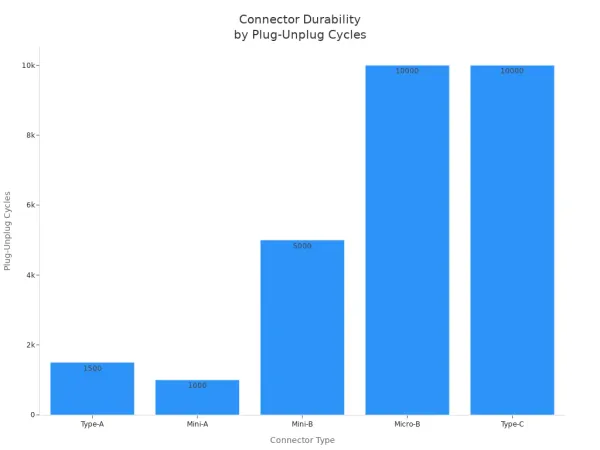
Note: Mini usb connectors are more durable than usb-a, but both offer enough cycles for years of normal use. Usb 3.0 connectors use the same shape as usb-a, so you get the same durability with faster speeds.
Usb-a and mini usb connectors give you a strong, stable connection every time you use them. Their durability makes them a smart choice for electronic components and integrated circuits that need to work reliably over time.
Mini USB, USB-A, and USB Type-C: Evolution of USB
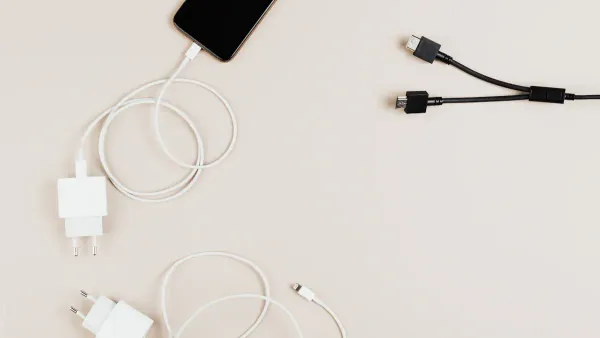
Transition to USB Type-C
You see a big change in how devices connect and communicate. The move from mini usb usb a to usb type-c happened because manufacturers wanted better performance and easier use. USB-C technology brings many improvements to electronic components and integrated circuits. You get a single connector that works for charging, data transfer, and even audio or video output. USB-c supports high-speed data transfer rates up to 40 Gbps, which means you can move large files quickly. You also get improved power delivery, with up to 100 watts for charging laptops and other devices.
- USB-c has a symmetrical design. You do not need to worry about plugging it in the wrong way.
- USB-c works with many devices, including smartphones, tablets, laptops, and monitors.
- USB-c supports audio and video output, so you can connect to projectors and high-resolution screens.
- USB-c technology makes it easier for manufacturers to design devices with fewer ports.
Manufacturers now standardize usb type-c to make devices future-proof. You benefit from faster speeds, more power, and a universal connector that fits many electronic components and integrated circuits.
Why Mini USB and USB-A Still Matter
You still find mini usb usb a connectors in many devices. These connectors remain important for electronic components and integrated circuits, especially in older systems and budget-friendly products. USB-a is common in laptops and desktops, giving you access to printers, keyboards, and external drives. Mini usb appears in legacy devices like cameras and MP3 players.
| Scenario | Explanation |
|---|---|
| Legacy Systems | USB-A is crucial for compatibility with older devices and systems that still rely on it. |
| Economic Factors | Businesses have invested heavily in USB-A ecosystems, making abrupt changes costly. |
| Emerging Markets | USB-A remains dominant in budget-conscious segments due to its affordability and availability. |
You rely on usb-a for legacy support in many workplaces. Transitioning away from usb-a could disrupt workflows in manufacturing and IT. Some innovations in usb-a, such as enhanced power delivery, extend its usefulness. Manufacturers keep mini usb and usb-a ports in new devices because they offer wide compatibility and prevent obsolescence. These connectors are easier and cheaper to design, and they provide enough performance for many tasks.
Tip: You can keep using your favorite gadgets and peripherals with mini usb usb a, even as usb-c becomes more common.
You see that mini usb usb a connectors help electronic components and integrated circuits stay useful and reliable. USB-c is the future, but mini usb and usb-a still play key roles in connecting, charging, and transferring data in many devices.
Mini USB vs USB-A: Key Differences
Size and Design
You notice clear differences in size and design when you compare mini usb and usb-a connectors. Mini usb is smaller than usb-a, which makes it perfect for compact devices. The mini usb connector has an anvil shape and uses a 5-pin design. Usb-a, on the other hand, is larger and rectangular with a 4-pin layout. You often see usb-a as the standard usb port on computers and game consoles. Mini usb fits into smaller electronic components and integrated circuits, such as early digital cameras.
| Feature | Mini USB | USB-A |
|---|---|---|
| Size | Smaller than USB-A | Standard size |
| Design | Anvil shape, 5-pin connector | Rectangular, 4-pin connector |
| Introduction Year | 2005 | 1996 |
Mini usb usb a connectors help you connect different devices to electronic components and integrated circuits, making them essential for many gadgets.
Typical Applications
You use mini usb and usb-a connectors in different ways. Mini usb appears in devices that need a small, sturdy connection. You find it in printer cables, laptop charging cables, digital camera cables, HDMI cables, smartphone charging cables, gaming console cables, and scanner or fax cables. Usb-a is the main usb port for host devices like PCs, laptops, and game consoles. You use usb-a to connect keyboards, mice, external drives, and other accessories.
- Mini usb works best for compact devices and portable electronics.
- Usb-a supports a wide range of peripherals and remains the most common universal serial bus port.
| Connector Type | Size Comparison | Device Integration |
|---|---|---|
| Mini USB | Smaller than USB-A | Designed for compact devices like early digital cameras |
| USB-A | Larger rectangular | Suited for host devices such as PCs and game consoles |
Strengths and Limitations
You benefit from the strengths of both connectors. Usb-a offers a flat, rectangular design that is easy to use and widely compatible. You can use it for charging and data transfer in many devices. Mini usb stands out for its smaller size, which makes it ideal for older electronics like MP3 players and gaming controllers.
| Connector Type | Strengths | Use Cases |
|---|---|---|
| USB-A | Original flat rectangular design, widely compatible | Used for charging and data transfer in various devices |
| Mini USB | Smaller size, used in older electronics | Common in devices like MP3 players and gaming controllers |
However, both connectors have some limitations. Usb-a and mini usb support usb 2.0 speeds up to 480 Mbps. Usb-a with usb 3.0 can reach 5 Gbps, but it still lacks advanced power delivery. Newer connectors like usb type-c offer faster data transfer and better power delivery. You may find that usb-a and mini usb do not support the latest features in modern universal serial bus technology.
- Usb-a and mini usb provide standard charging speeds.
- They do not support the advanced power delivery found in usb type-c.
- Usb-a remains the most common usb port, but it is less efficient than newer types.
Tip: You can rely on mini usb usb a connectors for many tasks, but for the fastest transfer and charging, usb type-c is the best choice.
You depend on usb connectors like Mini USB and USB-A for reliable connections in modern devices. These connectors support efficient data transfer and power delivery, making your experience smoother.
- Mini USB ensures compatibility with older electronic components and integrated circuits.
- USB-A remains a familiar interface in many modern devices, especially personal computers and laptops.
| Connector Type | Relevance | Reason for Continued Use |
|---|---|---|
| USB-A | High | Found in many legacy systems despite newer standards emerging |
| Mini USB | Moderate | Still used in older devices requiring compatibility |
You benefit from usb technology because it is backward-compatible, so your older devices keep working with new equipment. Even as trends shift toward new connectors, usb continues to play a key role in modern devices.
FAQ
What devices still use Mini USB connectors?
You find Mini USB connectors in older digital cameras, MP3 players, and some GPS units. These connectors help you transfer data and charge devices. They remain important for electronic components and integrated circuits in legacy gadgets.
Why does USB-A remain popular in computers?
You see USB-A ports on most computers because they support many accessories. USB-A connects keyboards, mice, and external drives. This connector helps you link electronic components and integrated circuits for reliable data transfer and power.
Can you use USB-A and Mini USB for charging and data transfer?
You can use both connectors for charging and moving files. USB-A and Mini USB support power delivery and data transfer. These features make them essential for connecting electronic components and integrated circuits in many devices.
Are Mini USB connectors more durable than USB-A?
You get more plug-unplug cycles with Mini USB connectors. Mini USB often lasts longer than USB-A. This durability helps electronic components and integrated circuits stay reliable in devices you use every day.
Do USB-A and Mini USB work with newer USB standards?
You can use USB-A and Mini USB with adapters or cables. They support backward compatibility. This means you keep older electronic components and integrated circuits working with new devices.