Lightning USB Lightning Makes Charging Simple and Fast
You want charging to be simple and fast, right? Lightning usb lightning cables give you just that for your Apple devices. Yo
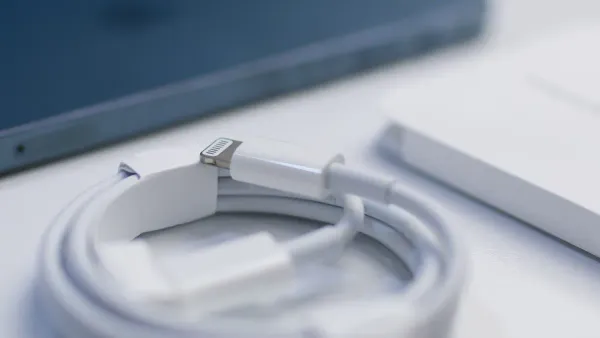
You want charging to be simple and fast, right? Lightning usb lightning cables give you just that for your Apple devices. You enjoy speed and efficiency every time you plug in. The compact lightning cable fits easily into your bag or pocket, making daily use a breeze. These cables connect perfectly with Apple devices thanks to MFi certification and advanced electronic components. Take a look at the main benefits users love:
| Benefit | Description |
|---|---|
| Durability | Braided nylon and reinforced connectors resist fraying and breakage |
| Compatibility | Works safely with Apple devices |
| Safety Features | Prevents overheating and short-circuiting |
With reliable lightning technology, you get fast charging and peace of mind.
Key Takeaways
- Lightning USB cables provide fast charging, allowing you to charge your device up to 50% in just 30 minutes.
- Choose MFi-certified cables for safety and reliability, as they prevent overheating and ensure compatibility with Apple devices.
- The compact design of Lightning cables makes them easy to carry, eliminating the hassle of tangled wires.
- Regularly clean your Lightning cable to maintain charging efficiency and extend its lifespan.
- Using a USB-C to Lightning cable can enhance charging speed and data transfer, making it a versatile choice for Apple users.
What Is a Lightning Cable?
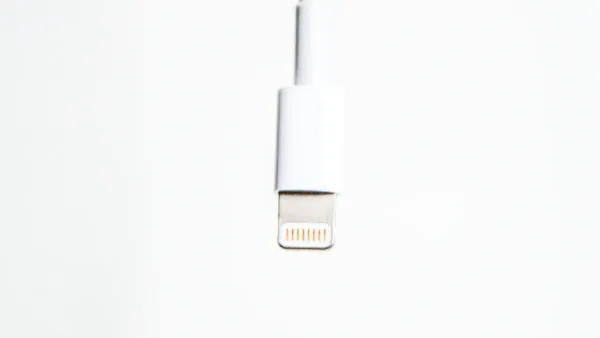
A lightning cable is your go-to tool for charging and connecting Apple devices. You probably use it every day, but have you ever wondered what makes it so special? This cable stands out because of its smart design and the advanced electronic components inside. The lightning connector uses integrated circuits to manage power and data, making sure your device gets exactly what it needs. Let’s break down what makes this cable so handy for you.
Compact Design
You’ll notice right away that a lightning cable feels light and easy to carry. The connector is small, so you can slip it into your pocket or bag without any trouble. This compact design means you don’t have to deal with bulky cables or tangled wires. The lightning connector fits perfectly into your Apple devices, thanks to its precise engineering.
Tip: Keep a spare lightning cable in your backpack or car. You never know when you’ll need a quick charge!
The cable’s eight-pin configuration is more than just a clever design. It helps boost both charging speed and data transfer. Here’s a quick look at how the technical specs help you:
| Specification | Contribution to Charging Performance |
|---|---|
| Eight-pin configuration | Enhances data transfer and charging capabilities |
| Maximum current of 2.4 amps | Allows for higher currents, enabling faster charging times |
| Supports fast charging modes | Optimizes charging efficiency based on user needs |
These features come from the electronic components and integrated circuits inside the cable. They work together to deliver reliable power and fast performance every time you plug in.
Apple Device Compatibility
You want a cable that works with all your Apple devices. The lightning cable delivers just that. It connects with a wide range of Apple products, so you don’t have to worry about switching cables for different devices. Whether you have an iPhone, iPad, or iPod, you’re covered.
Here’s a quick table showing some popular Apple devices that use the lightning cable:
| Device Type | Compatible with Lightning Cable |
|---|---|
| iPhone 5 | Yes |
| iPad 4th gen. | Yes |
| iPad mini | Yes |
| iPod nano 7th gen. | Yes |
| iPod Touch 5th gen. | Yes |
You can see that the compatibility list covers many Apple devices. This wide compatibility makes your life easier. You don’t have to keep track of different cables for each device. Just grab your lightning cable and you’re ready to go.
The lightning cable’s smart design and advanced electronic components make it a top choice for Apple users. You get a cable that’s easy to use, reliable, and ready for all your charging needs.
Lightning USB Lightning and Charging
Fast Charging
You want your device ready to go, not stuck on the charger. That’s where lightning usb lightning cables shine. These cables give you fast charging capabilities that save you time every day. When you use a lightning cable with the right charger, you can charge your device up to 50% in just 30 minutes. That’s a huge boost when you need a quick battery top-up before heading out.
The secret behind this speed comes from the advanced electronic components and integrated circuits inside the lightning cable. These parts help manage the flow of power, making sure your device gets the right amount of energy without overheating. The lightning connector supports fast charging up to 18-20W, which means you get more power in less time. You’ll notice the difference, especially if you’re always on the move.
Tip: Always use a lightning cable that supports fast charging compatibility. This ensures you get the best speed and efficiency from your charger.
Here’s a quick look at what makes fast charging possible:
| Feature | How It Helps You |
|---|---|
| Eight-pin lightning connector | Transfers power quickly and safely |
| Integrated circuits | Control voltage and current for fast charging |
| Quality materials | Reduce resistance for better efficiency |
With lightning usb lightning, you don’t have to wait around. You get fast charging, reliable performance, and the confidence that your device is safe.
Reliable Power Delivery
You want your device to charge safely every time. Lightning usb lightning cables deliver reliable power, thanks to smart design and strict safety standards. The electronic components and integrated circuits inside each lightning cable work together to keep your device protected.
When you choose a lightning cable with MFi certification, you know it meets Apple’s high standards for safety and compatibility. MFi stands for “Made for iPhone/iPad/iPod.” This means the cable has an authentication chip that checks for proper power delivery and prevents problems like overheating or short-circuiting.
Here’s why reliable power matters:
- MFi-certified lightning cables use quality materials and reinforced connectors.
- The integrated circuits inside the cable monitor voltage and current, keeping your device safe.
- Non-certified cables may skip these safety features, risking damage to your device.
Note: Always pick a lightning cable with MFi certification. It’s your best defense against overheating and device failure.
Let’s break down how lightning cables keep your charging sessions safe and steady:
| Feature | Importance |
|---|---|
| Quality Materials | Minimize resistance, allowing for efficient power transfer. |
| Construction | Reinforced connectors and durable braiding enhance reliability. |
| Safety Certifications | Protect devices from potential issues during charging. |
You get more than just a cable. You get a smart tool built with advanced electronic components and integrated circuits. These parts work behind the scenes to deliver steady power, protect your device, and make every charging session worry-free.
Lightning usb lightning cables give you fast charging, reliable power, and peace of mind. You enjoy speed, efficiency, and safety every time you plug in.
Key Benefits of Lightning Cable
Durability
You want a lightning cable that lasts. Durability matters every time you plug in your Apple device for charging and syncing. The secret to durability and longevity lies in the quality of the materials and the smart design of the electronic components and integrated circuits inside the lightning connector. Apple’s official lightning cable stands out in durability tests. Take a look at this table comparing different cable models:
| Cable Model | Bend Test (Failures) | Pull Test (Force to Failure) | Environmental Test |
|---|---|---|---|
| Apple Official | No damage | 55 N | No issues |
| Highwave | Fraying after 3,000 | 40 N | Brittle at low temp |
| Brand Y | Fraying after 2,500 | 35 N | Connector cracked |
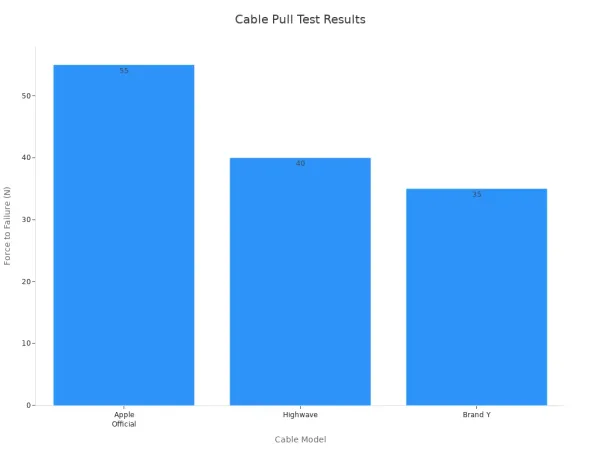
You can see that Apple’s lightning cable handles stress better than others. Users often report their lightning cable lasting several years. One person said their cable lasted about 4 years with daily charging and syncing. Another user mentioned their iPhone 6 lightning cable stayed in perfect condition after 3 years. You get durability and longevity, so you don’t have to worry about fraying or breaking.
Data Transfer
Lightning cables do more than just charging. You use them for charging and syncing your Apple devices, moving photos, music, and files quickly. The electronic components and integrated circuits inside the lightning connector help manage data transfer rates and keep your files safe. Here’s how lightning cable data transfer speeds compare:
| Cable Type | Data Transfer Speed |
|---|---|
| Lightning | Up to 480 Mbps (USB 2.0) |
| USB-C | Up to 40 Gbps (USB 3.1/4.0) |
Lightning cables support USB 2.0 speeds, which means up to 480 Mbps. USB-C cables offer much faster data transfer rates, up to 40 Gbps. If you use a USB-C to lightning cable, you get up to 10 Gbps, which helps when you need to transfer large files. Most users find lightning cable data transfer speeds reliable for everyday charging and syncing. You get consistent performance, thanks to the quality of the integrated circuits inside.
Tip: For transferring lots of photos or videos, try a USB-C to lightning cable for faster speed.
Versatility
Lightning cables give you versatility. You use one cable for charging and syncing your iPhone, iPad, or iPod. The lightning connector fits many Apple devices, so you don’t need different cables for each one. The electronic components and integrated circuits inside the lightning cable make it possible to switch between charging and syncing without any hassle. You get power for your device and quick access to your files. The quality construction means you can use your lightning cable at home, in the car, or on the go.
- Charge your Apple device fast.
- Sync music, photos, and contacts easily.
- Use one lightning cable for multiple devices.
You enjoy efficiency, speed, and power every time you use your lightning cable. The smart design and quality materials make it a top choice for charging and syncing.
Comparing Charging Options
Lightning vs USB-C
When you look at charging your Apple device, you often choose between a lightning cable and a usb-c to lightning cable. Both options use advanced electronic components and integrated circuits to manage power and data. The lightning cable works only with Apple devices, while usb-c connects to many brands and devices. If you use a usb-c to lightning cable, you get the best of both worlds—Apple compatibility and the fast charging speed of usb-c.
Here’s a quick table to help you see the main differences:
| Feature | Lightning Cable | USB-C |
|---|---|---|
| Compatibility | Apple devices only | Universal, many brands |
| Charging Speed | Up to 18W with usb-c to lightning cable | Up to 100W |
| Data Transfer Speed | Up to 480Mbps | Up to 40Gbps |
| Size and Design | Slim, compact | Slightly larger, still small |
| Reversibility | Yes | Yes |
| Versatility | Charging, basic data transfer | Charging, data, video, more |
| Market Adoption | Apple ecosystem | Widely adopted |
You notice that a usb-c to lightning cable lets you charge your iPhone or iPad much faster than a regular lightning cable. The integrated circuits inside both cables help control voltage and current, keeping your device safe. If you want fast charging and quick data transfer, a usb-c to lightning cable is a smart pick. You also get the benefit of using one cable for many devices if you have other gadgets that use usb-c.
Tip: Always pick a usb-c to lightning cable with MFi certification. This ensures the electronic components and integrated circuits meet Apple’s safety standards.
Lightning vs Wireless
You might wonder if you should use a lightning cable or go wireless. The lightning cable, especially a usb-c to lightning cable, gives you fast charging and reliable performance. Wireless charging, like MagSafe, feels convenient because you just set your device down—no cables needed. But there are some key differences.
- Lightning charging with a usb-c to lightning cable can charge your device from 0% to 50% in about 30 minutes.
- Wireless charging, even with MagSafe, is slower and tops out at 15W.
- Lightning cable charging has minimal energy loss, while wireless charging loses more energy during transmission.
| Charging Method | Power Output | Charging Time (0% to 50%) | Energy Loss |
|---|---|---|---|
| Lightning | 18W+ | ~30 minutes | Minimal |
| MagSafe | Up to 15W | Slower | Some loss |
You get more speed and efficiency with a usb-c to lightning cable. The electronic components and integrated circuits inside the lightning cable deliver power directly, making charging fast and safe. Wireless charging feels easy, but you wait longer for a full battery.
Users say lightning cables give reliable speed and work with many Apple devices. Wireless charging means no tangled cables, but it takes longer and sometimes your device may not line up perfectly on the pad.
Note: If you need a quick boost, grab your usb-c to lightning cable. For overnight charging, wireless can be handy.
You see that the lightning cable, especially the usb-c to lightning cable, stands out for speed, reliability, and the smart use of electronic components and integrated circuits. You get the best charging experience when you choose the right cable for your needs.
Tips for Efficient Charging
Use Certified Accessories
You want your lightning cable to work every time you plug it in. Using a genuine apple lightning cable gives you the best charging experience. Certified accessories contain electronic components and integrated circuits that meet apple’s strict standards. These parts help deliver power safely and efficiently. If you use non-certified lightning cables, you risk several problems:
- Your device might get stuck in recovery mode during updates.
- You could see random disconnections, which makes charging and data transfer unreliable.
- The cable may give wrong device information.
- Erase speeds can slow down and errors may happen.
- Uncontrolled power delivery can damage your device, causing overheating and battery aging.
- Poor materials can break connectors and shorten cable life.
Choosing certified lightning cables with usb-c connectors ensures optimal performance and safety measures. You protect your device and get fast, reliable charging every time.
Tip: Always check for MFi certification when buying a lightning cable. This label means the cable meets apple’s safety standards.
Keep Cables Clean
A clean lightning cable helps you get better charging efficiency. Dirt and corrosion on the connector can block power and slow down charging. Regular cleaning keeps the electronic components and integrated circuits inside working smoothly. Here’s how you can clean your lightning cable:
- Use a soft, dry, lint-free cloth to wipe the connector.
- Avoid liquids or cleaning products.
- Use pressurized air to blow out dirt from the charging port.
- Carefully use a toothpick to remove fluff, but don’t touch the sides of the port.
Keeping your lightning cable clean prevents wear and tear. You extend the cable’s lifespan and maintain efficiency. Avoid bending or pulling the cable too hard. Protect it from liquids and store it safely when not in use.
Optimize Device Settings
You can boost charging speed by adjusting a few settings on your device while using a lightning cable with usb-c. Try these steps:
- Lower the screen brightness in Settings > Display & Brightness.
- Turn on Dark Mode to save power, especially on OLED screens.
- Switch to Airplane Mode to reduce power use.
- Activate Low Power Mode in Settings > Battery.
Low Power Mode changes how your device uses energy. It slows down the CPU and GPU, stops background syncing, and dims the display. More power goes straight to charging the battery, so you get faster results. These settings help your lightning cable and usb-c charger deliver optimal performance.
Note: Using these tips with a certified lightning cable keeps your device safe and improves charging efficiency.
You get simple and fast charging every time you use a lightning USB lightning cable with your apple device. These cables deliver speed, reliability, and easy compatibility, thanks to smart electronic components and integrated circuits inside. Experts suggest you pick cables with MFi certification, braided nylon, and reinforced connectors for the best results. Top brands like Anker and Belkin offer durable options that last longer and keep your device safe.
| Criteria | Why It Matters |
|---|---|
| MFi Certification | Ensures safe, fast charging |
| Braided Nylon | Boosts durability |
| Reinforced Ends | Prevents fraying |
Choose the right cable and enjoy the convenience and efficiency lightning cables bring to your daily routine.
FAQ
How do electronic components inside a Lightning USB cable affect charging speed?
The electronic components and integrated circuits inside your Lightning USB cable control how fast your device charges. They manage power flow and keep your device safe from overheating. You get quick and reliable charging every time you use a high-quality usb-c to lightning cable.
Why should you choose the best usb-c to lightning cables for your Apple device?
You want the best usb-c to lightning cables because they use advanced electronic components and integrated circuits. These parts help deliver fast charging and protect your device. You avoid problems like slow charging or cable failure when you pick a trusted brand.
Can a Lightning USB cable help with data transfer?
Yes! The integrated circuits inside your Lightning USB cable make data transfer smooth and safe. You can move photos, music, and files quickly between devices. These electronic components keep your files secure and prevent errors during syncing.
How do you know if your Lightning USB cable is safe?
Look for MFi certification. This means your cable has passed Apple’s safety tests. The electronic components and integrated circuits inside certified cables protect your device from overheating and short-circuiting. You get peace of mind every time you charge.
What’s the best way to care for your Lightning USB cable?
Keep your cable clean and avoid bending it too much. The electronic components and integrated circuits inside need protection from dirt and damage. Store your cable safely and use gentle cleaning methods to keep it working well.